Published
Email deliverability tools fall into four classes: mailbox-provider dashboards, seed-list placement tests, authentication and DMARC reporting, and inbox warmup, with list validation sitting alongside them. They are not substitutes for one another. Each measures a different proxy for the same question — did a real subscriber see this message — and none of them answers it directly.
Two things changed in this category during 2026 that most comparison articles have not caught up with. Microsoft removed spam-trap hit counts from the SNDS Data Report on 22 July 2026, after migrating the service to a new portal in June and cutting the complaint feed back to headers only. And Validity’s Everest, the enterprise name in every deliverability round-up, no longer resolves as a product: the Everest product URL now serves a page for Validity Engage, described there as “a new direction for Validity: Your trusted capabilities, now part of the world’s best AI email platform” (checked 24 August 2026).
Every price below comes from the vendor’s own public pricing page, checked on 24 August 2026. In the last column, anything in quotation marks is documented by the vendor or the mailbox provider; everything else is our reading of what the tool structurally cannot see, and the sections underneath show the working. We sell email marketing, not deliverability software, so nothing here is an affiliate placement and no vendor paid for a position.
18 email deliverability tools compared by class, entry price and blind spot
The last column is the one no vendor publishes, and none of the round-ups ranking for this term on the day we checked carried an equivalent. It is also the column that decides whether a tool will answer your question. There are 20 rows for 18 tools: Folderly and Bouncer each sell two separately priced products with different meters, and collapsing them would hide the price you would actually pay.
| Tool | Class | Entry price (checked 24 Aug 2026) | What it measures | What it will not show you |
|---|---|---|---|---|
| Google Postmaster Tools | Provider dashboard | Free | Compliance status, spam rate, IP and domain reputation, authentication pass rate, encryption, delivery errors | Anything sent to Workspace addresses; data is withheld on low-volume days “to protect users’ privacy” |
| Microsoft SNDS + JMRP | Provider dashboard | Free | Per-IP volume, complaint rate and filter result for Outlook.com; complaint feedback loop | Domain-level data; spam-trap hit counts, removed from the Data Report on 22 July 2026 |
| Yahoo Sender Hub + CFL | Provider dashboard | Free | “Aggregated delivery statistics for your domain”, plus complaint feedback | A reputation grade — Yahoo publishes no graded equivalent to Google’s reputation dashboards |
| GlockApps | Seed testing + DMARC | Free (2 tests), then $59/mo for 360 test credits | Placement as Inbox, Tabs, Spam or Missing across seed accounts, SpamAssassin score, blocklists | Where the same message landed for your actual subscribers |
| Validity Engage (was Everest) | Enterprise placement + reputation | No published price | “Real-time placement testing”, “tested across 90+ email providers”, sender reputation, Sender Certification | Its own cost, and its own former product name |
| MailerCheck | Seed testing + validation | $0.01 per credit on a 1,000-credit ($10) minimum; 200 credits ($2) per placement test | Placement per test, list verification, content insights | Continuous state — each test is a separate purchase |
| Bouncer Deliverability Kit | Seed testing | $25/mo Starter: 250 test emails, 10 IPs/domains | Inbox placement, blocklist checks, authentication verification | The same seed-panel limit as every other tester |
| Folderly Inbox Insights | Seed testing | Free (2 tests/mo) or $79/mo for 100 tests | Placement tests with alerting | Whether a fix moved real recipients, as opposed to the panel |
| Folderly (main platform) | Managed warmup + remediation | $96 per mailbox per month, annual | Managed warmup and hands-on remediation | Cost predictability at scale — the meter is your mailbox count |
| MailGenius | One-off test | Free basic test | SPF, DKIM and DMARC checks, blocklist scan, spam score, reverse DNS, links, HTML | Ongoing state — it is a snapshot, not a monitor |
| MxToolbox | One-off test + monitoring | Free report and one monitor covering “the top 30 blacklists”; paid tiers unpriced on site | Headers, outbound IP blocklist reputation, SPF records | Placement inside any mailbox provider |
| Mailtrap Email Testing | Pre-send sandbox | Free (50 test emails) to $498/mo Enterprise, or $399/mo on annual billing | How a message renders and scores before it is ever sent | Anything about production sending — that is a separate product and a separate bill |
| EasyDMARC | DMARC reporting | Free deliverability test and a free DMARC tier (1 domain, 14 days of history); Plus from $35.99/mo annual, 2 domains | Aggregate and failure reports, SPF and DKIM alignment | Placement — a 100% DMARC pass rate is fully compatible with the spam folder |
| dmarcian | DMARC reporting | Personal free: 2 domains, 1,250 DMARC-capable messages/mo; Basic $19.99/mo annual | Who is sending as your domain and whether it aligns | The same: alignment is a prerequisite for the inbox, not a route to it |
| MailReach | Warmup + spam test | $19.50 per mailbox per month, up to 100 warmup emails a day, 20 spam-test credits | Whether warmup peers file your mail in the inbox | How humans who did not join a warmup pool behave |
| Warmy.io | Warmup + monitoring | Volume-based, no published price; 7-day free trial | Warmup progress, plus a “Google Postmaster integration” that pulls Gmail data into its dashboard | Any Gmail figure you could not already read free in Postmaster Tools |
| Instantly | Cold-outreach sequencer with warmup | $47/mo Growth: “Unlimited Email Accounts”, “Unlimited Email Warmup” | Warmup and reply activity across many sending mailboxes | Placement for a permission-based marketing list — the product is built around outreach infrastructure |
| Smartlead | Cold-outreach sequencer with warmup | $39/mo Base, unlimited mailboxes; standard warmup included, “Ultra Premium Warmup” as a paid upgrade | The same | The same |
| ZeroBounce | List validation, bundled tools | Free: 100 validation credits/mo, 1 placement test, 1 blocklist monitor. ZeroBounce ONE from $99/mo for 10,000 credits | Whether an address exists and will accept mail | Whether a valid address wants your mail — bounces and spam placement are different failures |
| Bouncer (verification) | List validation | $8 per 1,000 credits, falling to $0.002 per email at one million | The same | The same |
Two rows in that table are the whole category’s economics in miniature. Google Postmaster Tools costs nothing and is the most authoritative reading you will ever get for Gmail. Validity Engage publishes no price at all. Everything else is priced somewhere between those poles, and the price has almost no relationship to how close the tool gets to the truth.
Four classes of tool, four incompatible proxies for one question
The question every buyer actually has is “did my subscriber see this?” No product on the market measures that. Each class measures something adjacent and calls it deliverability, and the four somethings do not overlap.
Mailbox-provider dashboards measure your mail as the provider saw it, in aggregate, for that provider’s own users only. This is the closest thing to ground truth in the category, and it is free. It is also partial by construction: Google’s data “only applies to messages sent to personal Gmail accounts”, Microsoft’s SNDS is organised around individual IPs for Outlook.com, and Yahoo’s Sender Hub reports domain-level aggregates.
Seed-list testers send your message to a panel of accounts the vendor controls and report where it landed. The panel is real mail passing through real filters, which is genuinely useful. But the panel has no history with you, has never opened one of your emails and has never clicked anything — and engagement is a major input to placement decisions at every large provider. A seed test measures how your message is filtered in the absence of a relationship.
Authentication and DMARC tools parse the XML reports mailbox providers send back and tell you whether SPF, DKIM and alignment are correct. This is a records problem, not a placement problem. You can hold a perfect pass rate and still land in spam, because authentication proves who sent the message and says nothing about whether anyone wants it.
Warmup tools exchange mail between accounts inside a pooled network and mark it as read, replied and not-spam. What that measures is the behaviour of a network built for the purpose. It is the least representative proxy of the four, and the most heavily marketed as a fix.
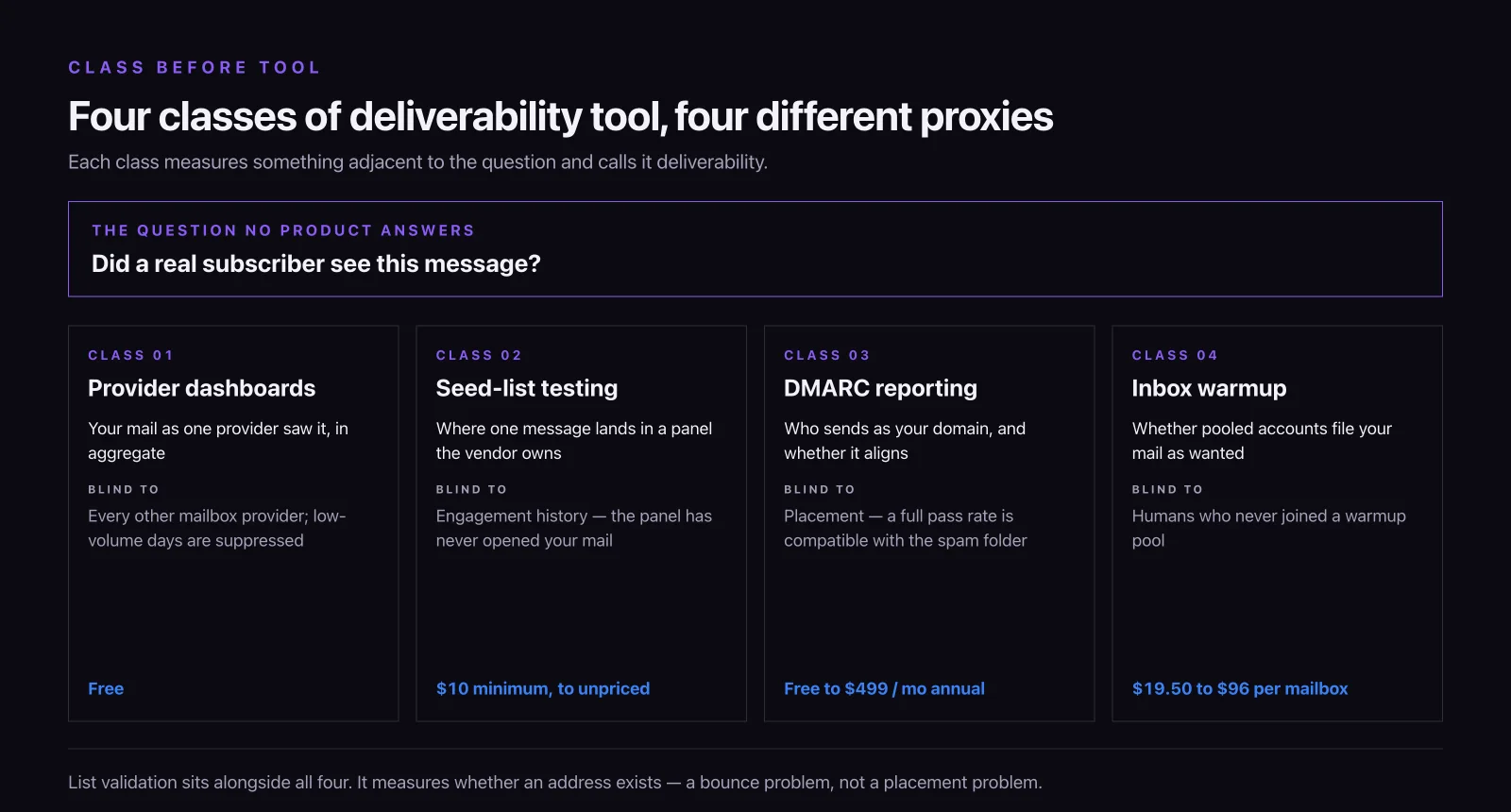
The practical rule: pick the class before you pick the tool. Buying a warmup subscription because a DMARC report looked wrong is the single most common wasted purchase in this category, and it is what happens when a comparison table sorts on price instead of on class.
Mailbox-provider dashboards are free, authoritative, and blind to each other
Start here, because the data is free and it comes from the party that actually made the delivery decision.
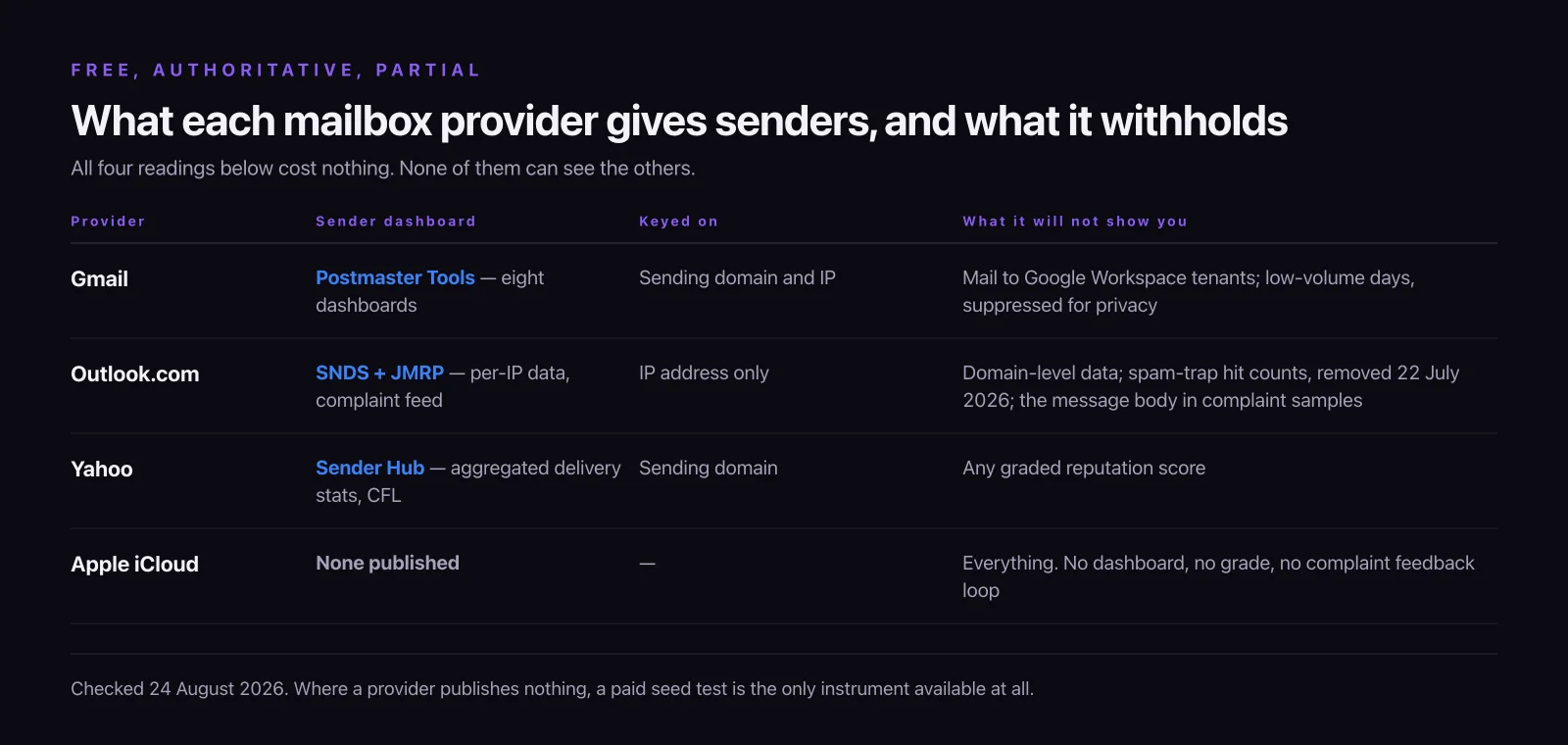
Google Postmaster Tools exposes eight dashboards, each defined in Google’s own documentation. Compliance status comes first and is the one added for the bulk-sender requirements. Spam rate is “the percent of your messages that recipients manually mark as spam in Gmail”. IP reputation and domain reputation are “the quality rating for the IP addresses you use to send email” and the equivalent for domains, reported as a grade rather than a number. Feedback loop covers “email campaign messages that recipients have marked as spam”. Authentication is “the percent of your email that passes SPF, DKIM, and DMARC authentication”. Encryption is “the percent of your email that’s sent over an encrypted SSL or TLS connection”. And delivery errors is “the percent of all authenticated messages (SPF or DKIM) that were rejected or that temporarily failed, compared to all authenticated messages”. Google is explicit that none of it is live: “Dashboard data isn’t real-time data… Typically, the data is updated within 24 hours but can take longer.”
Three limits are stated by Google and matter more than most of the features in this article. The data covers personal Gmail accounts only, so mail to a Google Workspace tenant is invisible here. Days with too little volume are suppressed: “Data might be missing if the total number of messages for a given day is too low. This is to protect users’ privacy.” And the spam-rate dashboard has a denominator problem that makes a low reading much weaker evidence than it looks — we set that out in full in a separate piece on why emails go to spam, and it is the single most misread number in this whole category.
Microsoft SNDS is the Outlook.com equivalent and it changed materially this year. Microsoft moved it to a new portal on 8 June 2026; automated access links now expire after 30 days and must be renewed; the complaint feed moved to header-only reports, so the message body and the complainant’s address are gone and matching a complaint back to a campaign now depends on your own Message-ID, X-headers, VERP path or DKIM selector; and, in Microsoft’s own words, “trap hit counts will no longer be included in the Data Report starting July 22, 2026”. That last change quietly deleted the only free spam-trap signal most senders had. If a tool’s marketing still promises SNDS trap visibility, it is describing a feed that no longer exists.
Yahoo offers a Sender Hub whose Insights feature “displays aggregated delivery statistics for your domain”, plus a Complaint Feedback Loop. There is no reputation grade.
Apple is the gap nobody prices in. iCloud Mail is a large consumer mailbox and Apple publishes no sender dashboard, no reputation grade and no complaint feedback loop comparable to the three above. For that slice of your list, a seed test is the only instrument available at all — which is one of the few places where paying for one is clearly justified.
Seed-list testing: what an inbox placement percentage is a percentage of
A placement test reports a number like “82% inbox, 14% spam, 4% missing”. Read the denominator before you act on it. That percentage describes the vendor’s seed accounts, not your list — and the composition of the panel, not your subscriber base, decides the result.
This matters in three specific ways.
Panel composition is not your list composition. If a tester’s panel is 40% Gmail and your list is 70% Gmail, a Gmail-specific problem is understated by the arithmetic before any filtering happens. Almost no vendor publishes its panel breakdown by provider, and none publishes it by tier.
Seed accounts have no engagement history with you. They have never opened, clicked, replied or moved a message out of spam. Engagement history is one of the strongest signals a large provider has, and by definition the panel carries none of it. A seed test measures the cold-start case, which is the right test for a new domain and the wrong test for an established list.
A test is a moment, not a state. MailerCheck charges 200 credits per placement test — $2 at its $0.01 credit rate, though the smallest purchase you can make is 1,000 credits, so the real entry cost is $10. Folderly’s Inbox Insights gives two free tests a month and then $79 a month for 100. Bouncer’s Deliverability Kit starts at $25 a month for 250 test emails across 10 IPs or domains. GlockApps runs two free tests, then $59 a month for 360 credits — the same per-month figure whether you pay monthly or annually. Whichever you buy, you are buying observations, and an observation on Monday says nothing about a filter change on Thursday.
This is also the honest answer to the “email deliverability test” versus “deliverability monitoring” question that sits behind most searches in this category. A free one-off test from MailGenius, MxToolbox or EasyDMARC tells you whether something is obviously broken right now. Monitoring is the same measurement on a schedule with alerts, and it is priced as a subscription because the value is in the second reading, not the first. If you only ever run the free test, run it after every template change rather than once when you set the domain up.
Authentication and DMARC tools report on records, not on placement
DMARC reporting is the least glamorous class here and the one most worth its money, because it answers a question nothing else does: who is sending mail as your domain, and does it align?
dmarcian is free for personal use at up to 2 domains and 1,250 DMARC-capable messages a month, with Basic at $19.99 a month on annual billing for 2 domains and 100,000 messages, Plus at $199 for 8 domains and a million messages, and Enterprise at $499 for 15 domains and five million — each of those figures roughly 20% higher if you pay monthly. EasyDMARC also has a free tier, at one domain and 14 days of history; paid starts at $35.99 a month annual for 2 domains with three months of report history, with Premium at $71.99 for 4 domains and a year of history. GlockApps bundles DMARC processing into the same subscription as its spam tests: 600,000 messages on the $59 Essential tier, rising to 12 million on Enterprise, with overage billed at $7.50 per 100,000 messages on Essential and $2 on Enterprise.
Two buying notes that the feature grids obscure. The meter is DMARC-capable messages, meaning reports processed, not emails you send — a domain that is being spoofed generates report volume you did not create. And report history length is the specification that gets rationed by tier: 14 days on EasyDMARC’s free plan, three months on its first paid one, a year on the tier above that. Three months is enough to fix a broken record and not enough to see a seasonal pattern or prove a trend to a finance team.
What none of these tools will do is tell you where your mail landed. Alignment is a gate, not a destination. Passing it is necessary and it is not sufficient, and the mechanics of why — including the alignment failure mode that catches most senders using an ESP — belong to a different article than a tools comparison.
Warmup tools measure a network that was built to like your mail
Warmup is the most aggressively sold class in this category and the one whose measurement is furthest from reality.
The mechanism is straightforward: your mailbox joins a pool, sends mail to other members, and other members open it, reply to it and drag it out of spam if it lands there. The vendor then reports a rising “deliverability score” as those interactions accumulate. MailReach charges $19.50 per mailbox per month with up to 100 warmup emails a day and 20 spam-test credits included. Folderly is $96 per mailbox per month on annual billing. Warmy.io prices on warm-up email volume, publishes no figures at all, and offers a seven-day free trial. Instantly ($47 a month on Growth) and Smartlead ($39 a month on Base) fold warmup into cold-outreach sequencers at a flat rate with unlimited mailboxes — Smartlead then sells an “Ultra Premium Warmup” upgrade on top.
Three things follow from how the mechanism works, and none of them appears on a warmup vendor’s pricing page.
The score is generated inside the pool. It measures whether pool members’ filters accepted mail from pool members, which is a real filtering decision made in an unrepresentative population. Rising to 99% inside the network does not translate into a number for your subscribers.
The pricing meter is usually your mailbox count, which means the cost tracks your sending infrastructure rather than your list, revenue or send volume. At $19.50 or $96 a mailbox that multiplies fast. The exceptions are the two sequencers: Instantly and Smartlead charge a flat rate for unlimited mailboxes, which is why an outbound team ends up there and a marketing team running one domain should not be paying a per-mailbox warmup fee at all.
And warmup is a ramp for a genuinely new or genuinely dormant sending identity. It is not a repair for a reputation problem caused by list quality or complaint rate, because the underlying cause keeps producing complaints while the pool keeps producing polite reads. If a warmup tool is being sold to you as a fix rather than as an onboarding ramp, that is the moment to check what is actually generating the complaints.
Note also the honest overlap: Warmy.io’s own pricing page lists a “Google Postmaster integration” that pulls Gmail data into its dashboard. That is a convenience feature, not a data source. The underlying figures are the free ones you can read yourself.
List validation reduces bounces, and bounces are a different failure from spam
Validation checks whether an address exists and will accept mail. Bouncer runs $8 per 1,000 credits, dropping to $0.002 an email at a million. ZeroBounce gives 100 free validation credits a month plus one placement test and one blocklist monitor, with ZeroBounce ONE from $99 a month for 10,000 credits drawn from a shared pool across validation, placement tests, warmup seeds and DMARC monitoring. MailerCheck is a flat $0.01 a credit with a 1,000-credit minimum and 10 free credits to try it.
Validation is worth doing before a first send to an old list, and it is a bounce-rate instrument, not a placement instrument. A hard bounce is a rejection; a spam-folder delivery is an acceptance. They have different causes and different fixes, and a clean validation report on a list that nobody asked to join will not move a single message out of spam.
The one place validation genuinely touches placement is the recycled spam trap — a real address, long abandoned, that the provider has repurposed. Validators cannot reliably identify these, because a recycled trap accepts mail exactly like a live mailbox. Until 22 July 2026, Microsoft’s SNDS trap hit counts were the closest thing senders had to a free confirmation that they were hitting traps at Outlook.com. That reading is gone.
The measurement none of these tools sells, and it is free
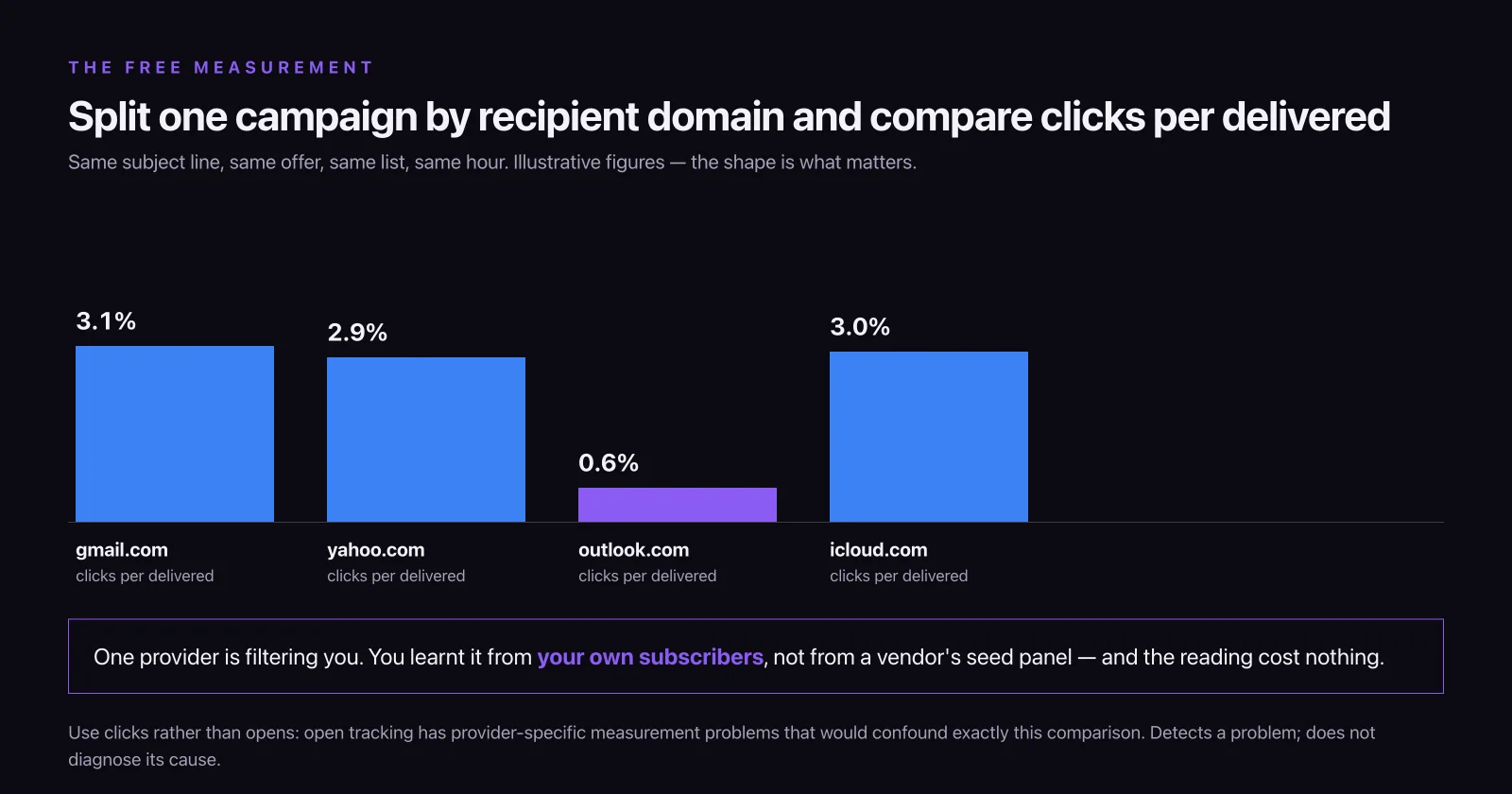
There is exactly one instrument that answers the question the whole category gestures at, and it is sitting in your sending platform already: split your own campaign results by recipient domain.
Group delivered messages by the part of the address after the @ — gmail.com, outlook.com and hotmail.com, yahoo.com, icloud.com, and everything else — and compare click-through rate per delivered message across those groups for the same campaign. Same subject line, same offer, same list, same hour. If clicks per delivered are materially lower at one provider than at the others, that provider is filtering you, and you have learnt it from your own recipients rather than from a panel.
Use clicks rather than opens for this comparison, because open tracking has known measurement problems that vary by provider and would confound exactly the comparison you are trying to make — the arithmetic of which metric survives is set out in our piece on what counts as a good email open rate.
This is our method, not an industry standard, and it has two real limits worth stating. It needs enough volume per provider group for the difference to mean anything, and it detects a placement problem rather than diagnosing its cause. But it costs nothing, it uses your actual subscribers, and it is the only reading in this article whose denominator is your own list.
A one-week protocol for evaluating any deliverability tool
Every vendor here offers a trial or a free tier. Most buyers spend it reading dashboards, which is the part of a deliverability tool that is easiest to build and hardest to falsify. Run this instead.
- Claim the free provider dashboards first. Google Postmaster Tools, Microsoft SNDS with JMRP, and Yahoo’s Sender Hub and Complaint Feedback Loop. This takes an afternoon and DNS access, costs nothing, and defines your baseline. Any paid tool now has to beat a number you already have.
- Write down the question you are buying an answer to, in one sentence, before you open a pricing page. “Are we landing in spam at Outlook.com” and “is something spoofing our domain” are answered by different classes of tool.
- Run two testers on the identical message, in the same hour. Same HTML, same from-address, same sending IP. If their placement percentages disagree by more than a few points, you are looking at panel composition, not at your mail.
- Ask each vendor for its seed panel breakdown by mailbox provider, in writing. The answer, or the absence of one, is more informative than any feature list.
- Check the history depth on the tier you can actually afford, not on the enterprise tier in the comparison column. Three months of DMARC history answers a different class of question than twelve.
- Run the recipient-domain split on your last three campaigns before you pay for anything. If your own data shows no provider-specific gap, the deliverability problem you were about to buy a tool for may not exist.
- Cancel one of the two trials deliberately and see what happens to your data. Tools that own your DMARC report history rather than forwarding it create a switching cost that is not on the price list.
What this category charges for, and how the meters differ
Nothing here is metered on the number of subscribers you email, which is the number most marketers use to estimate software cost. The meters are tests, mailboxes, domains and reports processed, and mixing them up is how a team that budgeted for a $79-a-month tester signs a $1,152 annual commitment for one managed mailbox instead.
Seed testers meter on tests: $2 a test at MailerCheck on a $10 minimum, 250 test emails for $25 a month at Bouncer, 360 credits for $59 a month at GlockApps, 100 tests for $79 a month at Folderly. Warmup tools mostly meter on mailboxes: $19.50 each at MailReach, $96 each at Folderly — with Instantly and Smartlead the flat-rate exceptions. DMARC platforms meter on domains and DMARC-capable messages: two domains at dmarcian Basic and EasyDMARC Plus, fifteen at dmarcian Enterprise. Validation meters on addresses, and unit cost falls by a factor of four between a thousand and a million.
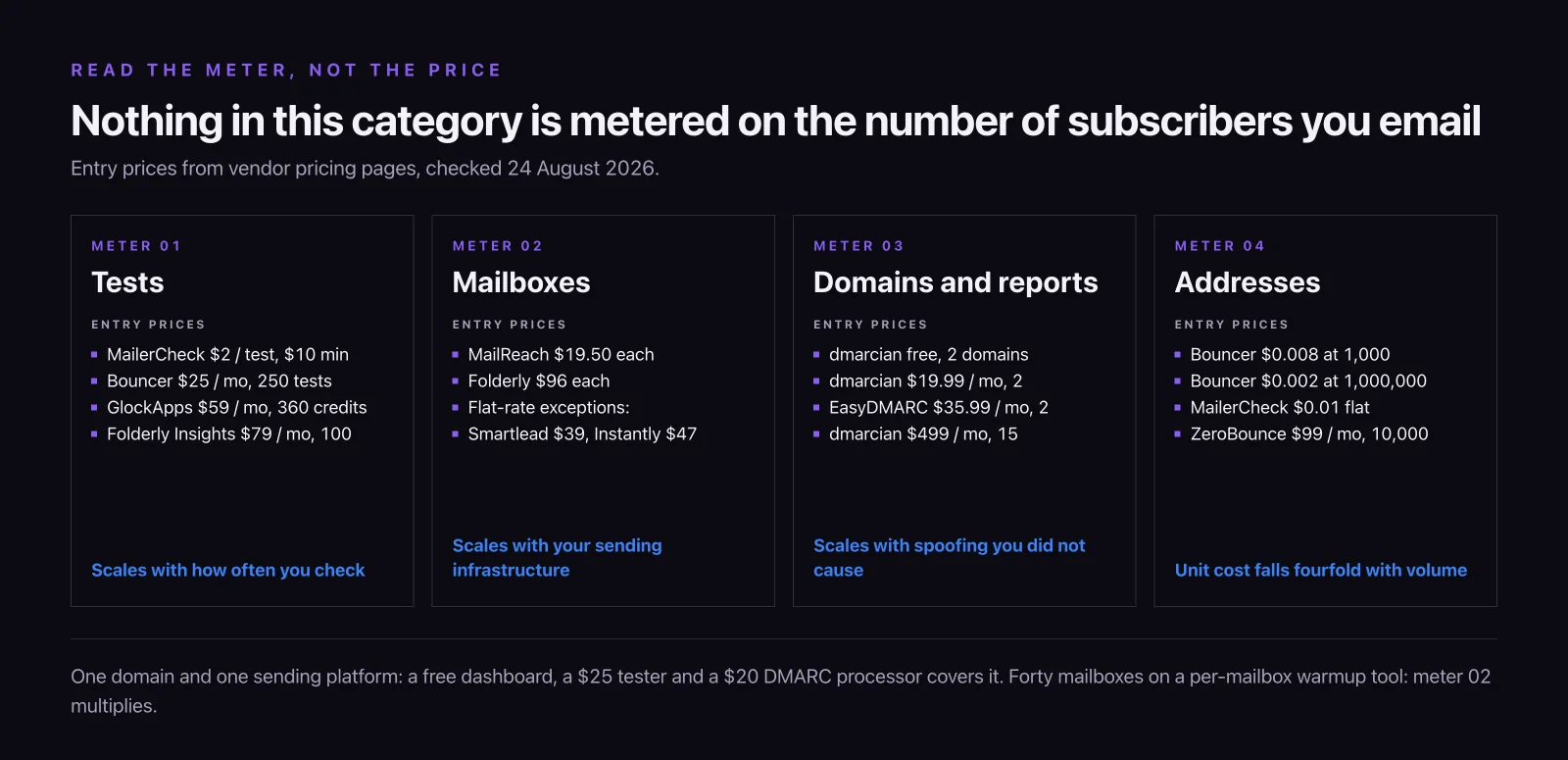
The consequence for a marketing team with one domain and one sending platform is that this category is cheaper than it looks — a free provider dashboard, a free or $25-a-month tester, and a $20-a-month DMARC processor covers the realistic need. The consequence for an outbound team running forty mailboxes is that it is far more expensive than it looks, because the mailbox meter multiplies.
Either way, the tool is an instrument and not a remedy. Buying a better thermometer has never lowered anyone’s temperature, and the work that actually moves placement — permission, list hygiene, sending consistency and a message people want — is programme work rather than software work. That is the part we do, inside email marketing, and it starts with reading the free dashboards you already have access to.
11 / Reader questions
Frequently asked questions
01What is the best tool for testing email deliverability?
There is no single best one, because the free mailbox-provider dashboards and the paid seed-list testers answer different questions. Google Postmaster Tools is the most authoritative source for Gmail and costs nothing; a seed tester such as GlockApps or Bouncer's Deliverability Kit checks several providers in one run, on the vendor's panel rather than on your list. Splitting your own campaign results by recipient domain is free and uses real subscribers.
02Are there free email deliverability tools?
Yes, and the most authoritative ones are free. Google Postmaster Tools, Microsoft SNDS with JMRP, and Yahoo's Sender Hub and Complaint Feedback Loop cost nothing and come from the mailbox providers themselves. MailGenius and MxToolbox run their one-off tests free outright, and GlockApps, Folderly, ZeroBounce, Mailtrap and EasyDMARC all give a free allowance before charging.
03What is the difference between an email deliverability test and deliverability monitoring?
A test is one message scored once; monitoring is the same measurement repeated on a schedule with alerting. The distinction decides the bill: tests are sold in credits, from roughly $2 per placement test, while monitoring is a subscription running from free tiers and around $20 a month up to several hundred. A single passing test proves nothing about next Tuesday's send.
04Which email service has the best deliverability?
No sending platform can promise inbox placement, because placement is decided by the receiving mailbox provider using your sending domain's own reputation, not your vendor's. Shared-IP platforms pool reputation across customers, dedicated IPs isolate it. Reputable providers differ far less than their marketing suggests, and none of them publishes a placement rate you can audit.