Published
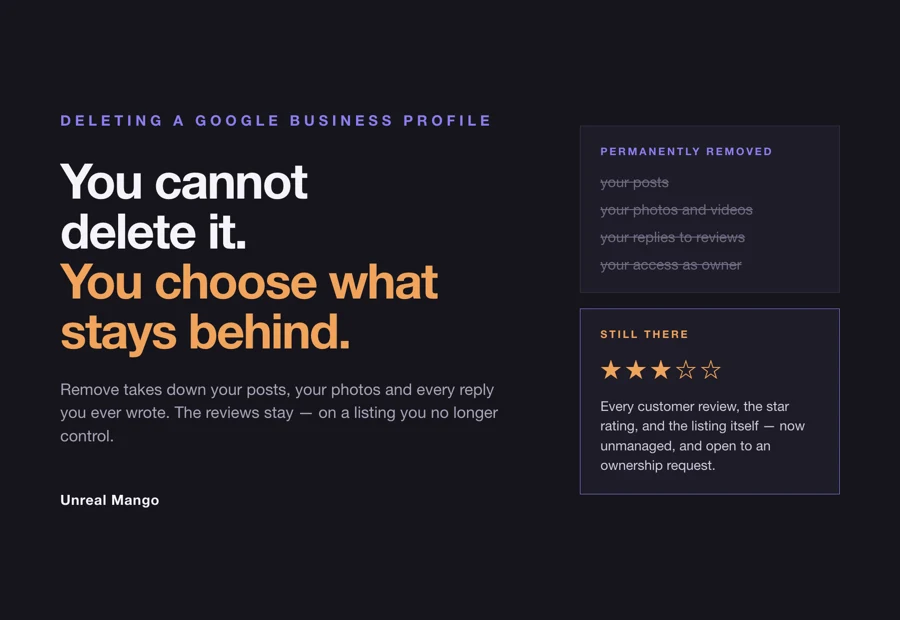
To delete a Google Business Profile, open the profile and select More → Business Profile settings → Remove Business Profile → Remove profile content and managers, then Continue, Remove, Done. Only a primary owner can do it. What that button does not do is take your business off Google — and it does not delete a single review.
That gap between what people expect and what the button does is the reason this search exists. Half a dozen different situations send people here, and only one of them ends with Remove.
Remove a Google Business Profile in five steps, and what the button leaves behind
Google’s own path, in its own labels:
- Go to your Business Profile and sign in with the Google account that manages it.
- Select More, then Business Profile settings.
- Select Remove Business Profile, then Remove profile content and managers.
- If you want to show that the business has shut, turn on Mark your business as permanently closed.
- Select Continue, then Remove, then Done.
For several profiles at once, sign in to the Business Profile Manager, select the profiles, then Actions → Remove businesses → Remove.
Now the part the step-by-step guides stop short of. Google’s help page states that “any posts, photos, videos, and review replies by owners and managers are permanently removed” — and, in the same breath, that user-generated content and reviews remain. The listing itself may still appear in Search and Maps afterwards.
| What is on your profile | After “Remove profile content and managers” |
|---|---|
| Posts you published | Permanently removed |
| Photos and videos you uploaded | Permanently removed |
| Your replies to customer reviews | Permanently removed |
| Customer reviews and customer photos | Stay on the listing |
| The star rating built from those reviews | Stays |
| The listing in Search and Maps | May still appear, now unmanaged |
| Your access as owner or manager | Ends |
Read the two halves of that table together and the outcome is worse than doing nothing. You end up with a live listing carrying your name, your address, your star rating and every complaint anyone ever left — with your side of every conversation deleted and no way to answer the next one. The listing is now unowned, so anyone can send an ownership request for it, though Google notes the option to claim a profile is not always available.
This is the single most useful thing to know before pressing Remove, and it is why the rest of this page is mostly about the other buttons.
Seven situations hide behind one search, and only one of them ends in Remove
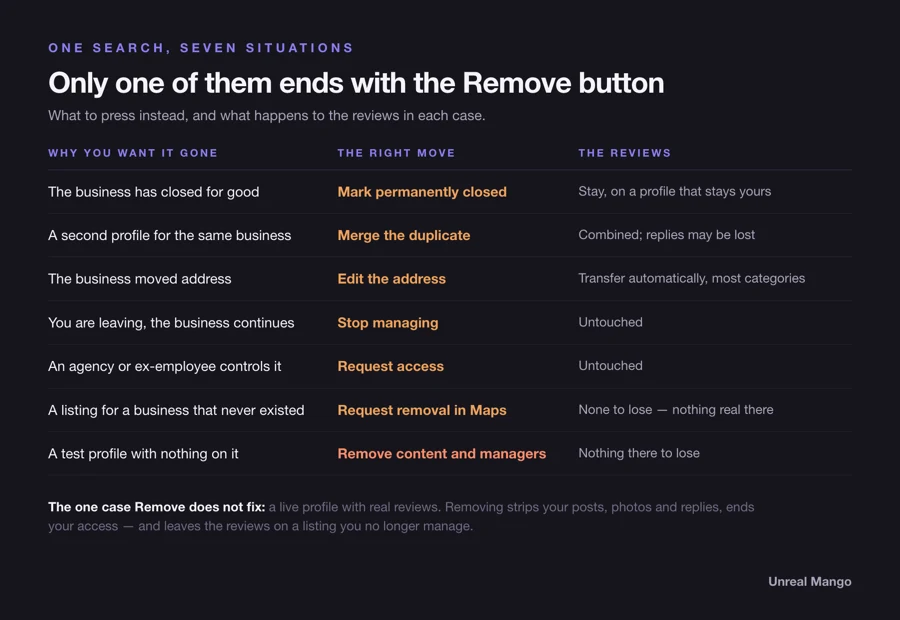
Before the steps, the diagnosis. Match your situation to the row:
| Why you want it gone | The right move | What happens to the reviews |
|---|---|---|
| The business has closed for good | Mark it permanently closed | Stay on the profile, which stays yours |
| A second profile exists for the same business | Merge the duplicate, or remove it if it is empty | Combined onto the surviving profile; replies may be lost |
| The business moved to a new address | Edit the address on the existing profile | Transfer automatically in most categories |
| You are leaving, the business continues | Stop managing, or transfer primary ownership | Untouched |
| An agency or ex-employee controls the profile | Request access, then take it over | Untouched |
| A listing exists for a business that never did | Request its removal from Search and Maps | N/A — there should be nothing there |
| It was a test profile with nothing on it | Remove profile content and managers | Nothing to lose |
Only the last two rows are a clean case for deletion. Everything above them has a button that costs you less.
There is one genuine exception to “you cannot really delete it,” and it is not the Remove button. Google runs a separate removal route for listings that should not exist at all: “You can request a business to be removed, even if you don’t own the Business Profile.” The grounds are narrow — a business “can be removed from Google if it never existed or isn’t eligible to be on Google” — and the route runs through Maps rather than the profile dashboard: select the place, then Suggest an edit → Place is closed or not here, choose the reason, and Submit, while signed in to your Google account. Google’s stated outcome: “If the request is approved, the business will be removed from Search and Maps.” For wrong details or fraudulent activity on a real business, Google points to its business redressal complaint form instead.
Mark the business permanently closed instead of removing it
If the business has actually shut, this is the move. It tells customers the truth, keeps the review history attached to a profile you still control, and stops people turning up at an empty unit.
- Go to your Business Profile.
- Select Edit profile, then Hours.
- Next to “Hours,” select Edit, then Permanently closed.
- Select Save.
For several at once: Business Profile Manager → select the businesses → Actions → Mark as permanently closed → confirm.
Google is direct about how this looks afterwards: “If you mark a business as permanently closed, your Business Profile may still appear on Search and Maps for users who search for it. It clearly shows that your business is closed.” Over time, per Google’s removal page, it “will slowly disappear from search results and then be completely removed” — with no published timeframe for that decay.
Two details that decide which closure label you want:
- Temporarily closed is for pauses, not for a week off. Google’s rule: if the business is closed for more than 7 days, closed for the off-season, or closed indefinitely, use Temporarily closed. If it is closed for 7 days or less, use special hours instead.
- Closure does not touch the reviews you already have. “If your business closes for a while or permanently, the reviews remain on the profile.” What Google does not say on either page is whether a closed profile keeps collecting new ones, so plan on keeping the history you have rather than on the profile continuing to earn.
How to merge a duplicate Google Business Profile without losing the reviews
Duplicates are the most common real reason behind this search, and removal is usually the wrong tool. The decision turns on one question: does the duplicate have reviews on it?
| The duplicate | What to do |
|---|---|
| Empty, and you own it | Remove it — Google says you can remove a duplicate you created “without affecting your verified listing” |
| Has reviews, and you own both | Ask Google to merge them, so the reviews come across |
| Has reviews, and someone else owns it | Request access first, then merge |
| Not a duplicate but an outdated address | Edit the address — do not create anything new |
To merge, report a suggestion on Google Maps: open the duplicate, select Suggest an edit → Place is closed or not here → Duplicate of another place, then Submit. Google’s stated outcome is worth quoting exactly, because it contains the one loss you should plan for: “When 2 profiles are merged, their reviews are combined, but replies to reviews may be lost.”
So a merge saves the reviews and can cost you the replies underneath them. If those replies matter — and on a profile with a few sharp one-star reviews they matter a great deal — copy them into a document before you request the merge, then re-post the important ones on the surviving profile afterwards.
Removing the duplicate instead does the opposite: the reviews stay stranded on a listing nobody manages, and they never join the profile you are keeping. That is the trade nobody in the top results spells out.
If the duplicate is claimed by someone else, you cannot merge it until you can act on it. Send an ownership request, and the clock starts: “the current profile owner is then notified by email and has 3 days to respond.” No response inside three days and you may get the option to claim the profile yourself — Google warns that option “isn’t always available.”
When the business moved, the reviews follow the address, not a new profile
This is the scenario where “delete and start over” does the most damage, and Google says so outright: do not create a new Business Profile because of a change in physical location or ownership.
Edit the address on the existing profile instead. Google’s stated behaviour: “If you move to a new address and keep the same business name, Google will transfer your reviews automatically.” Two carve-outs to know about — for certain categories, hotels, golf courses and scenic attractions among them, reviews might not be moved automatically, and if you have already created and verified a second profile by mistake, the route back is to contact Google and ask for the reviews to be transferred from the old profile to the new one.
Ownership changes work the same way. If a business has a new owner or manager but keeps the same name, the reviews remain, and so they do after a minor name change or a rename across multiple locations. The new owner inherits the history rather than starting clean — Google’s own caveat is that a business which changes substantially can lose its reviews, so “same name, same place” is carrying weight in that sentence. Either way, a bruised profile is a thing to price into buying a business.
Expect a lag on any of this. Google’s note on profile edits: “Changes to your profile usually take about 10 minutes to show up. In some cases, it can take up to 30 days.”
Who is allowed to press Remove, and the seven-day lock on new owners
Half the people who cannot find the Remove button are looking at it from the wrong role.
| Action | Primary owner | Owner | Manager |
|---|---|---|---|
| Edit business info, publish posts, respond to reviews | Yes | Yes | Yes |
| Add or remove people | Yes | Yes | No |
| Remove profile content and managers | Yes | See note | No |
Google’s wording on managers is unambiguous: they have “mostly the same access to the profile as owners. The only exception is they can’t add or remove users or remove the profile.” If you are a manager and the option is missing, that is the reason.
The note on owners: Google’s permissions table lists profile removal under “Owner,” but its removal page is narrower — “Only the primary owners can remove the profile content and managers.” Two Google pages, two widths. Work to the narrower one and you will not be surprised by a greyed-out button.
Two more constraints that catch people:
- A primary owner cannot remove themselves. Google: “If you’re the primary owner, you can’t remove yourself until after you transfer primary ownership to someone else.” Handing the business over is a transfer, not a deletion.
- New owners and managers wait seven days. For the first week after being added you cannot delete or undelete the profile, remove other owners or managers, or transfer primary ownership. If you have just been given access and the controls throw an error, nothing is broken — come back in a week.
To take yourself off a profile without touching anything else: Business Profile settings → People and access → select your own name → Stop managing → confirm.
Get the profile back from an agency or an ex-employee before you delete anything
The most common story behind “how do I delete this” is not a closed business. It is a profile that somebody else controls: the agency you stopped working with, the marketing hire who left, the web developer who set it up in 2019 on their own Gmail address. Deleting is what people reach for when they cannot get in.
You do not need to. Request ownership instead:
- Go to
business.google.com/add. - Enter the business name and address.
- Select the business from the list.
- When Google says someone else may manage it, select Request Access.
- Complete the form and select Submit.
The current owner is emailed and has three days to respond. If they approve, you are in. If they ignore it, you may get the option to claim the profile yourself — Google is explicit that this is a may, not a guarantee. Where it is offered, open your confirmation email, select View request, then Verify, and follow the verification steps. If they deny the request, you can still suggest an edit to the profile and appeal the decision. Service-area businesses with no public address fall outside this flow and need Google support directly.
Compared with removal, this path keeps every review, every photo and the profile’s whole history — and it ends with the asset in your account instead of nobody’s.
Deleting a Google Business Profile on a phone
There is no documented mobile removal flow, which is why searches for doing this on a phone or an iPhone are so unsatisfying. What Google documents for mobile is editing: in the Google Maps app, tap Business at the bottom right, then Edit profile, and after your changes tap Save. The removal path — More → Business Profile settings → Remove Business Profile — is written up only for the profile view on a computer.
Two practical notes for phone users:
- Marking the business closed is the mobile-friendly action. The hours edit sits two taps inside Edit profile. Actual removal is safer done at a desktop, signed in as the primary owner, where every confirmation screen is visible.
- For a place you do not manage, the Maps app is the route. Search for it, open the listing, select Suggest an edit → Place is closed or not here, then choose from options including Temporarily closed, Permanently closed, Doesn’t exist here, Duplicate of another place, Moved to a new location and Not open to the public, and Submit. Google’s caveat: “We review your edits, so it can take some time for your changes to show on the map.”
What removing the profile actually costs you in local search
A Business Profile is the only asset in local search that a small business owns outright and cannot rebuild by spending more. The reviews took years, the photos took customers, and the address history is what tells Google the business is real.
Removing it hands three things away at once. The reviews carry on existing without you, so the next unhappy customer gets the last word permanently. The listing stops being managed, so the hours, the phone number and the category drift out of date and nobody can fix them. And the profile sits unowned, which means the recovery route from here runs through an ownership request to whoever takes it next, not through a button.
The order to work through, cheapest first: update the profile, mark it closed if it really has closed, merge a duplicate rather than deleting it, transfer ownership if you are the one leaving — and only remove content and managers when there is genuinely nothing on the profile worth keeping. Everything upstream of that last step keeps the review history alive, which is also the part that does the most work in the local pack, and the reason our separate guides to getting more Google reviews and to optimising the profile itself both start from the assumption that the profile still exists.
If the profile is a mess because nobody has owned it in two years — wrong hours, an agency’s phone number, four one-star reviews with no replies — deleting it is the expensive way to fix that. Sorting out who owns what, cleaning the listing and keeping it current is ordinary maintenance, and it is part of what we take on in marketing for small businesses.
Sources, and what each statement rests on
- Removal steps, the multi-profile path, “any posts, photos, videos, and review replies by owners and managers are permanently removed,” user-generated content and reviews remaining, the “slowly disappear from search results” wording, and the primary-owner requirement: Google Business Profile Help, “Remove a Business Profile from your Google Account.”
- Requesting removal of a listing you do not own, the “never existed or isn’t eligible to be on Google” grounds, the Place is closed or not here route and “if the request is approved, the business will be removed from Search and Maps”: Google Business Profile Help, “Request removal of a Business Profile from Google Search & Maps.”
- Permanently and temporarily closed steps, the “more than 7 days / 7 days or less” rule, and the profile still appearing in Search and Maps after closure: Google Business Profile Help, “Mark your business as closed.”
- Reviews remaining after closure, automatic review transfer on a move with the same business name, the hotels, golf courses and scenic attractions exception, reviews remaining after an ownership or minor name change, and the instruction not to create a new profile after a move or ownership change: Google Business Profile Help, “Move your reviews across Business Profiles.”
- Removing a duplicate you own “without affecting your verified listing,” the merge-by-suggestion route, “when 2 profiles are merged, their reviews are combined, but replies to reviews may be lost,” and “the option to claim a profile isn’t always available”: Google Business Profile Help, “Resolve duplicate profiles and ownership issues.”
- The ownership request flow, the 3-day response window, the conditional claim-by-verification fallback and the appeal route: Google Business Profile Help, “Request ownership of a Business Profile.”
- Owner and manager permissions, the “Stop managing” path, the primary owner’s inability to self-remove, and the seven-day lock with its full list of blocked actions: Google Business Profile Help, “Manage your Business Profile owners and managers.”
- The “Suggest an edit” option list and the review lag on suggested edits: Google Maps / Local Guides Help, “Mark a place reopened or closed on Google Maps.”
- “Changes to your profile usually take about 10 minutes to show up. In some cases, it can take up to 30 days”: Google Business Profile Help, “Manage your business address.”
- Mobile editing path (Business → Edit profile → Save in the Google Maps app): Google Business Profile Help, “Edit your Business Profile,” iPhone and iPad instructions. Google documents no mobile removal path.
- None of these Help Center pages carries a visible last-updated date. Interface labels are as documented by Google at the time of writing; Google changes them without notice, and the option that matches the label is the one to follow.
10 / Reader questions
Frequently asked questions
01How long does it take to delete a Google business profile?
Google publishes no timeframe for the removal itself. Its removal page says only that posts, photos, videos and review replies by owners and managers are permanently removed and that your access ends. For the listing, Google says a profile marked permanently closed will slowly disappear from search results, again with no timeframe, and separately warns that ordinary profile edits take about 10 minutes to show up and in some cases up to 30 days.
02Does deleting a Google Business Profile delete the reviews?
No. Google's help page is explicit that user-generated content and reviews remain after you remove profile content and managers. What gets permanently removed is everything you added — posts, photos, videos and your replies to reviews. The star rating and the customer reviews behind it stay on a listing you no longer control.
03How can I remove myself from a Google business profile?
Open Business Profile settings, go to People and access, select your own name, then select Stop managing and confirm. This removes only your access and leaves the profile, its content and its other managers untouched. One exception: a primary owner cannot remove themselves until they transfer primary ownership to someone else.
04Can I delete a Google Business Profile and start over?
You can, but Google advises against it. Its guidance is not to create a new Business Profile because of a change in physical location or ownership — in most categories a move keeps the reviews if you edit the address on the existing profile, while a fresh profile starts at zero reviews and the old listing lingers as a duplicate. Starting over is the one move that reliably destroys the review history.
05How do I remove a business from Google Maps that I don't own?
Google has a removal route that does not require ownership: find the place in Maps, select Suggest an edit, then Place is closed or not here, choose the reason and Submit. Google states you can request a business to be removed even if you don't own the Business Profile, and that if the request is approved the business will be removed from Search and Maps. The grounds are narrow — a business that never existed or isn't eligible to be on Google, not a profile you have simply grown tired of.
06Do reviews transfer when you merge two Google Business Profiles?
Yes, with one loss. Google states that when 2 profiles are merged, their reviews are combined, but replies to reviews may be lost. That asymmetry is the argument for merging a duplicate rather than removing it: removal orphans the reviews on a listing you no longer manage, while a merge brings them onto the profile you keep.
07What is the difference between removing a profile and marking it permanently closed?
Removing strips your content and your access but leaves the listing and its reviews in place, unmanaged and open to an ownership request from someone else. Marking it permanently closed keeps you in control: the profile stays yours, the reviews stay attached, and Google labels it as closed in Search and Maps so nobody turns up at a locked door.