Published
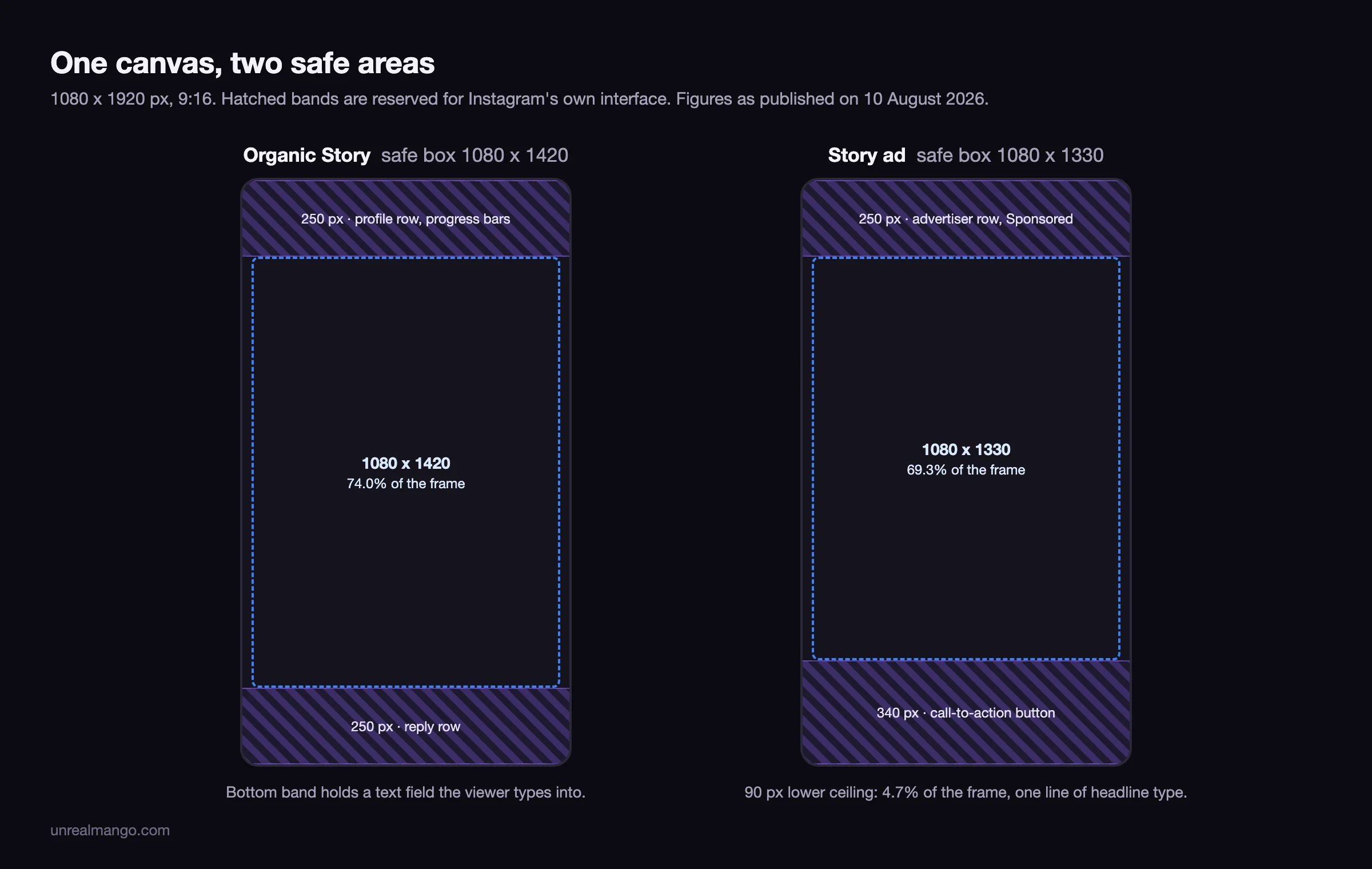
Instagram Story dimensions are 1080 x 1920 pixels, a 9:16 vertical frame, and that figure is the same for an organic Story and a Story ad. What differs is the safe area inside it. An organic Story reserves roughly 250 pixels at the bottom for the reply row; a Story ad reserves roughly 340 for its call-to-action button.
That 90-pixel gap is the whole problem. It is 4.7% of the frame height, about one line of headline type, and it sits exactly where the closing line of a design usually goes. Build to the organic figure, boost the same file as an ad, and the last line goes under the button.
Where these numbers come from. Meta’s help pages are closed to automated retrieval, so every figure below is third-party, dated to the last update of the source that publishes it, or derived here with the arithmetic shown. The same method, applied across the whole Meta placement grid, is in our Facebook ad sizes guide, linked further down. Everything on this page was checked on 10 August 2026.
The Story size everyone agrees on, and the safe area they do not
The canvas is settled. Every source that publishes a recommended resolution publishes 1080 x 1920 at 9:16, and Canva adds that you can scale down at the same ratio to 900 x 1600 or 720 x 1280 without breaking anything.
| Spec | Value | Source and date |
|---|---|---|
| Recommended resolution | 1080 x 1920 px, 9:16 | Agreed by every source that states one |
| Recommended export, ads | 1440 x 2560 px | Sprout Social 11 May 2026 as a minimum, Vaizle 16 January 2026 as a recommendation |
| Minimum, organic | 150 x 150 px | Sprout Social, updated 11 May 2026 |
| Minimum, ads | 500 px wide, or 600 x 1067 | Sprout Social 11 May 2026; Meta help centre, as shown in search results 10 August 2026 |
| Image file cap | 30 MB | Snappa 2 January 2026; Sprout Social 11 May 2026, stated for ads |
| Video file cap | 4 GB | Snappa 2 January 2026, PostFast 12 June 2026 |
| Formats | JPG, PNG, MP4, MOV | Snappa 2 January 2026 |
| Frame rate | 30 fps | PostFast 12 June 2026 |
The agreement stops there. The safe area, the part of the frame no interface element covers, comes back as three different boxes depending on who you read, and the two sources that do name a surface for their number name opposite ones.
What occupies the top and bottom bands, and why the paid frame is tighter
The reserves are not arbitrary margins. They are the height of the things Instagram draws on top of your file, and the two surfaces draw different things.
| Band | Organic Story | Story ad |
|---|---|---|
| Top | Progress bars, profile picture, account name, timestamp, close and menu icons | Progress bars, advertiser name, the Sponsored label, menu icon |
| Bottom | Reply field, share and like controls | Call-to-action button, advertiser row |
| Overlaid by you | Stickers, polls, questions, link sticker, music, countdown | Not documented in any Instagram spec sheet checked here |
The bottom row is where the 90 pixels go. An organic Story ends in a text field the viewer can type into; a Story ad ends in a button the advertiser is paying to have tapped. No published source explains the difference, so treat 340 as the larger of two published figures rather than as a measured button height.
The sourcing itself is the interesting part. PostFast, updated 12 June 2026, publishes 250 top and 340 bottom and attributes both to the organic interface. Vaizle, updated 16 January 2026, publishes 250 top and 340 bottom too, but attributes the 340 specifically to the call-to-action overlay on ads. Same two numbers, opposite explanations, five months apart. Designing to the larger figure is what makes the disagreement stop mattering.
The three safe boxes in circulation, and what each one protects
Collect what the current sources publish and you get three boxes for the same frame, all of them presented as the safe area for an Instagram Story.
| Safe box | Reserves it implies | Where it comes from | What it protects |
|---|---|---|---|
| 1080 x 1610 | 310 px total, split not stated | Sprout Social 11 May 2026, Vaizle 16 January 2026, and one of the two figures in Google’s AI Overview | Text and interactive elements, organic only |
| 1080 x 1420 | 250 top, 250 bottom | Derived here from the 250 px edges published by SocialSizes March 2026; printed directly as 1080 x 1420 in Google’s AI Overview | An organic Story with no sticker below the midpoint |
| 1080 x 1330 | 250 top, 340 bottom | Derived here from the paid reserves published by Vaizle 16 January 2026 | A Story ad with a call-to-action button |
Two problems with that set are worth naming.
The 1610 figure, which is the most widely published of the three, is unusable as printed, because it never says how the 310 pixels are divided. Split evenly it gives 155 at each edge, and 155 pixels does not clear a reply row that the same generation of sources measures at 250 to 340. Split 250 at the top and 60 at the bottom it clears nothing at all. It is a real number attached to no layout.
And the percentages do not survive their own arithmetic. PostFast prints 250 px as 14% of the frame and 340 px as 20%. On a 1920-pixel frame, 14% is 269 pixels and 20% is 384. The percentages are 19 and 44 pixels more generous than the pixel figures printed beside them, which means a designer working from the percentage column and a designer working from the pixel column in the same table produce different layouts.
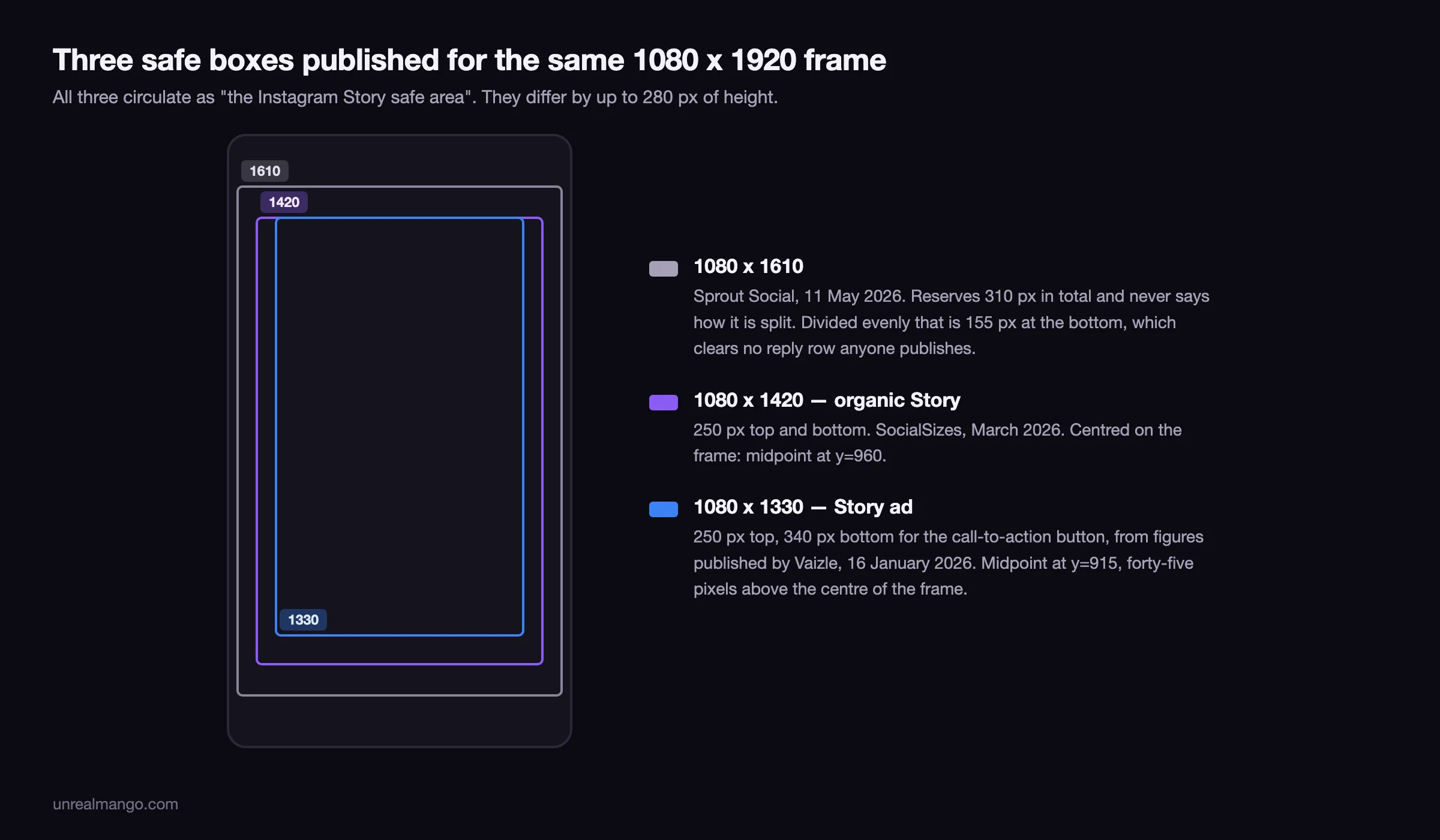
Note the asymmetry that falls out of this. The 1080 x 1420 organic box is centred on the frame: 250 at each edge puts its midpoint at y=960, dead centre. The 1080 x 1330 paid box is not. Its midpoint sits at y=915, forty-five pixels above the centre of the frame. A composition centred by eye in the paid safe box is not centred in the frame, and that matters the moment the same artwork is reused as a Highlight cover.
One boundary before you use the 1330 figure. It applies to a paid Story running in the Stories placement and nowhere else. Leave Reels switched on in the same ad set and the binding numbers change entirely: the Reels bottom reserve is published as high as 672 px, with a 150-pixel engagement rail on the right edge. Those values, the spread they sit in, and the cross-placement envelope built from them are in our Facebook ad sizes guide, which also collects bottom reserves of 380 and 672 for Stories from Meta-wide sources. In other words 340 is the Instagram-specific ceiling, not the Meta-wide one.
What Instagram does to a photo that is not 9:16
Upload a 4:5 or a square image to an organic Story and Instagram decides what to do with it. Preview App, writing in April 2021, listed the outcomes still visible today: the app crops it, zooms it, or shrinks it and fills the leftover space with an auto-generated background colour. Which of the three you get is not something the published guides let you predict.
The paid equivalent is at least predictable. A non-native ratio on a Meta ad placement is letterboxed with plain black bars, and you do not choose the fill or get a generated one; the sourcing for that, across the whole placement grid, is in the Facebook ad sizes guide linked above.
So the same file has two failure modes. Posted organically it is unpredictable but never obviously broken. Boosted as an ad it is predictable and obviously broken.
The fix in both cases is the same, and it is not a crop. Build on a 1080 x 1920 canvas and place the 4:5 asset inside it, so the fill is a decision rather than an outcome. If the asset is small and you are tempted to scale it up to fill the frame, that is the moment to check what kind of file it is; the difference between artwork that survives scaling and artwork that does not is covered in vector versus raster images.
Video length, file caps, and the limits that are organic-only
Story video runs up to 60 seconds per card. Snappa on 2 January 2026, PostFast on 12 June 2026 and Vaizle on 16 January 2026 all publish 60, and Google’s AI Overview repeats it. None of them documents what happens to a longer upload.
One current source still publishes 15 seconds. SocialSizes, updated March 2026, lists a maximum video duration of 15 seconds and a maximum image duration of 7. The 15-second figure is the pre-2023 limit, from the era when longer uploads were chopped into 15-second segments. It is being reprinted, not measured.
The image duration is genuinely unsettled. Meta’s help page for Stories ads, as quoted in Google’s own results on 10 August 2026, says images show for 5 seconds by default, and Google’s AI Overview repeats the 5. PostFast publishes 7 seconds, and SocialSizes lists a maximum image duration of 7. Nobody sources the 7. If a static frame has to be read, treat 5 seconds as the budget and set the reading order accordingly.
Two ceilings apply to organic Stories and have no paid equivalent at all. PostFast publishes a limit of 100 Stories per day per account. And an organic Story expires after 24 hours unless it is saved to a Highlight, where a paid Story runs for as long as the ad set is funded.
Story Highlight covers are a circle cut from a vertical frame
Highlight covers are the one Instagram Story surface with no paid equivalent, and no source checked publishes a display diameter or a crop origin for them. The geometry can be derived instead, on the assumption of a centred crop, and it is unforgiving.
The cover is uploaded as the same 1080 x 1920 frame and displayed as a circle whose diameter cannot exceed the 1080-pixel width. That circle is inscribed in a centred 1080 x 1080 square, and it covers 78.5% of that square, so the four corners, 21.5% of the square’s area, are cropped away before anyone sees the icon. Against the full Story frame, the visible circle is 44.2% of the pixels you uploaded: 916,088 of 2,073,600.
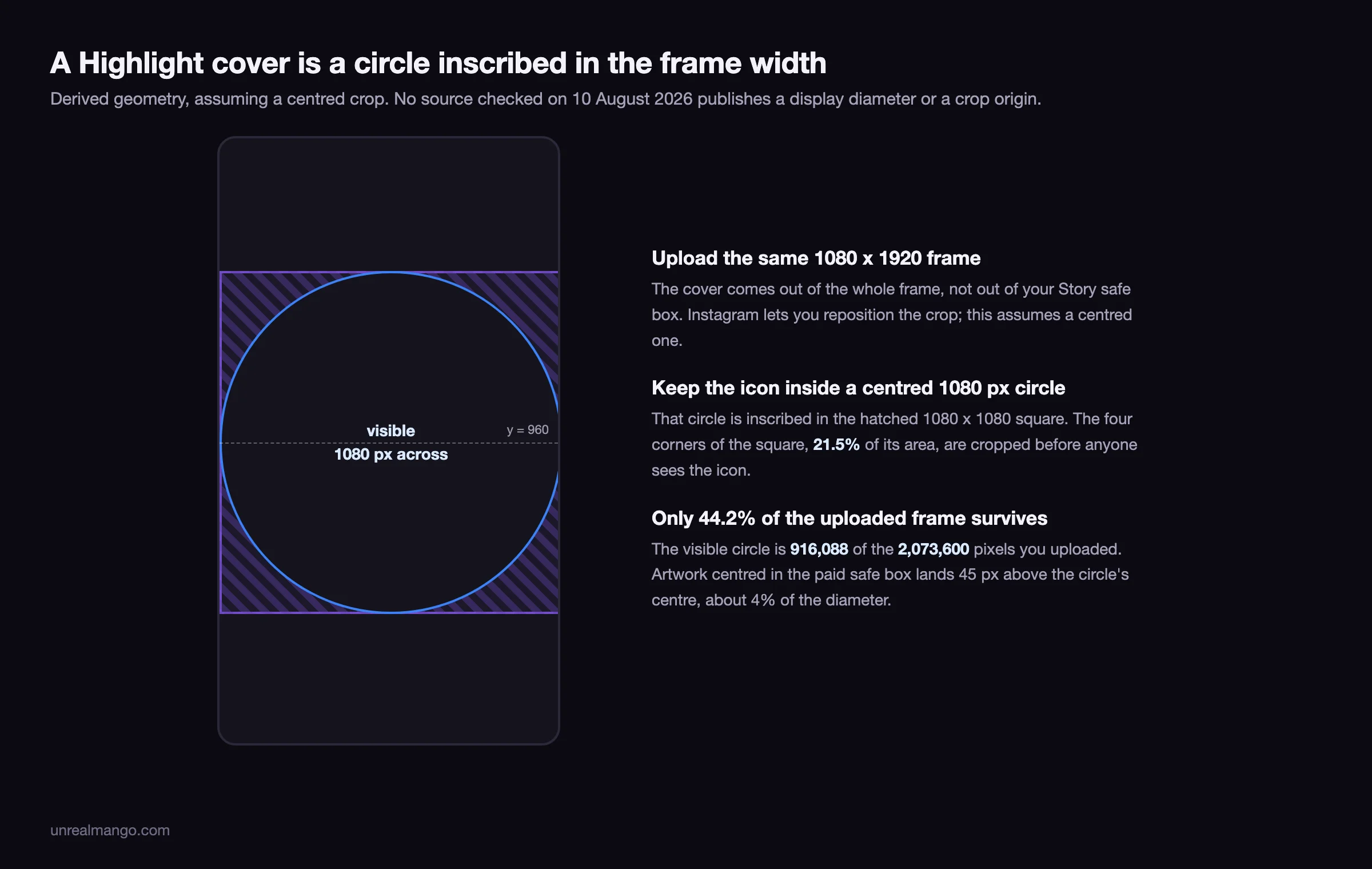
Two consequences follow. An icon that fits a 1080 x 1080 square but touches its corners loses those corners, which is the common way a Highlight set ends up with one icon visibly clipped. And artwork centred in the paid safe box lands 45 pixels above the circle’s centre, roughly 4% of the diameter: two or three screen pixels at the size a Highlight actually renders. Worth knowing, not worth re-laying-out for.
Stickers spend the safe box, not the reserve
The interactive layer is a large part of why organic Stories exist as a format: link stickers, polls, quizzes, questions, countdowns, music, and the tap-to-add prompts. None of the Instagram guides checked here lists that layer as part of a Story ad spec, so design the paid cut as though the button is the only overlay, and confirm anything interactive in the placement preview before you rely on it.
The pixel consequence of a sticker is easy to miss. A sticker is not part of Instagram’s own overlay, so it does not live in the reserved band. You place it, and if you place it where it will actually be read, you place it inside the safe box. Its height comes out of the 1420 pixels you were designing with, not out of the 250 you had already written off.
Sticker heights are not published anywhere, and they change with text length and with the phone. Measure your own: post a test Story with the stickers you actually use, screenshot it, scale the screenshot to 1080 wide, and read the occupied height off the file. That measurement matches your account’s habits, which no guide can.
Do the same measurement before deciding a Story underperformed. A poll placed over the headline suppresses the thing being measured, and reading that as a content result rather than a layout result is a reliable way to redesign the wrong element. If you are comparing Story performance across weeks, how to calculate engagement rate sets out which denominator each platform hands you.
Design to the paid box and the organic cut comes free
The rule that falls out of all of this is one line: for a Stories-only layout, build inside 1080 x 1330 starting 250 pixels from the top, and both the organic and the paid version survive.
That box clears the organic reply row with 90 pixels to spare and clears the call-to-action button exactly. It costs 6.3% of the organic safe box, which is the price of never re-laying-out a Story because someone decided to put money behind it. It is not a cross-placement rule: switch on Reels or any other Meta surface and the numbers in the Facebook ad sizes guide take over.
Three habits make the single-box approach hold up:
- Keep the text on its own layer. The only edit between the organic cut and the paid cut is vertical position, and that is a thirty-second job on a layered file and a re-do on a flattened one.
- Put the closing line above y=1580, not against it. 340 pixels is the largest bottom reserve any Instagram-specific guide publishes, and only two guides publish it at all, for two different surfaces. Sitting a line exactly on that boundary makes the layout depend on a figure that is one revision away from moving.
- Export at 1080 x 1920 for organic and 1440 x 2560 for paid. Not 4K. Sprout Social publishes 1440 x 2560 as the minimum resolution for a Stories ad and Vaizle recommends the same export, so on the paid side the 1080 series is the floor rather than the target. Above 1440 x 2560 you are paying upload time for pixels the re-encode discards.
None of this is a template you download once and stop thinking about. Instagram moves its interface, the reserves move with it, and the figures here are what published sources stated on 10 August 2026, not a permanent specification. Re-measure from a screenshot when the app visibly changes, and keep both cuts in the same file so re-measuring costs one edit rather than two.
For anyone running Stories at volume, the version of this that scales is a brief where the safe box is written down as a number rather than held as a habit by whoever happens to be designing that week. That is the boring half of the social media work we do for clients, and it is the half that stops a campaign from discovering the button on launch day.
09 / Reader questions
Frequently asked questions
01What are the dimensions of an Instagram Story?
1080 x 1920 pixels, a 9:16 vertical frame, for both photos and videos. Images cap at 30 MB and videos at 4 GB. You can scale down at the same ratio, and 900 x 1600 or 720 x 1280 both upload cleanly, but 1080 wide is the figure every 2026 guide publishes as the recommendation.
02Is an Instagram Story 16:9?
No, a Story is 9:16, the same two numbers inverted. 16:9 is landscape, 1920 x 1080, and dropped into a Story it does not fill the screen: Instagram crops, zooms or shrinks it and generates a background behind it. The tall side of a Story is always the 1920.
03What is the safe zone for an Instagram Story?
Keep text and logos inside 1080 x 1420 pixels, starting 250 pixels down from the top. That clears the profile row above and the reply row below. For a Story ad, pull the bottom edge up to a 1080 x 1330 box, because the call-to-action button sits where the reply row would be.
04Are Instagram Story ad dimensions different from organic Stories?
The canvas is identical at 1080 x 1920. The safe area is not. Published 2026 guides give the paid frame roughly 340 pixels of bottom reserve against 250 for organic, because a Story ad carries a call-to-action button and an advertiser row where an organic Story carries the reply bar.
05How do I resize a photo to fit an Instagram Story?
Put it on a 1080 x 1920 canvas rather than handing Instagram a photo of the wrong shape. Upload a 4:5 or a square image and the app crops it, zooms it, or shrinks it and fills the leftover space with a generated background, and the published guides do not let you predict which of the three you get.
06What size is an Instagram Story Highlight cover?
Upload the same 1080 x 1920 frame and keep the icon inside a centred circle 1080 pixels across. The cover displays as a circle inscribed in a 1080 x 1080 square, so the four corners of that square, 21.5% of its area, are discarded before anyone sees the icon.
07Should I export an Instagram Story at 1080 x 1920 or 1440 x 2560?
1080 x 1920 for an organic Story, 1440 x 2560 for a paid one. Sprout Social publishes 1440 x 2560 as the minimum resolution for Stories ads and Vaizle recommends the same export, so the 1080 series is the floor on the paid side rather than the target. Past 1440 x 2560 there is nothing to gain.