Published
A LinkedIn single image ad is 1200 x 628 pixels at 1.91:1, or 1200 x 1200 square, under 5 MB, with a 70-character headline and 150 characters of intro text. Almost every other format changes at least one of those four numbers, and only three inherit them outright. The full table is below, and each figure carries the LinkedIn page it came from.
How this was checked. Every number on this page was read off LinkedIn’s own specification pages on 10 August 2026, one format at a time, and not from any aggregated cheat sheet. For this query in the United States on that date Google returned an AI Overview, a People Also Ask block, a video pack and ten organic results, five of them LinkedIn properties. Four of those five cover a single format each; the fifth is a summary page whose numbers do not always match the dedicated pages, which is a section of its own below. The most recent third-party guide in the set was eight days old and covered one format; the most comprehensive was from December 2024 and counted eleven formats. Search demand for the query is 720 a month in the US, and 1,000 for the phrasing “linkedin ad specs” (DataForSEO, checked 10 August 2026).
Every LinkedIn ad format’s pixel sizes, ratios and file weights
This is the whole creative surface in one place. Which of these formats you are eligible to run is decided before you design anything, by your objective and your audience’s region, and that is a separate exercise we walk through in types of LinkedIn advertising.
| Format | Ratio | Recommended | Minimum | Maximum | File | Weight |
|---|---|---|---|---|---|---|
| Single image, landscape | 1.91:1 | 1200 x 628 | 640 x 360 | 7680 x 4320 | jpg, png, gif | 5 MB |
| Single image, square | 1:1 | 1200 x 1200 | 360 x 360 | 4320 x 4320 | jpg, png, gif | 5 MB |
| Single image, vertical | 4:5, 2:3 or 1:1.91 | 720 x 900, 600 x 900 or 628 x 1200 | 360 x 640 | 2430 x 4320 | jpg, png, gif | 5 MB |
| Carousel card | 1:1 | at least 1080 x 1080 | — | — | jpg, png | 10 MB |
| Video, landscape | 16:9 | — | 640 x 360 | 1920 x 1080 | mp4 | 500 MB |
| Video, square | 1:1 | — | 360 x 360 | 1920 x 1920 | mp4 | 500 MB |
| Video, vertical | 4:5 | — | 360 x 450 | 1080 x 1350 | mp4 | 500 MB |
| Video, vertical | 9:16 | — | 360 x 640 | 1080 x 1920 | mp4 | 500 MB |
| Video thumbnail | match the video | — | — | — | jpg, png | 2 MB |
| Connected TV | 16:9 | 1920 x 1080 | 1280 x 720 † | 1920 x 1080 † | mp4, H.264 | 500 MB |
| Document | vertical, horizontal or square | — | — | 300 pages | pdf, doc, docx, ppt, pptx | 100 MB |
| Event | 4:1 | pulled from the Event page | — | — | — | — |
| Message and conversation banner | 300 x 250 | 300 x 250 | — | 300 x 250 | jpg, png | 2 MB |
| Spotlight logo | 1:1 | 100 x 100 | — | — | jpg, png | 2 MB |
| Spotlight background | 300 x 250 | 300 x 250 | — | — | jpg, png | 2 MB |
| Follower logo | 1:1 | 100 x 100 | — | — | jpg, png | 2 MB |
| Text ad logo | 1:1 | 100 x 100 | — | — | jpg, png | 2 MB |
Four notes that the table cannot hold. Vertical single image ads deliver to mobile only, which LinkedIn states on the spec page itself; landscape and square deliver to both. Carousel ads accept no video at all. The 10 MB on carousel is the figure LinkedIn’s carousel spec page gives as the maximum file size, not a documented per-card allowance, so a ten-card ad should be budgeted as a single 10 MB set rather than 100 MB. And the dagger on connected TV matters: LinkedIn names 1280 x 720 and 1920 x 1080 as the two accepted resolutions, not as the ends of a range, so 1600 x 900 is not a documented option even though it sits between them and is a clean 16:9.
Recommended or maximum: LinkedIn labels the difference on some formats and not others
Two numbers govern every text field, and they fail in different ways. The recommended length is the one LinkedIn says will display without being shortened. The maximum is the one above which Campaign Manager will not accept the field at all. Exceed the first and your copy still runs, cut mid-sentence. Exceed the second and there is no ad.
LinkedIn publishes both numbers on exactly one of the pages checked. The video ads specification gives a headline as “70 characters recommended, 200 characters maximum” and introductory text as “150 recommended, 600 maximum”. The single image and document pages give one number per field with no label — headline 70, intro 150 — and no statement about what happens at 71. The carousel page does the same with its own, tighter figures: 45 characters per card headline against 255 of intro text.
That asymmetry matters when you write once and run everywhere. A 130-character headline is inside the documented maximum for a video ad and outside any documented allowance for the single image ad sitting in the same campaign. The safe reading is the conservative one: treat every unlabelled figure as a truncation threshold rather than a rejection threshold, and treat the lowest number across the formats in the campaign as the real brief.
Headline is 25, 45, 50 or 70 characters depending on which format you picked
The field called “headline” is four different fields wearing one name, five if you count the separate offer headline on a Lead Gen Form. Nothing in Campaign Manager warns you that the copy approved for a single image ad will not fit a carousel card, and the gap between the widest and narrowest is a factor of 2.8.
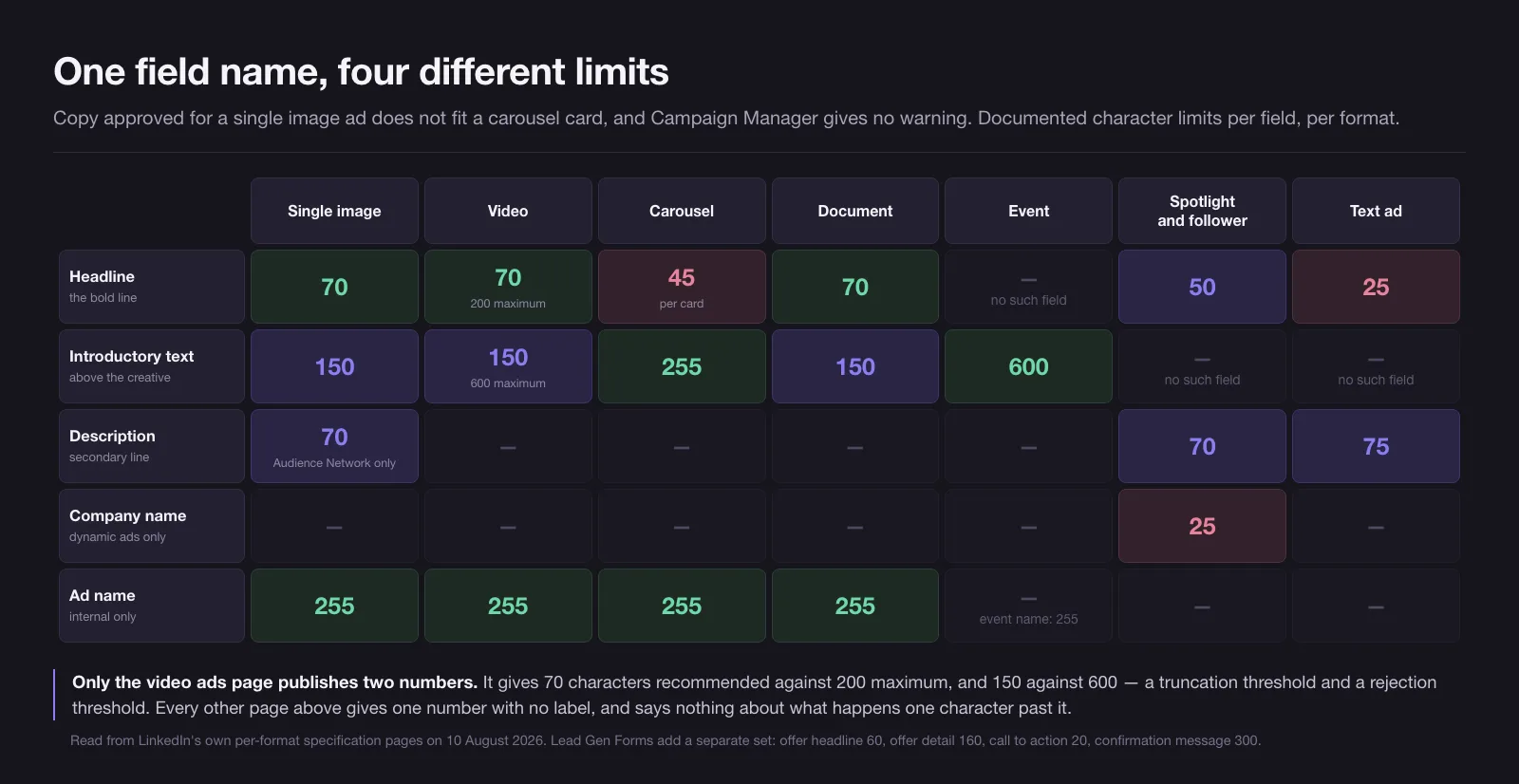
| Field | Single image | Video | Carousel | Document | Event | Spotlight | Follower | Text ad |
|---|---|---|---|---|---|---|---|---|
| Ad name | 255 | 255 | 255 | 255 | — ‡ | — | — | — |
| Headline | 70 | 70 rec / 200 max | 45 per card | 70 | — | 50 | 50 | 25 |
| Introductory text | 150 | 150 rec / 600 max | 255 | 150 | 600 | — | — | — |
| Description | 70, Audience Network only | — | — | — | — | 70 | 70 | 75 |
| Company name | — | — | — | — | — | 25 | 25 | — |
| Call to action | — | — | — | — | — | 18 | preset list | preset list |
‡ The event ads page publishes no ad name and no headline. What it gives 255 characters to is the optional event name, and the ad’s only writable copy is 600 characters of intro text.
Four things in that table are worth pulling out. Carousel gives the shortest headline of any feed format at 45 characters, and gives the longest intro text of any feed format at 255 — the opposite trade to the one most briefs assume. Text ads run a 25-character headline, which is roughly four words. The single image description field exists only if you have opted into the LinkedIn Audience Network, so on LinkedIn alone it is dead weight. And spotlight and follower ads have no intro text field at all, so everything you want to say has to fit a 50-character headline, a 70-character description and a 25-character company name.
A Lead Gen Form adds its own set on top, and it does not follow the pattern: offer headline 60 characters, offer detail 160, call to action 20, confirmation message 300, privacy policy text 2,000, up to three custom questions of 100 characters each, and up to 12 fields against a recommended 3 to 4. The form name allows 256 characters where every ad name allows 255 — a one-character difference that exists for no reason anyone has documented.
Introductory text, and the truncation point LinkedIn never publishes
Here is the honest state of it. LinkedIn does not publish, anywhere in its advertising specifications, the character position at which intro text collapses behind “see more” on desktop as against mobile. Not on the format spec pages, not on the summary guide, not in the ad copy guidance. Every number circulating for that cutoff comes from third parties counting pixels in a live feed, and those counts disagree with each other and go stale whenever the feed layout changes.
What LinkedIn does publish is a recommended length per format, which is the length it says will not be shortened. That is the number to design against, and it is not the same across the feed:
- Single image, video and document ads: 150 characters
- Job ads: 150 characters, from the ads guide summary rather than a dedicated spec page
- Carousel: 255 characters
- Event ads: 600 characters
- Video hard maximum: 600 characters, against 150 recommended
The device split that LinkedIn does document is a different one, and it is about which asset renders at all rather than where text stops:
- Vertical single image creative delivers to mobile only
- Landscape and square single image creative delivers to both
- The 300 x 250 banner on message and conversation ads is desktop only, so mobile recipients see the message body with no image
- Text ads are a right-rail desktop unit, which is why they carry the shortest headline on the platform at 25 characters
So the practical rule for intro text is not a mobile number and a desktop number. It is 150 characters for anything in the feed, written so the first clause survives on its own, with anything past 150 treated as a bonus that some readers will never open. That is also the reason the strongest first line is a claim rather than a wind-up.
Where LinkedIn’s own pages disagree, down to 1200 x 627 against 1200 x 628
LinkedIn maintains a summary page, its ads guide, alongside a dedicated specification page per format. On 10 August 2026 the two did not agree on five fields, and one of the gaps is large enough to change a brief.
| Field | Ads guide summary | Dedicated spec page | Gap |
|---|---|---|---|
| Message ads, message text | 1,500 characters | 8,000 characters | 5.3x |
| Message ads, call to action | 20 characters | 25 characters | 5 characters |
| Single image, recommended size | 1200 x 627 | 1200 x 628 | 1 pixel |
| Document ads, page count | 300 pages maximum | under 10 pages, 300 maximum or 1 million words | recommendation missing from the summary |
| Connected TV | “supports standard video ad specs” | its own spec: 16:9 only, 6 to 60 seconds, H.264 bitrate floor | not the same spec |
The message ads gap is the one that costs work. Writing to 1,500 characters when the field accepts 8,000 is a wasted opportunity; writing to 8,000 when the enforced limit is 1,500 is a rejected ad. The dedicated Sponsored Messaging spec page is the more specific document and states 8,000 with a 25-character call to action, so that is what we design to — and we check it again before every build, because a summary page and a spec page drifting apart is exactly the failure mode that makes any static cheat sheet unsafe.
The single-pixel gap is smaller but more instructive, because it is a rounding disagreement rather than a specification one. A 1200-pixel-wide image at a true 1.91:1 ratio is 628.27 pixels tall, so 628 is the correct rounding and the spec page is right to publish it. The summary page’s 627 is one pixel short, giving 1.914:1. Google’s AI Overview on this query quotes both figures in the same answer. Both are well inside the 5% ratio tolerance LinkedIn documents for video and does not document for images, so in practice the difference is invisible. It is worth knowing only because it explains why every guide you compare will differ by a pixel, and why that difference is not the thing to worry about.
The 5% aspect-ratio tolerance that decides whether a video export passes
The video specification is the only one that publishes a tolerance, and it explains a class of upload failures that otherwise look random. LinkedIn documents a minimum aspect ratio of 9:16, given as 0.563, a maximum of 16:9, given as 1.778, and an aspect ratio tolerance of 5%. Both width and height are bounded at 360 pixels minimum and 1920 maximum regardless of ratio, with each ratio carrying its own tighter envelope on top.
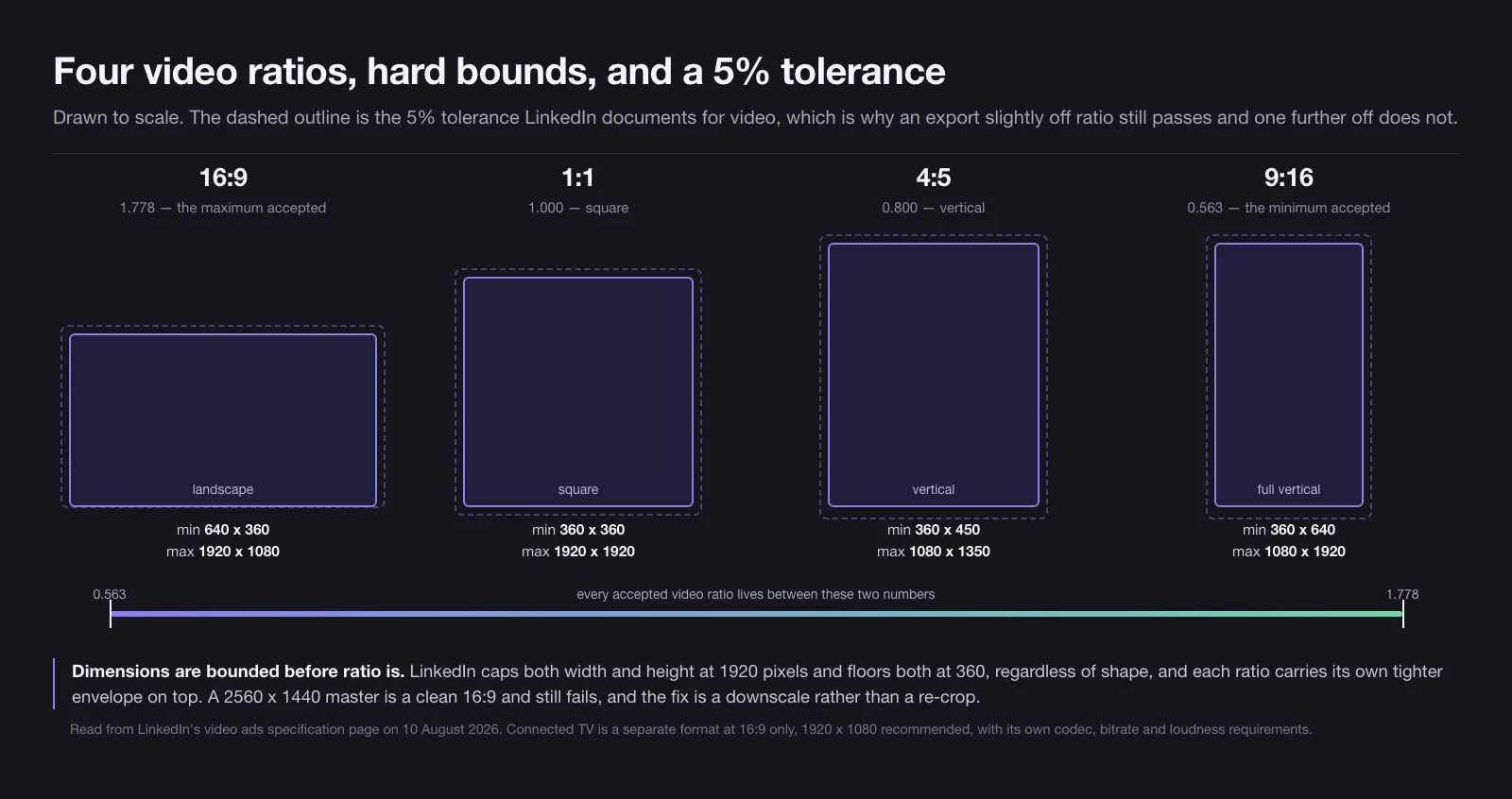
That 5% is why a 1080 x 1320 export still counts as 4:5 — it is 2.3% off the exact ratio — and why 1080 x 1250 does not, at 8% off. Both sit inside the 1080 x 1350 ceiling for 4:5, so it is the tolerance rather than the size cap deciding the outcome. Dimensions are checked before ratio, which is why a video mastered at 2560 x 1440 fails despite being a clean 16:9: 2560 exceeds the 1920 maximum, and the fix is a downscale rather than a re-crop.
The rest of the video envelope, checked the same day: mp4 container, 75 KB minimum to 500 MB maximum file size, 3 seconds to 30 minutes duration, 30 frames per second recommended, audio in AAC or MPEG4 at a sound rate under 64 KHz, captions optional, and a custom thumbnail that must match the video’s own aspect ratio and stay under 2 MB. The thumbnail ratio requirement catches people who cut a 16:9 still out of a 4:5 video.
Document ads: 300 pages allowed, ten recommended, one page-size rule
Document ads pair a standard 70-character headline with the strictest file preparation on the platform. LinkedIn accepts pdf, doc, docx, ppt and pptx up to 100 MB, and caps the document at 300 pages or one million words, whichever comes first. It then recommends under ten pages, which is a thirty-fold difference between what is permitted and what is advised.
Three preparation rules sit underneath and are easy to miss because they are not dimensional:
- Multi-layer PDFs must be flattened or merged before upload
- Every page must be fitted to matching dimensions; a deck with one landscape page among portrait pages is the common failure
- Hyperlinks must be secure
LinkedIn also names the page layouts it supports rather than leaving it to ratio: Letter at 8.5 by 11 inches, Tabloid at 11 by 17, Legal at 8.5 by 14, Statement at 5.5 by 8.5, Executive at 7.25 by 10.5, Folio at 8.5 by 13, plus A3, A4, B4 and B5. Orientation may be vertical, horizontal or square. Document ads carry no landing page URL, because the asset is the destination.
Sponsored Messaging: the banner is desktop-only and the subject line is undocumented
Both inbox formats share one creative asset and one blind spot. The banner is optional, jpg or png, a maximum of 300 x 250 pixels, and no heavier than 2 MB. LinkedIn’s message ads page states plainly that it is “only available on desktop”, and the conversation ads page says the same. Since LinkedIn’s inbox is used heavily on mobile, the working assumption should be that most recipients never see the banner, and no information the message depends on can live inside it.
The text allowances on the dedicated pages are generous and identical across both formats: ad name 255 characters, message text 8,000, custom footer 20,000, call to action 25. The sender image is pulled from the designated sender’s LinkedIn profile and is not something you supply.
What is missing is the subject line. Message ads have one, it is the first thing a recipient reads, and neither the specification page nor the summary guide gives it a character limit. Treat it as the shortest field in the format and write it to fit a phone’s notification preview, because no LinkedIn page will tell you where it stops. These two formats also cannot be delivered to members located in the EU at all, which is an eligibility rule rather than a spec, covered in the format guide linked above.
Connected TV carries a broadcast spec no other LinkedIn format has
The summary guide says connected TV “supports standard video ad specs”. Its own specification page says otherwise, and the difference is the gap between a social export and a broadcast deliverable.
| Parameter | Sponsored Content video | Connected TV |
|---|---|---|
| Ratios accepted | 16:9, 1:1, 4:5, 9:16 | 16:9 only |
| Dimensions | 360 to 1920 pixels wide | 1920 x 1080 or 1280 x 720 |
| Duration | 3 seconds to 30 minutes | 6 to 60 seconds |
| Codec | not specified | H.264 |
| Bitrate | not specified | 12 Mbps minimum, 15 to 40 recommended |
| Frame rate | 30 fps recommended | 23.98, 24, 25, 29.97 or 30, constant, 29.97 recommended |
| Chroma subsampling | not specified | 4:2:0, with 4:2:2 recommended |
| Audio | AAC or MPEG4, under 64 KHz | 2-channel, -23 integrated LUFS, PCM 16 or 24-bit preferred or AAC, 192 Kbps minimum, 48 kHz |
The loudness target is the tell. Minus 23 integrated LUFS is the European broadcast delivery standard, not a social media figure, and hitting it requires a loudness meter rather than a normalisation checkbox. The bitrate floor of 12 Mbps means a file that streams acceptably in the feed will be rejected here. And the recommended duration set, 6, 15, 30, 45 or 60 seconds, is a broadcast slot list; the documented range is wider at 6 to 60 seconds, which contradicts the flat “15 or 30 seconds” figure that circulates in most LinkedIn format guides.
Three formats where there is nothing for you to design
Thought leader ads, article ads and newsletter ads have no creative specification of their own, and this is the single most common misunderstanding about them. LinkedIn’s thought leader ads page states that the ad creative is the thought leader’s post, and that its specs are the same as those for regular image and video ads. Article and newsletter ads inherit single image ad specs, because the creative is an organic post containing the article.
The consequence is a set of fields that do not exist rather than fields with limits:
- No headline and no introductory text can be added; any edit has to come from the original author
- No advertiser URL is added; a click goes to the organic post, article or newsletter
- No call to action button, with one exception: an article ad on the lead generation objective renders a CTA reading “Unlock Article”
- Posts containing multiple images, polls or a document cannot be promoted as thought leader ads
Event ads sit half in this group. There is no image to upload, because the 4:1 creative is pulled from the LinkedIn Event page, so the Event’s own header is the ad creative; what you control is 600 characters of intro text and a 255-character event name. If a post’s own reach is the asset you are amplifying, the governance side of borrowing someone’s profile matters more than any pixel dimension, and we covered that separately in LinkedIn thought leader ads.
The six files that cover every LinkedIn placement
Designing per format produces sixteen separate exports and four versions of the truth. Four masters plus two small assets cover the same ground:
- 1200 x 1200, 1:1, under 5 MB. Serves square single image ads on both devices and, at 1080 x 1080 or larger, every carousel card. The single most reusable frame on LinkedIn.
- 1200 x 628, 1.91:1, under 5 MB. The landscape single image ad. Keep the crop safe for 627 as well, since that is what LinkedIn’s summary page publishes.
- 720 x 900, 4:5, under 5 MB. The vertical single image ad, mobile only, and the frame that holds the most feed height on a phone.
- 1920 x 1080, 16:9, mp4 under 500 MB. The maximum landscape video and the recommended connected TV size, though a connected TV cut needs its own encode against the bitrate, frame rate and loudness targets above.
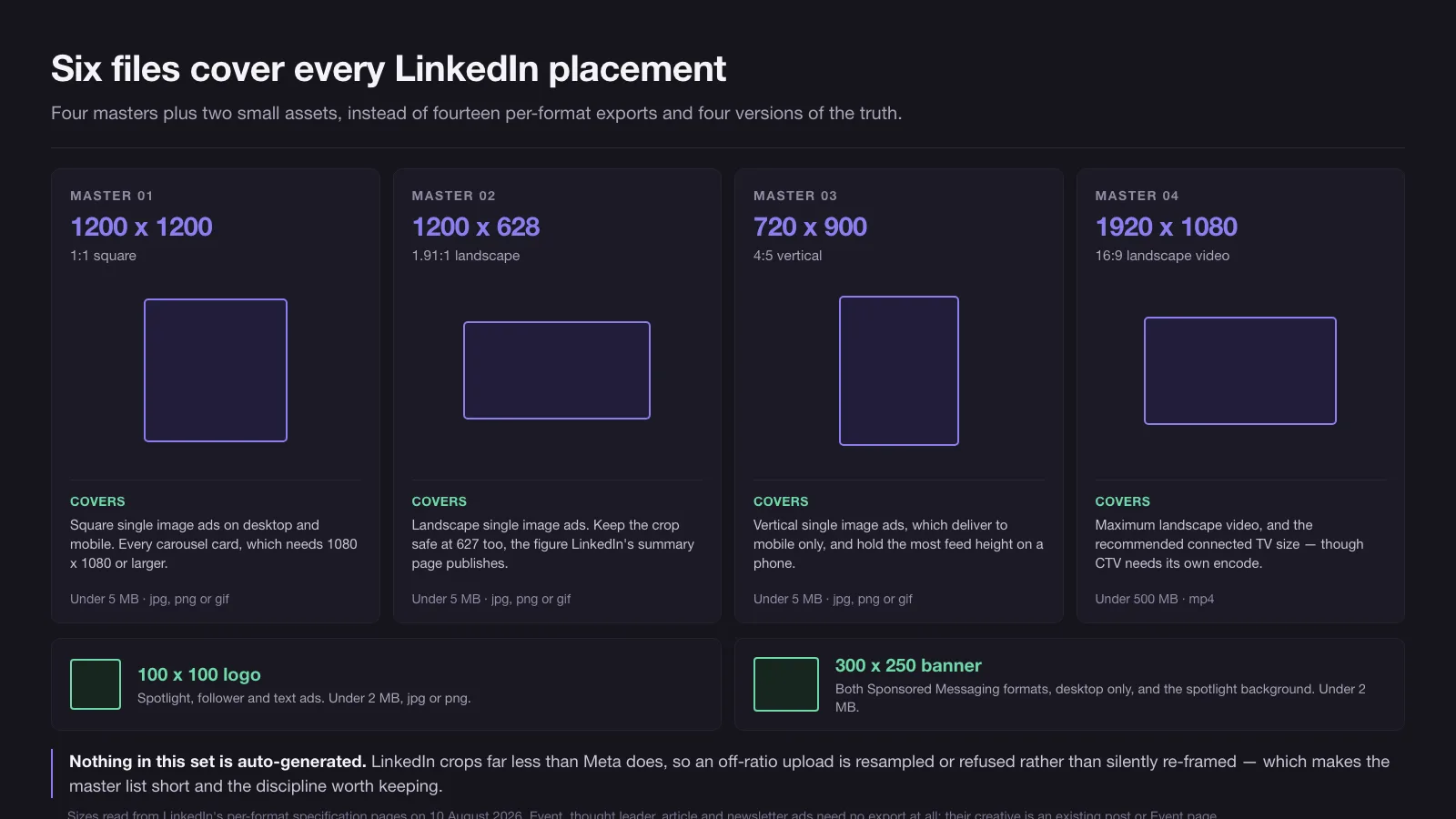
Two small assets finish the set: a 100 x 100 logo under 2 MB, which covers spotlight, follower and text ads, and a 300 x 250 banner under 2 MB, which covers both Sponsored Messaging formats and the spotlight background. Six files in total, and nothing in the list is produced by a tool that guesses at the crop.
The same discipline applied to Meta’s placements produces a different answer, because Meta crops automatically where LinkedIn mostly does not, and we set that out in Facebook ad sizes. If you would rather hand over the whole set, briefed and cut to these numbers rather than to a cheat sheet, that is part of what we do on LinkedIn ads.
Sources and dates. Every figure above was read on 10 August 2026 from LinkedIn’s own specification pages for single image, video, carousel, document, event, thought leader, connected TV, article and newsletter, conversation, message, Lead Gen Form, spotlight, follower and text ads, plus the ads guide summary page, which is the only source for the job ads figure. Specifications change without announcement and LinkedIn ships Marketing API versions monthly, so treat any figure here as valid as of that date and re-check the specific field before a build rather than trusting the page as a whole.
12 / Reader questions
Frequently asked questions
01What are the recommended image sizes for LinkedIn ads?
LinkedIn recommends 1200 x 628 pixels for a landscape single image ad (1.91:1), 1200 x 1200 for square (1:1), and 720 x 900 for vertical (4:5, mobile only). Carousel cards want at least 1080 x 1080. Landscape video tops out at 1920 x 1080 and square video at 1920 x 1920. All checked on LinkedIn's spec pages on 10 August 2026.
02What is the maximum file size for a LinkedIn ad?
It depends on the format, across a range of 250 times. Single image ads allow 5 MB, carousel ads 10 MB in total, document ads 100 MB, and video and connected TV ads 500 MB. Logos, Sponsored Messaging banners and custom video thumbnails are capped at 2 MB each. Checked 10 August 2026.
03Does 1920 x 1080 work on LinkedIn ads?
Yes for video, no for images. 1920 x 1080 is the maximum landscape video size LinkedIn accepts and the recommended connected TV size. For a single image ad it is legal, since the landscape maximum is 7680 x 4320, but it is not the recommended 1.91:1 shape and will be resampled to fit the feed column.
04What is the character limit for a LinkedIn ad headline?
There is no single limit. Text ads allow 25 characters, carousel cards 45, spotlight and follower ads 50, a Lead Gen Form offer headline 60, and single image, video and document ads 70. Only the video ads page publishes a separate hard maximum, 200 characters, above the recommended 70.
05How long can a LinkedIn video ad be?
A Sponsored Content video ad can run from 3 seconds to 30 minutes, with a file between 75 KB and 500 MB. Connected TV is a separate format with its own, much narrower range: 6 to 60 seconds, and LinkedIn recommends exactly 6, 15, 30, 45 or 60. Checked 10 August 2026.
06What aspect ratios does LinkedIn accept for ads?
Eight, depending on format. Images take 1.91:1, 1:1, 1:1.91, 2:3 and 4:5. Video takes 16:9 and 9:16 on top of 1:1 and 4:5, with a 5% tolerance and hard bounds of 0.563 and 1.778. Event ads use 4:1, pulled from the Event page. Sponsored Messaging banners and dynamic ad backgrounds get no ratio at all, only a 300 x 250 pixel ceiling.
07Where does LinkedIn cut off ad intro text on mobile versus desktop?
LinkedIn does not publish a per-device truncation point for ads anywhere in its specifications. What it publishes instead is a recommended length per format, which is the length it says will not be shortened: 150 characters for single image, video, document and job ads, 255 for carousel, 600 for event ads.