Published
Use 1200 x 630 pixels, PNG or JPEG, under 600 KB. That one file clears every documented minimum on every platform that renders link previews. The harder question is what happens to it afterwards, because most of what is published about Open Graph image sizes cannot be traced to any platform’s documentation at all.
How this was checked. Every number below was pulled on 24 August 2026 and carries the source that publishes it and the date that source was last updated. Four platforms turned out to document their preview images properly, three document nothing at all, and one has taken its documentation off the web entirely. Where sources contradict each other, this page prints the contradiction instead of picking a winner, and where nothing credible exists, it says so rather than repeating the number everyone else repeats.
The one size that works everywhere, and who actually documents it
One export at 1200 x 630 satisfies every published floor simultaneously. Here is what each platform states, and who states it.
| Platform | Documented minimum | Documented file ceiling | Published by |
|---|---|---|---|
| Facebook, Instagram, Threads | 200 x 200 absolute, 600 x 315 for large format | 8 MB | Meta, no date on page |
| 300 px wide, aspect no wider than 4:1 | 600 KB | Meta, no date on page | |
| 1200 x 627; under 401 px wide renders as a thumbnail | 5 MB | LinkedIn help centre, “updated 2 years ago” | |
| iMessage | 900 px wide; under 150 px may be shown as an icon | 1 MB page, 10 MB assets | Apple TN3156, revised 30 April 2024 |
| X large card | 300 x 157, ratio 2:1 | under 5 MB | X, surviving only in third-party copies |
| X small card | 144 x 144, ratio 1:1 | under 5 MB | X, surviving only in third-party copies |
| Slack | nothing published | nothing published | — |
| Discord | nothing published | nothing published | — |
| Telegram | nothing published | nothing published | — |
LinkedIn’s 1200 x 627 is the highest floor anyone publishes, and Apple’s 900-pixel width is second. That is why 1200 wide is the sensible target rather than the 200 or 600 that Meta’s own thresholds would technically allow. The same file answers the social share image size question for every one of these surfaces; there is no per-platform export to make.
Three of those rows are empty, and that is the finding. Slack’s own crawler documentation describes exactly which metadata it reads and how long it caches the result, and contains no image dimension, no aspect ratio and no file-size limit. Discord’s developer reference defines an embed image object with url, width and height fields and states no limit on any of them, and says nothing about Open Graph at all. Telegram’s Bot API documents the small-versus-large preview toggle and no image spec of any kind. Every Slack, Discord and Telegram OG image number in circulation, including the 1200 x 630 and 5 MB figures that appear on dozens of guides, has no source behind it.
1200 x 630 is not 1.91:1, and no whole-pixel pair at that width is
Every guide including Meta’s own describes 1200 x 630 as a 1.91:1 image. It is not.
1200 ÷ 630 = 1.9048 to four decimal places, or exactly 40/21. The stated 1.91 is 0.0052 higher, a drift of about 0.28%. That gap is invisible in a feed, and it matters in exactly two places: when you build a preview component in your own interface and hardcode aspect-ratio: 1.91, and when you scale the asset and round.
You cannot close the gap by picking better integers either. 1.91 is 191/100 and 191 is prime, so an exact 1.91:1 image needs a width that is a multiple of 191. At 1200 wide the exact height would be 628.2723 pixels; at 630 high the exact width would be 1203.3. Neither is a whole number, and neither neighbour lands on it: 1200 x 628 gives 1.9108 and 1200 x 629 gives 1.9078. The nearest genuinely exact 1.91:1 pair in that size range is 1146 x 600.
None of this is a reason to change your export. It is a reason to write 1200 x 630 in your specification rather than 1.91:1, because the ratio is the approximation and the pixel pair is the real number.
For a high-density export, 2400 x 1260 is the correct double. It contains 3,024,000 pixels against the original 756,000, exactly four times as many. The compressed file will be smaller than four times the original, because the added resolution is spatially correlated and compresses efficiently, but how much smaller depends entirely on the artwork and nobody has published a general figure. Both sizes fit comfortably under every ceiling in the table above.
Where a 1200 x 630 image gets cut, measured in pixels
The two crops that actually happen to an OG image are a centre square and a 2:1 letterbox, and they are wildly unequal in what they destroy.
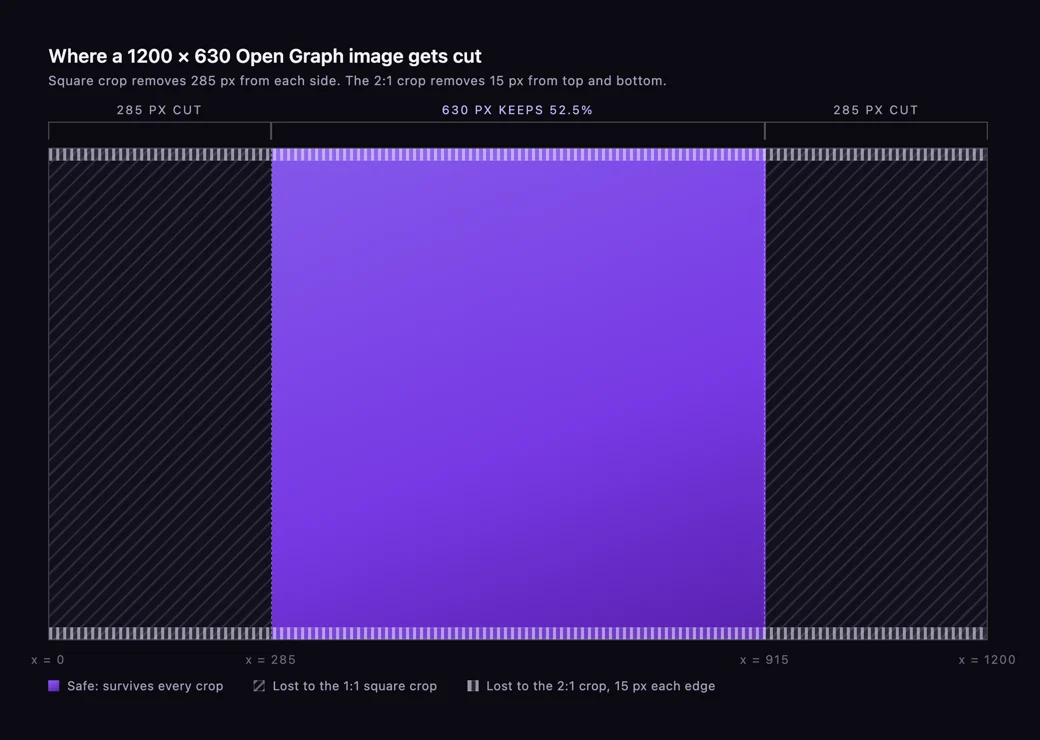
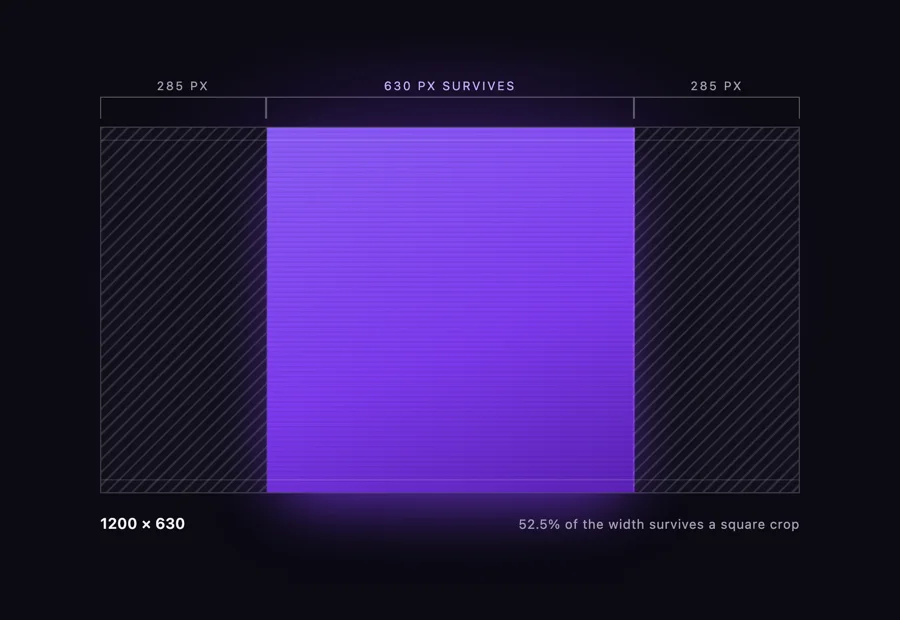
Square crop, 1:1. Height is the limiting dimension, so the result is 630 x 630. Only 52.5% of the original width survives: 285 pixels are removed from the left and 285 from the right, leaving a centred column running from x = 285 to x = 915. Nearly half the image is gone. This is the crop X applies to its small summary card, which its documentation describes as cropped to a square on all platforms, and it is the crop that turns a horizontally arranged logo-plus-headline lockup into a headline with half a logo.
Letterbox crop, 2:1. X’s large card asks for 2:1. At 1200 wide that means 600 high, and a 1200 x 630 image is 30 pixels too tall. A centred crop takes 15 pixels off the top and 15 off the bottom, losing 4.762% of the height and none of the width. That is nothing. A 1200 x 630 design survives X’s large card essentially intact.
So the safe zone is not a set of margins on all four sides. It is a 630-pixel-wide centred column, plus 15 pixels of breathing room top and bottom. Anything that must remain readable in every context belongs inside that column, which is 52.5% of the canvas. Anything outside it is decoration that you are choosing to lose.
That framing is worth keeping separate from paid creative. Ad placements have their own reserved bands and their own delivery rules, which we cover in Facebook ad sizes; an og:image is not an ad and no ad safe-zone template applies to it.
What each platform publishes about preview images, and what it does not
The documentation quality across the eight platforms that render OG previews is not remotely uniform, and knowing which numbers have a publisher behind them changes how much you should trust them.
Meta (Facebook, Instagram, Threads). Documents the 200 x 200 absolute minimum, the 600 x 315 large-format threshold, the 8 MB ceiling and the 1200 x 630 recommendation. Also documents that its crawler accepts only gzip and deflate encodings, and that the first person to share a URL will not see a rendered image because the crawler has to see the image at least once before it can render it. Declaring og:image:width and og:image:height is documented as letting the crawler render immediately rather than downloading and measuring the file asynchronously.
WhatsApp. Documented separately from Facebook, and the numbers are different: at least 300 pixels wide, an aspect ratio of 4:1 width to height or less, file under 600 KB, tags inside <head> and non-empty, crawled by a GET with a WhatsApp/2.x.x.x user agent, preview appearing in the composer within about ten seconds.
X. This is the one that has gone backwards, and further than most write-ups realise. Every card documentation URL now redirects to a generic API landing page: /cards/overview/summary-card-with-large-image, /cards/overview/summary, /cards/overview/markup and /cards/guides/getting-started all return a 307 to docs.x.com, and that site’s sitemap contains no card pages at all. Checked 24 August 2026. Both card specifications — 2:1, 300 x 157 minimum for the large card; 1:1, 144 x 144 minimum for the small one; 4096 x 4096 maximum and under 5 MB for both; JPG, PNG, WEBP and GIF with only the first frame of an animation used; SVG unsupported — now survive only in third-party reproductions of pages that no longer exist. X’s processor is documented as checking for the Twitter-specific property first and falling back to the Open Graph property when it is absent, so og:image alone is enough for the picture. twitter:card has no Open Graph equivalent and cannot be inherited, and sources disagree on what happens without it: one says X defaults to the small card, another says it falls back to a plain link with no image at all.
LinkedIn. Better documented than its reputation suggests, and the source is worth reading rather than quoting second-hand. LinkedIn’s help centre publishes a minimum of 1200 x 627 pixels, a recommended ratio of 1.91:1, a 5 MB file ceiling, and one threshold nobody repeats: images under 401 pixels wide display as a thumbnail. That 1200 x 627 is a minimum, not a recommendation, which is why it is the highest floor in the table above. The page carries no date beyond “updated 2 years ago”. It is reachable — LinkedIn’s robots.txt disallows the whole domain to unnamed agents but explicitly allows /help/ to every major named crawler, which is presumably why so many guides retell the number instead of linking it.
Slack. Documents its crawler thoroughly and its image requirements not at all. It reads Open Graph and X Card metadata, fetches as little of the page as it can using HTTP Range headers, retrieves the referenced image to check validity, caches responses globally for around thirty minutes, and states plainly that it does not honour robots.txt.
Discord. Publishes nothing about link previews or Open Graph. Its documented 20 MB, 50 MB and 500 MB figures are attachment upload limits for files you send in a message, an entirely different mechanism from unfurling somebody’s link.
Telegram. Documents no image spec, but documents something more useful: in its Bot API, prefer_small_media and prefer_large_media are options set by whoever posts the link, not properties of your image. Whether Telegram shows your preview large or as a thumbnail is partly not a publisher-side decision at all.
WhatsApp’s 300 KB limit is about your HTML, not your image
The most widely repeated WhatsApp OG fact is wrong, and the correction is sitting in the same paragraph of Meta’s documentation that produced it.
Meta’s WhatsApp link-preview documentation states two separate 300-and-600 numbers. The image must be under 600 KB. The meta tags must appear within the first 300 KB of the HTML. Somewhere in the retelling those collapsed into a single claim that your WhatsApp preview image must be under 300 KB, and that claim now appears on help pages, agency blogs and platform documentation for other products.
The same paragraph is also read backwards. Meta’s wording is that the image should be 300 pixels or more in width “with 4:1 width/height or less aspect ratio”, which caps how wide the image may be relative to its height. It sets no limit on how tall an image can be. A portrait image passes that test and then fails for an entirely different reason: every surface that renders it expects a landscape frame and crops accordingly.
The practical consequence of the real rule is the opposite of restrictive. 600 KB is generous for a 1200 x 630 export; a text-led PNG at that size typically lands between 60 and 200 KB. The rule you actually have to respect is the HTML one: if your page injects a large inline script, a base64 hero image or a wall of critical CSS above your meta tags, you can push og:image past the 300 KB mark and lose the preview entirely while your image file is perfectly legal. Keep Open Graph tags near the top of <head>, before anything bulky.
WhatsApp also has no cache-clearing tool, no debugger and no published cache duration. When a WhatsApp preview is stale, the only lever you have is changing the image URL.
LinkedIn’s small preview is a 2024 product decision, not a sizing mistake
If your LinkedIn link previews render small, no change to your image will fix it, because the cause is not your image.
In May 2024 LinkedIn deliberately shrank link previews on organic posts. Its statement at the time described simplifying the feed by changing the image size and third-party article link preview for organic posts, in order to keep members on LinkedIn engaging with commentary rather than leaving through the link. Full-width previews were retained for sponsored content, and LinkedIn documents the split itself in a help article about the differences in image size and third-party links between organic posts and Sponsored Content.
So the honest answer to “why is my LinkedIn preview small” is that organic previews are small by design, and no image size restores the full-width layout organically. There is one real width threshold, and it is not the 200 pixels that circulates in blog posts: LinkedIn’s own help centre says images under 401 pixels wide drop to a thumbnail. Clear 401 and you have done everything an image can do; the rest is the 2024 feed change. LinkedIn’s paid placements are a separate system with their own dimensions and character limits, and are not addressed here.
The Post Inspector still exists and still forces a refresh. Its cache duration does not: the widely quoted seven days has no LinkedIn source, and at least one dated account contradicts it outright, describing the cached copy as persisting indefinitely until manually refreshed.
Apple’s technote is the best link-preview documentation any vendor has written
Apple’s technote on rich previews for Messages, first published in September 2017 and revised on 30 April 2024, is the most complete link-preview documentation any vendor has produced, and it is the one almost nobody quotes.
It uses standard Open Graph rather than Apple-specific tags: og:image, og:title, og:description and og:site_name, with the explicit instruction not to put the site name or other branding into og:title because the preview shows it separately. Then it gives numbers nobody else does:
- Preview images should be at least 900 pixels wide.
- Images under 150 pixels wide may be ignored or presented as an icon instead. Only two platforms publish a threshold of this kind at all — this one and LinkedIn’s 401 pixels.
- The linked page itself is limited to 1 MB, and total associated resources — icons, images, video — to 10 MB.
- Link previews do not follow meta redirects and do not run JavaScript. Metadata has to be present in the HTML the server returns. Server-side redirects are followed.
- When no image of sufficient size or quality is available, iMessage falls back to the site’s own icon. Sizing that icon properly is a separate subject from this one and has its own set of files and thresholds.
Apple also advises avoiding text in preview images altogether, on the grounds that previews render at varying sizes depending on context and device. It then adds the sentence every other vendor should copy: these are guidelines only, and the limits may change.
The JavaScript point deserves emphasis because it applies far beyond iMessage. Every major preview crawler reads the raw HTML response. If your og:image tag is written by client-side JavaScript, no crawler will ever see it — a failure mode that also shows up in ordinary indexing checks, which is why an OG audit belongs inside a broader technical SEO audit rather than as a separate ritual.
WebP renders everywhere, AVIF does not, SVG never did
The most recent dated, methodical test of Open Graph image formats — published in December 2024 and last updated on 28 July 2026 — ran the same page across eleven platforms and produced a clean split.
| Format | Renders | Fails |
|---|---|---|
| PNG, JPEG | everywhere | — |
| WebP | all eleven tested, including LinkedIn and X | — |
| AVIF | Facebook, Pinterest, Threads, WhatsApp | X, LinkedIn, Discord, Mastodon, Slack, iMessage, Bluesky |
| SVG | — | documented as unsupported by X; fails elsewhere in practice |
| Animated GIF | first frame only on X | animation never plays |
WebP being universally safe is a change. A widely cited April 2022 test found LinkedIn rejecting WebP outright; the 2026 test finds it working. That looks like a real platform change rather than a disagreement, but it is worth knowing that if you read a WebP warning, check its date.
AVIF is the trap. It fails on seven of eleven platforms and it fails silently — the reported symptom on Mastodon, tracked in its issue queue since January 2025, is a blank preview rather than an error. If your build pipeline converts images to AVIF automatically, your og:image needs an exemption. This is also the one place where the vector-versus-raster decision is made for you: SVG is unsupported for previews regardless of how well it would serve the same artwork elsewhere on your site, so the OG export is always a raster file. The trade-offs between the two formats generally are covered in vector vs raster.
One more format note, and it is a warning about a claim rather than a fact: nobody has published a credible test of what happens to a transparent PNG in a link preview. Whether the alpha channel composites to black, to white, or survives is asserted confidently in several places and sourced in none of them. Flatten your background and the question does not arise.
The seven og:image tags, and which of them change anything
The Open Graph protocol defines seven properties around the image. The specification itself sets no dimensions and no file size — every number in this article comes from a platform, not from the protocol.
| Tag | What the spec says | Worth setting? |
|---|---|---|
og:image | An image URL which should represent your object within the graph | Required |
og:image:url | Identical to og:image | No, it is a duplicate |
og:image:secure_url | An alternate URL to use if the webpage requires HTTPS | Obsolete in practice; serve HTTPS |
og:image:type | A MIME type for this image | Optional, harmless |
og:image:width | The number of pixels wide | Yes — lets Meta render on first scrape |
og:image:height | The number of pixels high | Yes, same reason |
og:image:alt | A description of what is in the image, not a caption | Yes — the spec says if you specify an image you should specify this |
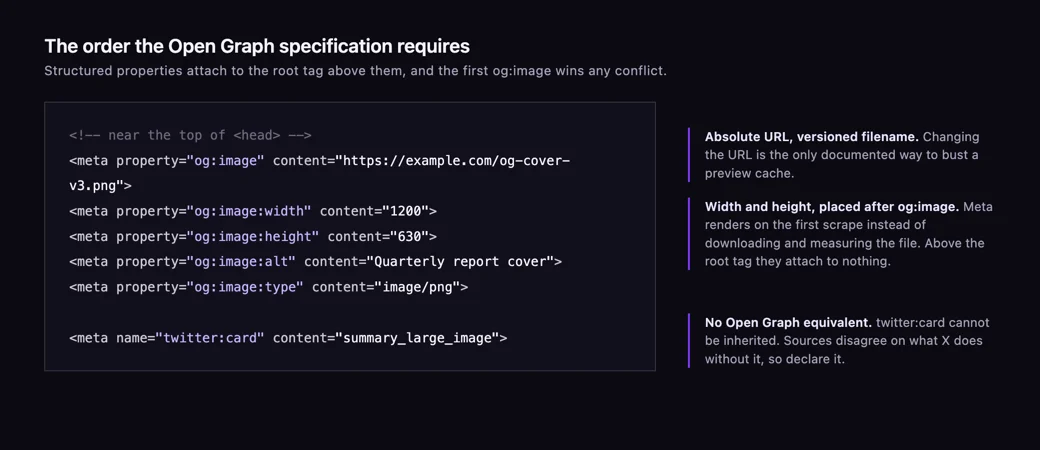
Two behaviours in the specification are easy to miss. Multiple og:image tags are legal, and the first one from top to bottom wins during conflicts — which is how a plugin-generated tag silently overrides the one you hand-wrote lower in the head. And structured properties must come after the root tag they belong to, so og:image:width placed above og:image attaches to nothing.
Use absolute URLs with the scheme included. The spec’s own description is a URL, not a path, and relative paths are the single most common reason a correctly designed image never appears anywhere.
No platform documents how long it caches your preview
Every preview platform caches. Not one of them publishes how long, with a single exception.
The figures in circulation — thirty days for Facebook, seven days for LinkedIn — appear on dozens of pages and trace to nothing. Meta’s crawler and sharing documentation states no preview-cache TTL in days or seconds anywhere, though it does document a 24-hour cache on your robots.txt, which is a different thing entirely and may be where the habit of quoting durations came from. Slack is the exception: it documents caching responses globally for around thirty minutes, which is why Slack previews correct themselves quickly and the others do not.
What Meta does document is the rule that actually solves the problem:
We cache all images referenced based on each image’s URL, so if you replace an image: Use a new URL for the new image or the image won’t be updated.
That is the only primary-sourced cache-busting instruction in the entire ecosystem, and it generalises. Renaming og-image.png to og-image-v2.png — or appending a version query string — forces a fresh fetch on every platform at once, including the ones with no tooling. It is more reliable than any debugger.
The tooling, where it exists:
| Platform | Refresh tool in 2026 | State |
|---|---|---|
| Meta | Sharing Debugger, Scrape Again | Live; also scriptable via the Graph API with scrape=true |
| Post Inspector | Live; cache duration undocumented | |
| X | Card Validator | Retired. Preview function removed 2 August 2022 by official announcement; the tool itself disappeared later, undated. No replacement |
| Telegram | @WebpageBot | Exists; its own bug tracker carries repeated reports of it failing to clear the cache |
| — | None | |
| Slack | — | None needed; ~30 minute cache |
| Discord | — | None documented |
Testing an X card in 2026 therefore means pasting the URL into a draft post and looking at what renders. The third-party “card validators” that fill the search results for that query fetch your meta tags themselves; they do not query X’s cache and cannot flush it.
Three things about OG images that nobody can source, including us
Writing this page turned up three questions that get confident answers everywhere and have no evidence behind any of them. Naming them is more useful than joining in.
How wide a preview image actually renders on screen. Not one published source gives a measured CSS-pixel width for a preview image in a mobile feed or a messenger thread. Every result is an upload-size guide. And no single number could be right: rendered width depends on viewport, platform layout, app version and whether the link is in a feed, a reply or a compose box. Any minimum-type-size rule you have read — “text must be at least N pixels because previews render at M pixels wide” — is built on a number nobody has measured. Use the crop geometry above instead, which is arithmetic rather than assertion.
What happens to transparency. No dated test describes whether alpha composites to black, to white, or survives. Flatten and move on.
Whether platforms re-encode your file and what that does to text. No platform documents its re-encoding pipeline or quality setting, and no dated test measures legibility loss afterwards. The common advice to prefer PNG over JPEG for text-heavy OG images is sound reasoning about compression artefacts on hard edges, but it is reasoning, not a measured result, and anyone presenting it as one is guessing.
A design spec for one image that survives every crop
Everything above collapses into a short brief you can hand to whoever makes the file.
- Canvas 1200 x 630, or 2400 x 1260 if you want the high-density version. Write the pixel pair in the spec, not “1.91:1”.
- Critical zone: the centred 630-pixel column, x = 285 to x = 915. Logo, headline, anything that must read after a square crop lives here. That is 52.5% of the width.
- Outer 285 pixels each side: decoration only. Background, texture, a bleeding graphic element. Assume it disappears.
- Top and bottom 15 pixels: keep clear. X’s large card takes them.
- Flatten the background. No transparency, no assumptions about what sits behind it.
- Export PNG for text-led designs, JPEG for photographic ones. Never AVIF, never SVG. WebP is safe but buys you little at this file size.
- Target well under 600 KB. WhatsApp’s ceiling is the binding one and it is easy to clear.
- Version the filename.
og-cover-v3.png, notog-cover.png. It is the only cache-busting method with a documented basis, and you will need it. - Declare
og:image,og:image:width,og:image:heightandog:image:alt, absolute URLs, near the top of<head>, server-rendered rather than injected by JavaScript.
That is one asset, roughly one afternoon, and it is the difference between a link that looks deliberate in a Slack channel and one that shows half a logo. Building that asset properly, alongside the rest of a brand’s shared visual system, is what our graphic design work covers.
The dimensions for individual content formats are a different question with different answers — story frames, video thumbnails and paid placements each carry their own geometry and their own reserved areas, and none of them is interchangeable with the file described here.
13 / Reader questions
Frequently asked questions
01What size should my OG image be?
1200 x 630 pixels, exported as PNG or JPEG and kept under 600 KB. That single file clears every documented minimum on every platform at once: Meta's 600 x 315 large-format floor, X's 300 x 157, WhatsApp's 300-pixel width, Apple's 900-pixel width, and LinkedIn's 1200 x 627, which is the highest floor anyone publishes.
02What is an Open Graph image?
It is the picture a platform shows when someone shares your link, declared in your page head as og:image. It is not part of your page design and nobody browsing your site ever sees it. Facebook, LinkedIn, X, WhatsApp, Slack, Discord, Telegram and iMessage all read the same tag.
03How to create an Open Graph image?
Design one 1200 x 630 file, keep every element that must stay readable inside the centre 630-pixel-wide column, and export it as PNG if it carries text or JPEG if it is photographic. Then declare it with og:image plus og:image:width, og:image:height and og:image:alt in the page head.
04How to check an Open Graph image?
Meta's Sharing Debugger and LinkedIn's Post Inspector both still work and both force a re-scrape. X retired its Card Validator, so the only way to test an X card in 2026 is to paste the URL into a draft post and look at it. For WhatsApp there is no tool at all.
05What is the OG image size for WhatsApp?
1200 x 630 works, and Meta's own WhatsApp documentation sets the real requirements as at least 300 pixels wide, an aspect ratio no wider than 4:1, and a file under 600 KB. The 300 KB figure repeated across the web is a misreading: that limit applies to your HTML, not your image.
06What is 1080x1350 aspect ratio?
1080 x 1350 is 4:5, a portrait ratio. It is an Instagram feed post size, not an Open Graph size, and it appears in OG searches only because people arrive from social-size cheat sheets. It satisfies WhatsApp's 4:1 width-to-height ceiling, which only bars extreme letterboxes, but it will be cropped hard everywhere a landscape preview is expected.
07Does one Open Graph image work for every platform?
One file is accepted everywhere, but it is not rendered identically anywhere. A 1200 x 630 image loses 47.5% of its width to a square crop on X's small card, loses about 5% of its height to X's large card, and appears at a fraction of its size in a LinkedIn organic post. Design for the square crop and the rest follows.