Published
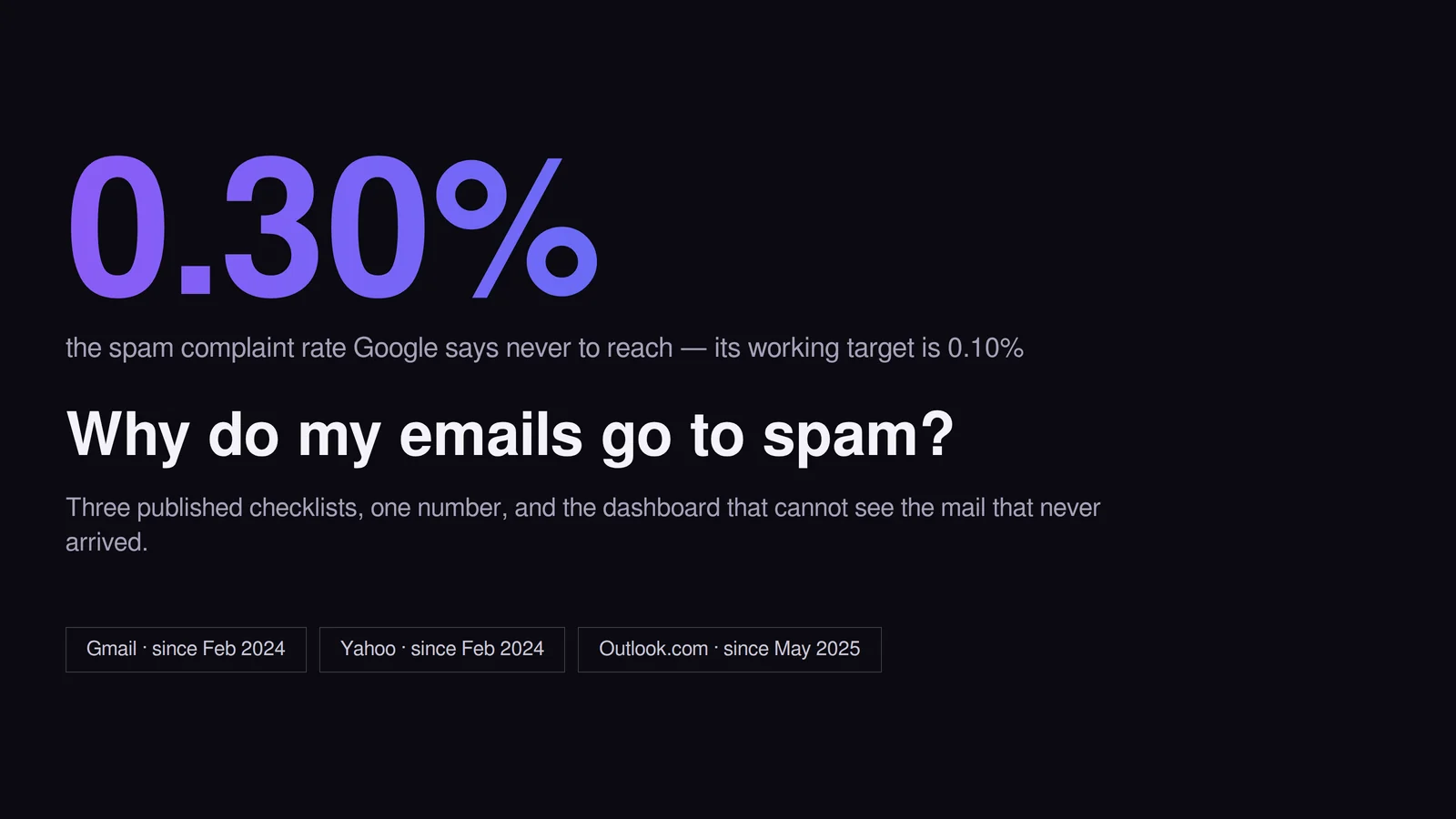
Your emails go to spam because you fail a published checklist, not because of a word in your subject line. Since February 2024 Gmail and Yahoo have required SPF, DKIM, DMARC alignment and one-click unsubscribe from bulk senders, plus complaints under 0.10% for Gmail and 0.3% for Yahoo. For Gmail, a bulk sender is any domain sending 5,000 messages a day to personal Gmail accounts. Microsoft added its own authentication bar for Outlook.com in May 2025.
How this was checked. In August 2026 we read the current sender documentation from each provider directly rather than the summaries that rank for this question: Google’s sender guidelines, its sender guidelines FAQ and its separate subscription guidelines, Yahoo’s sender best practices, and Microsoft’s announcement for high-volume senders. Every threshold below is attributed to the provider that enforces it, with the date it came into force, because this is the part of the topic that goes stale fastest.
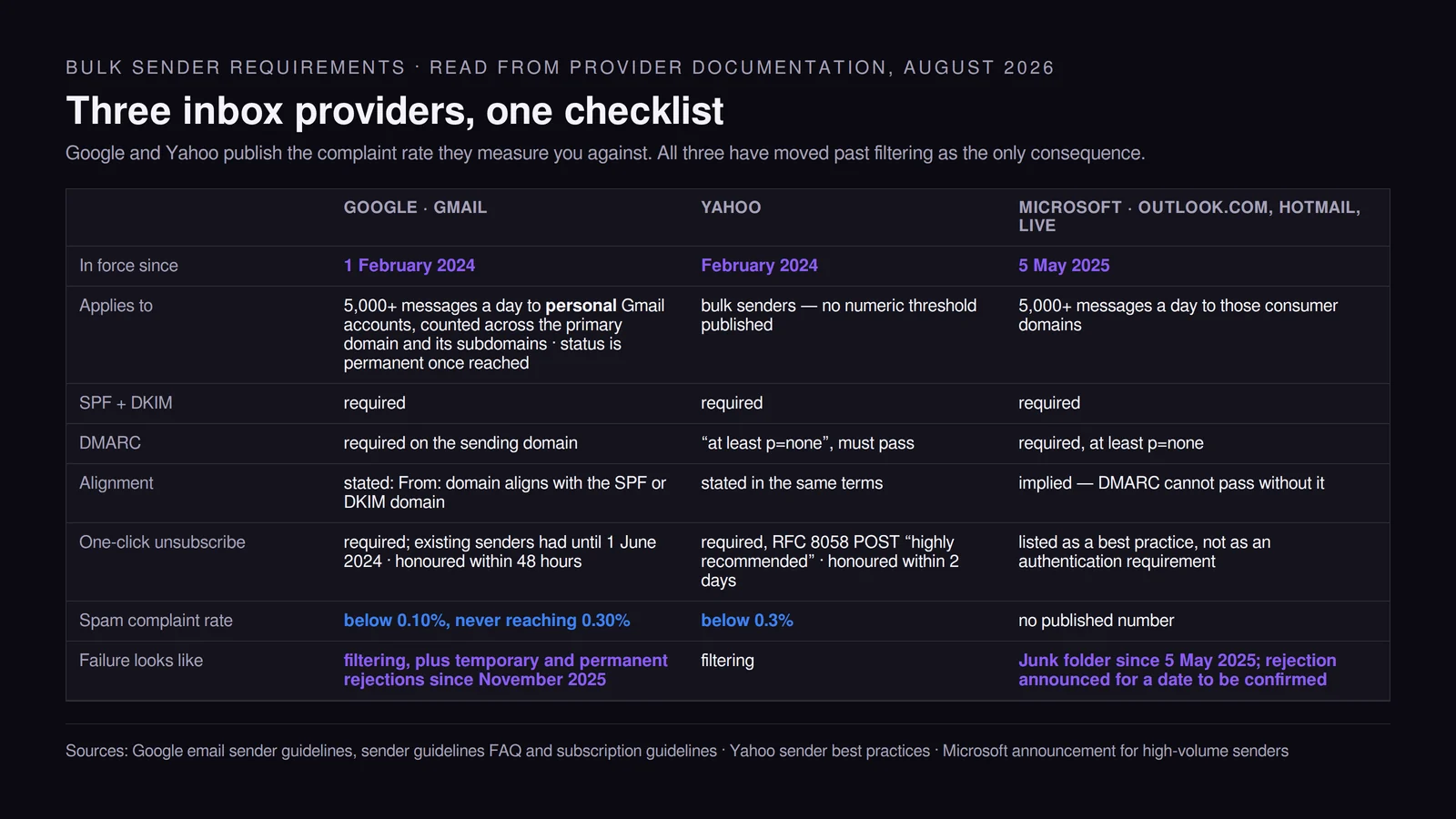
Three inbox providers publish the same checklist, and failure is no longer only a spam folder
The rules are not secret and they are not a matter of opinion. Each provider states them, and two of the three state the number they measure you against.
| Google (Gmail) | Yahoo | Microsoft (Outlook.com, Hotmail, Live) | |
|---|---|---|---|
| In force since | 1 February 2024 | February 2024 | 5 May 2025 |
| Applies to | 5,000+ messages a day to personal Gmail accounts, counted across the primary domain and its subdomains | bulk senders, no numeric threshold published | 5,000+ messages a day to those consumer domains |
| SPF | required | required | required |
| DKIM | required | required | required |
| DMARC | required on the sending domain | “at least p=none”, and DMARC must pass | required, at least p=none |
| Alignment | stated: From: domain must align with the SPF or the DKIM domain | stated in the same terms | implied — DMARC cannot pass without it |
| One-click unsubscribe | required for marketing and subscribed messages, visible link too; existing senders had until 1 June 2024 | required, RFC 8058 POST “highly recommended”, visible link in the body | listed as a best practice (“functional unsubscribe links”), not as an authentication requirement |
| Unsubscribe honoured within | 48 hours | 2 days | not stated |
| Spam complaint rate | “below 0.10%”, never reaching 0.30% | “below 0.3%” | no published number |
What has changed since these rules landed is the consequence of failing them. For the first eighteen months, missing records mostly meant heavier filtering, which is why almost every article on this question assumes a spam folder. Both large providers have since moved past that.
Google’s own FAQ states it plainly: “Starting November 2025, Gmail is ramping up its enforcement on non-compliant traffic. Messages that fail to meet the email sender requirements will experience disruptions, including temporary and permanent rejections.” Microsoft announced that from 5 May 2025 it “will begin routing messages from high volume non-compliant domains to the Junk folder”, with a note that “in the future (date to be announced), non-compliant messages will be rejected” — and it already documents a rejection code for authentication failures, 550 5.7.515 Access denied, sending domain <domain> does not meet the required authentication level.
That changes what “my emails go to spam” can even mean. Some of the mail people are looking for was never accepted at all, so there is no spam folder to check and nothing about the copy to fix. The first diagnostic step, further down this page, is therefore to read the bounce before touching anything else.
The 5,000-a-day line is permanent, counted per primary domain, and excludes Workspace
Three details in Google’s FAQ change how this threshold behaves, and none of them appears in the summaries that rank for this question.
It is counted per primary domain, subdomains included. “When we calculate the 5,000-message limit, we count all messages sent from the same primary domain.” Splitting marketing onto a subdomain does not put you back under the line — the messages still count.
It is permanent. “Bulk sender status doesn’t have an expiration date. Email senders that have been classified as bulk senders are permanently classified as such.” Cross it once, on one unusually large Tuesday, and DMARC, alignment and one-click unsubscribe are obligations from then on. There is no quiet quarter that returns you to the lighter tier.
It counts personal Gmail only. “The Email sender guidelines don’t apply to messages sent to Google Workspace accounts. Sender requirements and Google enforcement apply only when sending email to personal Gmail accounts.” That matters in both directions. A consumer list crosses the line on volume alone. A B2B list sending mostly to company domains hosted on Workspace may sit under Google’s rule indefinitely — while still being filtered by exactly the same infrastructure, because the sender requirements are a floor, not the filter.
Below the line, less is required but not nothing. Google’s requirements for all senders, in force since the same February 2024 date, are SPF or DKIM, valid forward and reverse DNS records for the sending domain or IP, TLS for transmission, messages formatted according to RFC 5322, no impersonation of Gmail From: headers, and spam rates “below 0.3%”. The complaint ceiling applies to everyone; DMARC, alignment and one-click unsubscribe are what get added at 5,000.
SPF, DKIM and DMARC each prove a different thing, and alignment is where senders fail
The three records are usually described as a set, which hides the fact that they answer three separate questions.
- SPF answers “is this server allowed to send for this domain?” It publishes the servers authorised to send on behalf of the domain in the message envelope.
- DKIM answers “which domain takes responsibility for this message, and was it altered in transit?” It attaches a cryptographic signature that validates against a public key published in the signing domain’s DNS — and it is that signing domain, not the server, that DMARC later tries to match.
- DMARC answers “what should I do when neither of those ties back to the domain the human actually sees?” It is a policy record, and the thing it tests is alignment.
Alignment is where the failure usually sits, and it is the least intuitive part. Google and Yahoo both require that the domain in the From: header be aligned with either the SPF domain or the DKIM domain. A sending platform can hand you an SPF pass for its bounce domain and a valid DKIM signature under its key, so both checks show green in your platform’s dashboard, and DMARC still fails because neither authenticated domain matches the one your recipients read.
The fix is to authenticate on your own domain: a custom return-path and DKIM keys published as CNAME records under your domain, both of which every serious sending platform supports and documents. If your DMARC reports show pass for SPF and DKIM but fail for DMARC, alignment is the whole of your problem and no amount of content work will touch it.
One-click unsubscribe is a pair of headers, not a link in the footer
The requirement is specific enough that it can be checked in thirty seconds by viewing a message source. Two headers must be present: List-Unsubscribe carrying a URL, and List-Unsubscribe-Post: List-Unsubscribe=One-Click. The provider sends a POST request to that URL when the recipient uses the unsubscribe control in their mail client.
Google’s subscription guidelines set the bar for what happens next: implement one-click unsubscribe “in a way that no additional user action is needed to unsubscribe”, and “process and honor unsubscribe requests within 48 hours”. Yahoo’s version is to honour unsubscribes within 2 days. A POST endpoint that opens a preference centre, asks the person to confirm, or requires a login does not satisfy the one-click requirement, because those are additional user actions. The separate visible link in the body is allowed to be softer — Yahoo says explicitly that it “may direct to a preference page”.
The deadline for this one was later than the rest of the package: senders who already had an unsubscribe link were given until 1 June 2024 to implement the header pair, which is why some accounts passed the February 2024 checks and failed a few months later without changing anything.
Google also asks senders to identify each subscription list with a human-readable identifier in the List-Id header, or to use a distinct From: address per subscription — which is what lets a recipient unsubscribe from one thing rather than everything you send.
And the reason all of this belongs in an article about spam is mechanical rather than legal: the unsubscribe control and the spam button sit next to each other, and they are substitutes. Every time you make leaving expensive, some share of people take the cheaper exit instead — and that exit is the number being measured against 0.3%.
Your spam-rate dashboard measures annoyance, not placement
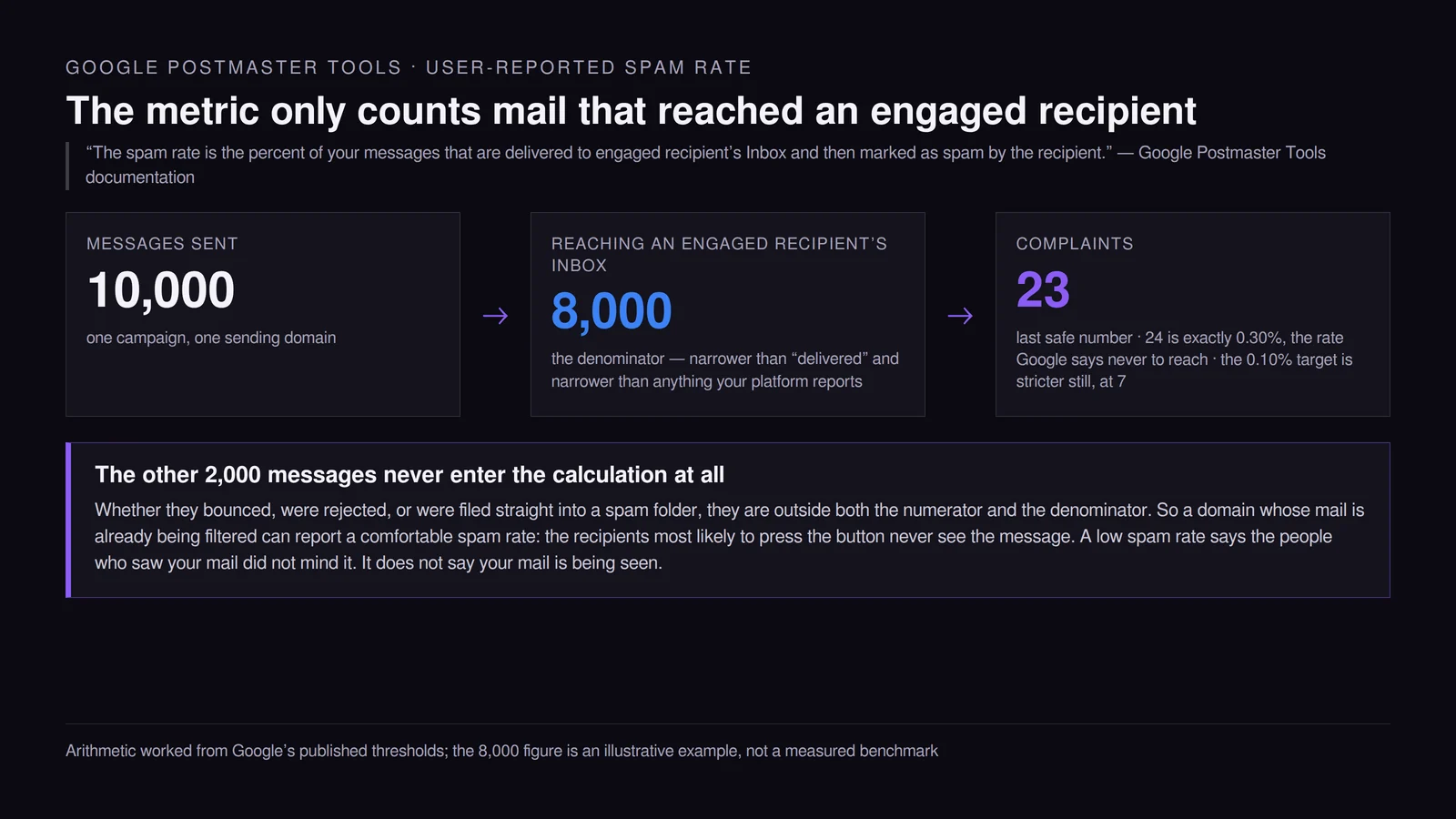
Google defines the metric precisely, and the definition is more restrictive than the way it is usually read: “The spam rate is the percent of your messages that are delivered to engaged recipient’s Inbox and then marked as spam by the recipient.”
Both halves of that fraction are conditional on reaching an inbox in the first place. Two consequences follow, and neither is obvious from the dashboard.
First, the arithmetic is tighter than the percentages suggest. A rate of 0.10% is one complaint per thousand counted messages and 0.30% is three. Take a send where 8,000 messages reach the inboxes of engaged recipients: 24 complaints is exactly 0.30%, and Google’s wording is to avoid “ever reaching a spam rate of 0.30% or higher”, so 23 is the last safe number. The 0.10% working target is stricter still, at 7. On a list of a few thousand that is a handful of people having a bad morning, which is why the metric is noisy at low volume and unforgiving at high volume.
Note what the denominator is not. Google’s phrasing is “engaged recipient’s Inbox”, which is narrower than “delivered”, narrower than “inboxed”, and narrower than anything your sending platform reports. Your own delivered figure is the wrong number to divide by.
Second, and more useful: the metric cannot see the mail that never reached an inbox. A domain whose messages are already being filtered can show a perfectly comfortable spam rate, because the recipients most likely to press the button never get the chance — their copy is sitting in a spam folder nobody opens. A low spam rate is evidence that the people who saw your mail did not mind it. It is not evidence that your mail is being seen.
Detecting the second problem takes a different instrument. Break engagement down by mailbox provider: if Gmail behaves normally and Outlook.com goes flat in the same week, you are looking at a provider-specific gate rather than a copy problem, and the bounce log will usually confirm it. Seed addresses across the major providers give you a direct read on placement. Open rates will not — Apple’s Mail Privacy Protection fires them mechanically, and what a good open rate actually is sets out which email metrics survive that and which have to be rebuilt.
Reputation attaches to your domain, so one campaign takes the invoices with it
Postmaster Tools describes reputation as “a rating of the quality of domains and IP addresses used to send email, and is determined by the sending behavior of a domain or IP address”, and grades it in four bands:
| Grade | Google’s description |
|---|---|
| Bad | “History of sending a high volume of spam regularly. Email from this domain or address is almost always marked as spam or rejected by the receiving server.” |
| Low | “History of sending a significant volume of spam regularly. Email from this domain or address is likely to be marked as spam.” |
| Medium | “History of sending legitimate email, but occasionally sends spam. Most email from this domain or address has a fair deliverability rate, except when there’s a notable increase in spam.” |
| High | “History of very low spam rates, and complies with Gmail’s sender guidelines. Email from this domain or address is rarely marked as spam by Gmail.” |
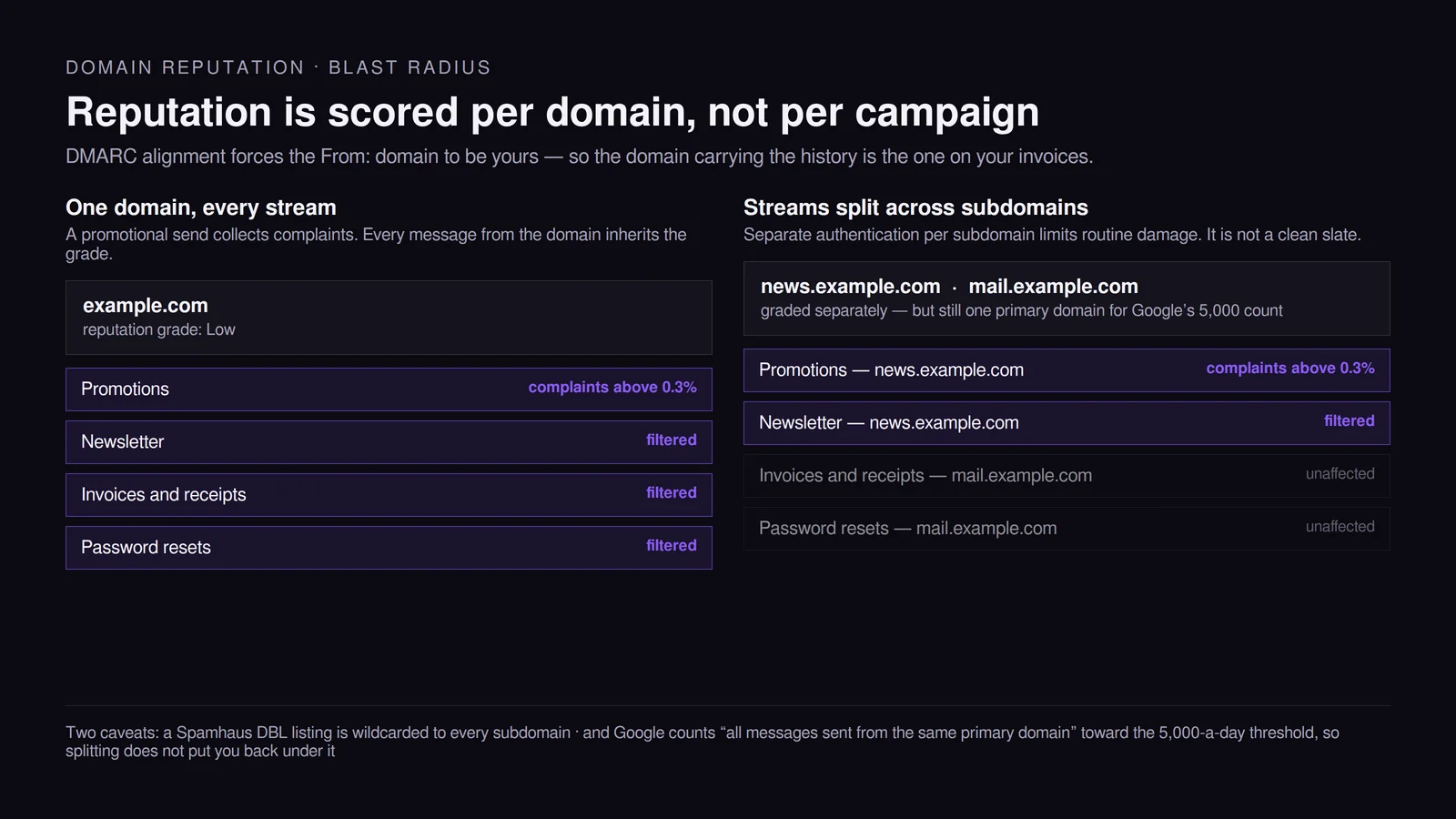
The word doing the work in every one of those descriptions is domain. And because DMARC alignment requires the From: domain to be yours, the domain accumulating that history is the same one on your password resets, your invoices and your order confirmations. A promotional send that collects complaints does not damage the campaign. It damages every message the company sends.
The standard mitigation is to split sending streams across subdomains — marketing from one, transactional from another, each authenticated separately — so that a bad campaign has a smaller blast radius. It is worth doing, and it is worth being precise about what it does not buy. It does not put you back under Google’s 5,000 threshold, because that limit counts “all messages sent from the same primary domain”. And it does not protect you from a blocklisting: a Spamhaus DBL listing is explicitly wildcarded, so all hostnames and subdomains of a listed domain return a listed result too. Separation limits routine reputational damage. It is not a clean slate.
A bought list damages the domain, not the campaign
This is where the two previous sections combine into the single most expensive mistake in email marketing, and the reason it is expensive is not the wasted spend on the list.
Purchased and scraped lists contain spam traps. Spamhaus defines a spamtrap as “an email address traditionally used to expose illegitimate senders who add email addresses to their lists without permission”, and describes seeded traps as addresses that trap operators “deliberately scatter — seeding around various places online that are not obvious (in webpage source code, for example)”. Hitting one is not a delivery failure you can absorb; it is a signal about how the list was built. In Spamhaus’s own words, seeded traps “highlight that the sender is either scraping addresses from the web or is buying lists from someone else who is scraping addresses”.
The instinct at that point is to find and remove the traps. Spamhaus addresses that directly: “We strongly urge people to view spamtraps as proof of a data collection or hygiene issue and not be misled into conducting a hunt for spamtraps. Attempting to locate and remove traps only treats the symptom and not the underlying problem.” Their position on paid list-cleaning services is the same — the argument of a 2021 piece titled You Can’t Buy Data Hygiene is that “senders that focus on obtaining explicit permission and verify their recipients are providing accurate data will have more successful marketing programs”.
Run the chain forward and the domain-level cost becomes clear. Addresses that never opted in produce complaints at rates well above an opted-in list. Complaints are the measured number. The measured number sets domain reputation. Domain reputation governs every stream sent from that domain. So the bought list does not cost you one campaign — it costs you the password reset your customer is waiting for, for as long as it takes the reputation to recover.
The alternative is slower and produces fewer names, which is the actual objection people have to it. It also produces a list where the addresses correspond to people who asked, and it makes the downstream questions answerable — starting with which of those names is a lead at all, which is where the MQL and SQL line sits.
Warming a domain is buying the history you do not have
A new domain has no sending record, and reputation is built from behaviour over time, so filters treat an unknown domain that suddenly sends tens of thousands of messages exactly as they should: as something that looks like a compromised account. Warming is the process of building that record deliberately.
Google states the shape of it in its own guidance: “start with a low sending volume to engaged users, and slowly increase the volume over time”, and “avoid introducing sudden volume spikes if you do not have a history of sending large volumes”. It also asks senders to “regularly monitor server responses, spam rate, and the sending domain’s reputation” while doing so — the ramp is meant to be steered, not scheduled and forgotten.
A working pattern that fits those constraints, offered as practice rather than as a published standard:
- Start with the most engaged segment you have — people who opened or clicked in the last 30 days. Engagement is the signal you are trying to generate, so send first to the people most likely to produce it.
- Roughly double the volume every second or third send rather than every send.
- Hold volume flat for a week whenever complaints tick up, deliveries slow, or the reputation grade moves down. Holding is the whole mechanism; ramping through a warning wastes the previous three weeks.
- Add colder segments only after the grade has held steady across several sends at the current volume.
Two to four weeks is a realistic ramp for a new domain with a clean, recent list. An old list needs longer, because the first sends will surface addresses that have gone stale and the bounces have to clear before volume can rise.
Consistency matters as much as the ramp itself. Three quiet months followed by one enormous Monday send is the volume signature Google’s own guidance warns about, and it is a self-inflicted problem: a cadence you can actually sustain is worth more to deliverability than any single large campaign. Deciding that cadence in advance is exactly the job a content calendar does, and email is the channel where the cost of an irregular schedule is measurable rather than aesthetic.
Content is the last thing to check, not the first
“Avoid spam trigger words” is the most repeated piece of advice on this topic and one of the least load-bearing. Neither Google’s sender guidelines nor Yahoo’s best practices publish a list of forbidden words. What they publish is authentication requirements, consent requirements, a message format standard (RFC 5322), an instruction not to impersonate Gmail From: headers, and a complaint threshold.
That does not make content irrelevant. It reorders it. The content-side failures that actually move placement, most consequential first:
- Mismatch with what people signed up for. Someone who subscribed for a product changelog and receives a partner promotion has been given a reason to complain, and complaints are the measured number. This is a content problem that shows up as a reputation problem.
- Image-only messages with little or no meaningful text, which give filters nothing to assess and break for every recipient who blocks images.
- Link shorteners and redirect chains, plus links pointing at domains with poor reputations of their own. The Spamhaus DBL lists domains, not IP addresses, and a domain referenced in the body of your message is exactly the kind of thing it exists to catch.
- From name, From domain and reply-to that do not agree with each other or with the authenticated domain.
- Word choice, a long way behind the other four.
If the first four are clean and authentication is passing, rewriting subject lines is a reasonable next experiment. Doing it while DMARC is failing is rearranging furniture in a house with no front door.
A 30-minute diagnostic when mail is already landing in spam
Work in this order. Each step rules out a class of cause, and the early ones are the cheapest.
- Read the actual bounce, if there is one. If you are seeing
550 5.7.515 Access denied, sending domain <domain> does not meet the required authentication levelfrom Microsoft, that is a rejection rather than a filing decision — the message never reached a spam folder at all. Gmail’s enforcement since November 2025 produces both temporary and permanent rejections, which land in your logs the same way. Rejections and spam-folder placement are different problems with non-overlapping fixes, and this step separates them in under a minute. - Open a message you actually received and read its headers. You are looking for
dmarc=passon the Authentication-Results line. If it saysdmarc=failwhilespf=passanddkim=passare both present, you have found an alignment failure — the checks passed for a domain that is not the one in your From: header. This is invisible in most platform dashboards and visible here. - Check Postmaster Tools for your sending domain — domain reputation grade, user-reported spam rate, delivery errors — over 30 days rather than 3. The metric is too noisy on a short window to act on.
- Look the domain up against the Spamhaus DBL. It lists domains only, so an IP check will not answer this question.
- Confirm the unsubscribe headers.
List-UnsubscribeandList-Unsubscribe-Postpresent, and the endpoint completing without a login or a confirmation click. - Break the last 90 days down by mailbox provider. A provider-specific collapse points at a provider-specific gate; an even decline across all of them points at the list or the domain.
- Pull the complaint segment. Which campaign, which acquisition source, which import. Complaints cluster, and the cluster usually names the cause.
Only after those seven does rewriting copy become a rational use of time. Most senders who arrive at this question are two DNS records and one list decision away from the inbox, and the diagnostic exists to stop them from spending a fortnight on subject lines instead. If the answer turns out to be structural rather than technical — the list, the consent, the cadence, the offer — that is the work our email marketing engagements start with, in that order.
11 / Reader questions
Frequently asked questions
01How do I stop emails from going to spam?
Pass the published checklist first: SPF, DKIM and a DMARC record whose alignment matches the domain in your From header, one-click unsubscribe headers on marketing messages, and a user-reported spam rate that stays under 0.3%. Google asks for under 0.10% as the working target and treats 0.30% as the line never to reach. Only after those are green does copy, subject line or send time change anything measurable.
02Why do my emails go to spam instead of the inbox?
Almost always because the receiving provider cannot tie the message to a domain with a sending history it trusts. Authentication that fails alignment, a spam complaint rate above 0.3%, a sudden volume increase on a domain with no track record, or addresses that never opted in will each do it on their own. Content is a smaller factor than most advice suggests.
03Why are my emails going to spam all of a sudden?
Look for something that changed on the sending side within the last two weeks: a new ESP or sending platform, a DNS edit that broke SPF or DKIM, a list import, or a volume jump. Google grades a domain on its sending history, so a bad send shows up as a lower reputation grade in Postmaster Tools rather than as an instant block, and the way back is consistent sending rather than a single fix.
04Why do my emails go to spam in Gmail specifically?
Gmail publishes exactly what it checks, and Postmaster Tools shows you where you stand. Sign the domain up, then read the domain reputation grade and the user-reported spam rate over 30 days. Gmail also requires DMARC and one-click unsubscribe from any domain sending 5,000 or more messages a day to personal Gmail accounts, counted across the primary domain and its subdomains, and that status is permanent once reached.
05Do I need DMARC if I send fewer than 5,000 emails a day?
Only if your domain has never once gone above it. Google classifies bulk senders permanently — its FAQ says the status has no expiration date — so a single day above 5,000 messages to personal Gmail accounts makes DMARC a standing requirement from then on, however small your sends are afterwards. Below the line you still need SPF or DKIM, valid forward and reverse DNS, TLS and a spam rate below 0.3%, which apply to every sender.
06What words make emails go to spam?
No published list exists. Neither Google's sender guidelines nor Yahoo's best practices name a single forbidden word. What they do specify is authentication, consent, message format according to RFC 5322, and the complaint rate. Word choice matters only through the complaint it eventually causes, which puts it far below authentication and list quality in the order of things to fix.
07How long does it take to fix a domain's reputation?
Weeks, not days, and only if the sending behaviour changes. Reputation is a rolling assessment of recent sending, so the recovery path is consistent volume to recipients who engage, complaints back under the threshold, and no new spikes. Domains that were listed on a blocklist or that sent to spam traps take longer, because the underlying acquisition problem has to be fixed first.