
Published
A content audit is a page-by-page review of everything you have already published, ending in one of four verdicts for every URL with enough data to carry one: keep, refresh, merge or prune. Done on free tools, it needs a sitemap, Google Search Console and one spreadsheet. What makes it useful is the thresholds, not the inventory.
Almost every published guide to this process stops one step short. They agree on the steps — set goals, build an inventory, pull the data, evaluate, act — and then describe the evaluation in adjectives. Keep what performs. Update what is outdated. Merge what overlaps. The reader ends up with a filled spreadsheet and no rule for reading it.
So this article is the missing half: the number attached to each verdict, and what to do at every point where the number is too small to trust. That second part matters more than it sounds. On a page with 74 impressions, the average position Search Console reports is not a measurement of anything — and the failure that costs most is not a bad threshold, it is a good threshold applied to a page that has not produced enough data to be judged at all.
What a content audit decides
The audit answers one question per URL: what should happen to this page in the next quarter? There are only four answers, and they are mutually exclusive.
- Keep — the page is doing its job. The correct action is none.
- Refresh — demand is reaching the page and the page is not converting it. The fix is editorial.
- Merge — two or more of your URLs are competing for the same query, and neither wins it.
- Prune — the page earns nothing and has no non-search job. It leaves the index by one of three exits.
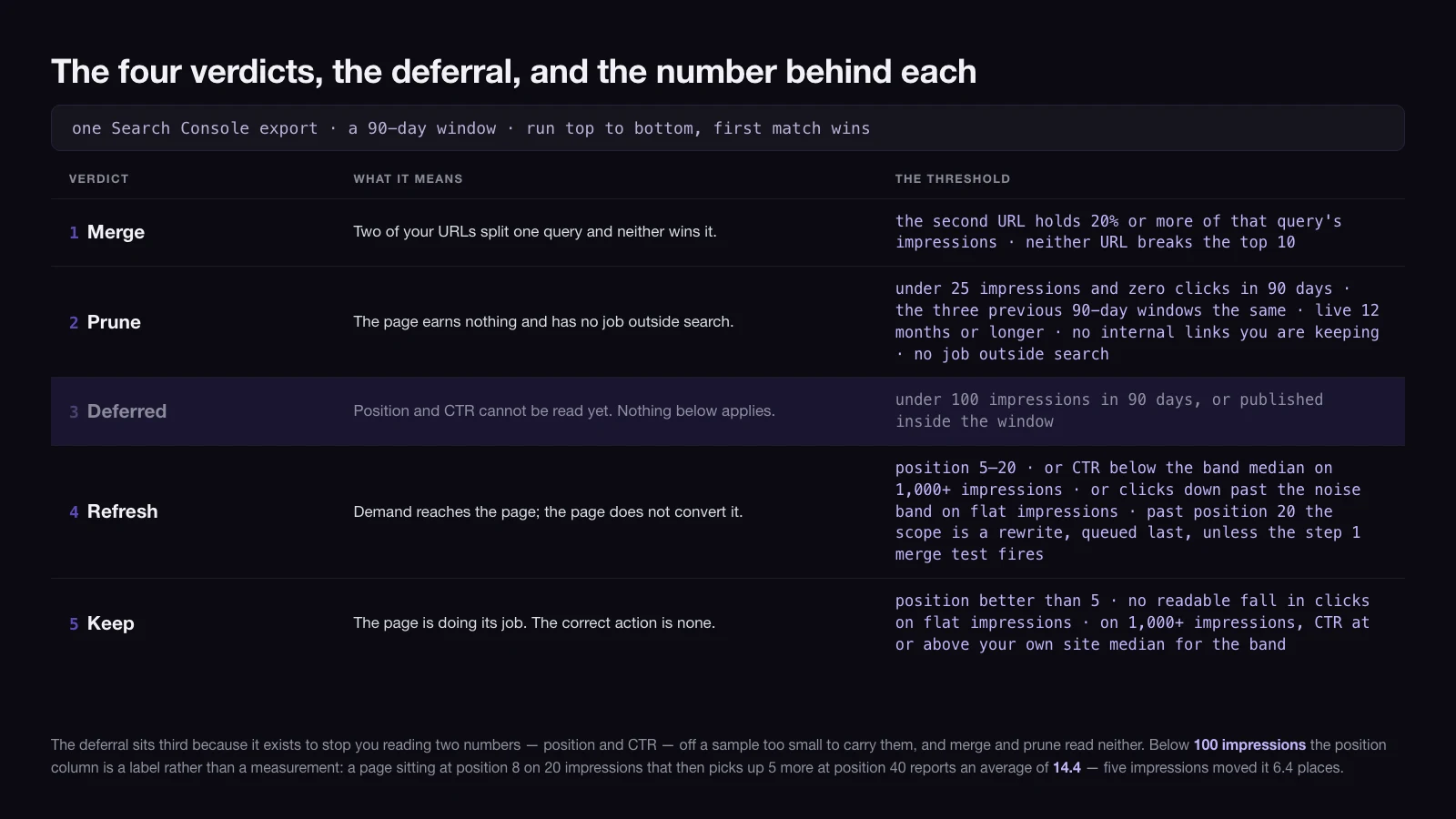
A page can look like it qualifies for two of those at once, so the tests are run in a fixed order and the first one that fires wins: merge → prune → data gate → refresh → keep. Without that order the sheet produces arguments instead of verdicts, and the argument is always about a page that nobody was going to touch this quarter anyway.
The data gate sits third rather than first for a reason worth stating early. It exists to stop you reading two specific numbers — average position and CTR — off samples too small to carry them, and merge and prune read neither. A page with 14 impressions has told you almost nothing about where it ranks, and quite a lot about whether anyone is looking for it. A page that cannot pass the gate is not a fifth verdict; it is a deferral, and on a first pass it is usually the largest single group.
Everything else that gets called a content audit is a different job. Whether you should be publishing this topic at all is a question for a content strategy, which sits a level above this and decides what the library is for. Whether Google can crawl, render and index the page is infrastructure, and it belongs to a technical SEO audit with its own checks and its own order. A content audit takes both of those as given and rules on the writing.
The three free inputs, and the two-way check between them
The inventory comes from the sitemap, not the CMS. Open /sitemap.xml or /sitemap-index.xml and take the URL list from there, because the sitemap is the set of pages you are asking Google to index — while a CMS export also hands you drafts, private pages, tag archives and author pages you never intended to rank. Auditing those wastes the afternoon.
The performance data comes from one Search Console export: Performance → Search results → Pages, last 90 days, with the comparison to the previous 90 days switched on. That single export fills five of the seven columns the sheet needs.
| Column | Source |
|---|---|
| URL | Sitemap |
| Impressions, last 90 days | Search Console |
| Impressions, previous 90 days | Search Console, comparison mode |
| Clicks, last 90 days | Search Console |
| Clicks, previous 90 days | Search Console, comparison mode |
| Average position, last 90 days | Search Console |
| Verdict | You |
Seven columns, and no others. Twenty-column audit templates are widely available and almost never filled in past row thirty; the fields that get abandoned are the ones no rule depends on. If a column does not change a verdict, it is decoration.
The two previous-period columns are the ones worth defending, because a single decision below needs both of them together: a fall in clicks only means the page decayed if impressions held steady. With clicks alone you cannot tell a page that lost its audience from a page whose audience stopped searching.
Then run the check that the two inputs make possible and that neither makes alone — compare the lists in both directions.
- In Search Console with impressions, absent from the sitemap. These are pages you are ranking with but not declaring: old URLs still linked from somewhere, parameter variants, taxonomy archives that picked up a query. Each one is either a page you should own properly or a leak you should close.
- In the sitemap, zero impressions in 90 days. Either nobody searches for it, or it is not in the index. Those look identical in this export and have opposite fixes, so check the URL in the Page indexing report before you write a verdict. Pruning a page that was simply never indexed destroys the evidence of the actual problem.
How much data a page needs before position and CTR mean anything
This is the gate the refresh and keep verdicts depend on, and it is the reason most of the sheet is left alone on a first pass. A page is deferred outright if it was published inside the window you are reading, because a page live for 41 of the last 90 days is being compared with pages that had all 90. Beyond that, each number carries its own floor.
Average position is impressions-weighted, and Search Console defines it as the position of the topmost result from your site. On small numbers that is easy to move. A page with 20 impressions at position 8 that then picks up 5 impressions at position 40 — one long-tail query, one SERP feature test — reports an average of (20 × 8 + 5 × 40) ÷ 25 = 14.4. Five impressions moved it 6.4 places. Below roughly 100 impressions in 90 days, treat the position column as a label, not a measurement.
Click-through rate needs far more data than people assume. CTR is a proportion, so its uncertainty falls with the square root of impressions. For an observed rate near 3%, the 95% interval around it looks like this:
| Impressions, 90 days | Observed CTR of 3% is really | What you can conclude |
|---|---|---|
| 100 | 1.0% – 8.5% | Nothing |
| 250 | 1.5% – 5.9% | Nothing useful |
| 500 | 1.8% – 4.9% | Gross differences only |
| 1,000 | 2.1% – 4.3% | Compare against your site median |
| 2,500 | 2.4% – 3.7% | Judge whether a title change worked |
Two notes on how to read that. The intervals are Wilson score intervals rather than the textbook p ± 1.96 × √(p(1−p)/n), because at 100 impressions and a 3% rate that formula returns a negative lower bound — it breaks below roughly five expected clicks, which is exactly the range an audit spends most of its time in. And the table is calculated at a 3% observed rate: at lower rates the interval narrows in percentage points but widens relative to the rate itself, so a page sitting at 0.6% needs more impressions to judge than one at 3%, not fewer. The practical rule that falls out of it: do not diagnose a CTR problem below 1,000 impressions in 90 days.
A drop in clicks needs a base before it is readable. Clicks are counts, and counts vary. Comparing two 90-day periods, a change is worth acting on when it is larger than roughly 2 × √(clicks in both periods added together). Working backwards from that gives the sizes at which a decline becomes visible at all:
| The fall you want to detect | Clicks needed in the earlier 90 days |
|---|---|
| A halving | about 25 |
| 30% | about 80 |
| 20% | about 185 |
A page that fell from 12 clicks to 8 has told you nothing. A page that fell from 119 to 61 has.
And the query table is not a census. Search Console withholds rare queries from the query dimension to protect user privacy, which means the queries listed under a page never sum to that page’s totals. The scale of the gap is larger than most audits assume: Ahrefs, publishing in February 2026 on data from April 2025, measured 22 billion clicks across 887,534 Search Console properties and found that anonymised queries accounted for 46.77% of the clicks it counted. Use the query table to diagnose why a page behaves as it does. Never use it to total.
Keep: the pages where the correct action is none
A page is a keep when all four hold: average position better than 5; at least 100 impressions in 90 days; no readable fall in clicks against flat impressions; and, on 1,000 impressions or more, a CTR at or above your site median for that position band. Below 1,000 impressions the CTR condition is dropped rather than failed, because the table above says it cannot be evaluated.
The third condition is worded as the exact complement of the decay trigger below, and deliberately so. A page whose clicks fell because the query itself lost demand has not decayed and is not a refresh — nothing you write will bring back searches nobody is running. It is a keep until either the demand returns or the page fails one of the other three.
The position boundary is set at 5 and not at 10 on purpose, so that keep and refresh cannot both fire on the same row. Positions 5 to 10 look comfortable and are the most recoverable band on the site; parking them under “keep” is how a sheet full of near-misses gets closed with nothing to do.
Your site median is a number you calculate once, from the same export. Group your pages into positions 1–5, 6–10 and 11–20, take the median CTR of each band, and write the three figures at the top of the sheet. They are worth more than any published CTR curve, because they already carry your SERP’s features, your brand recognition and your category. A page is underperforming when it sits below the median of its own site’s band — not below somebody else’s benchmark table.
Keep is a real verdict and it needs saying out loud, because the failure mode here is expensive. Rewriting a page that already ranks in the top four is the one edit in the audit with an asymmetric payoff: the upside is a few positions, and the downside is losing a match with search intent that took months to earn and that nobody on the team can fully explain. Recheck keeps in six months. Change nothing in between.
Refresh: position 5 to 20, and the two problems that hide inside it
Positions 5 to 20 with at least 100 impressions is the single most productive bucket in any audit. The page is already relevant enough to be shown; it is not relevant enough to be clicked. But two very different problems live in that band, and they take opposite fixes.
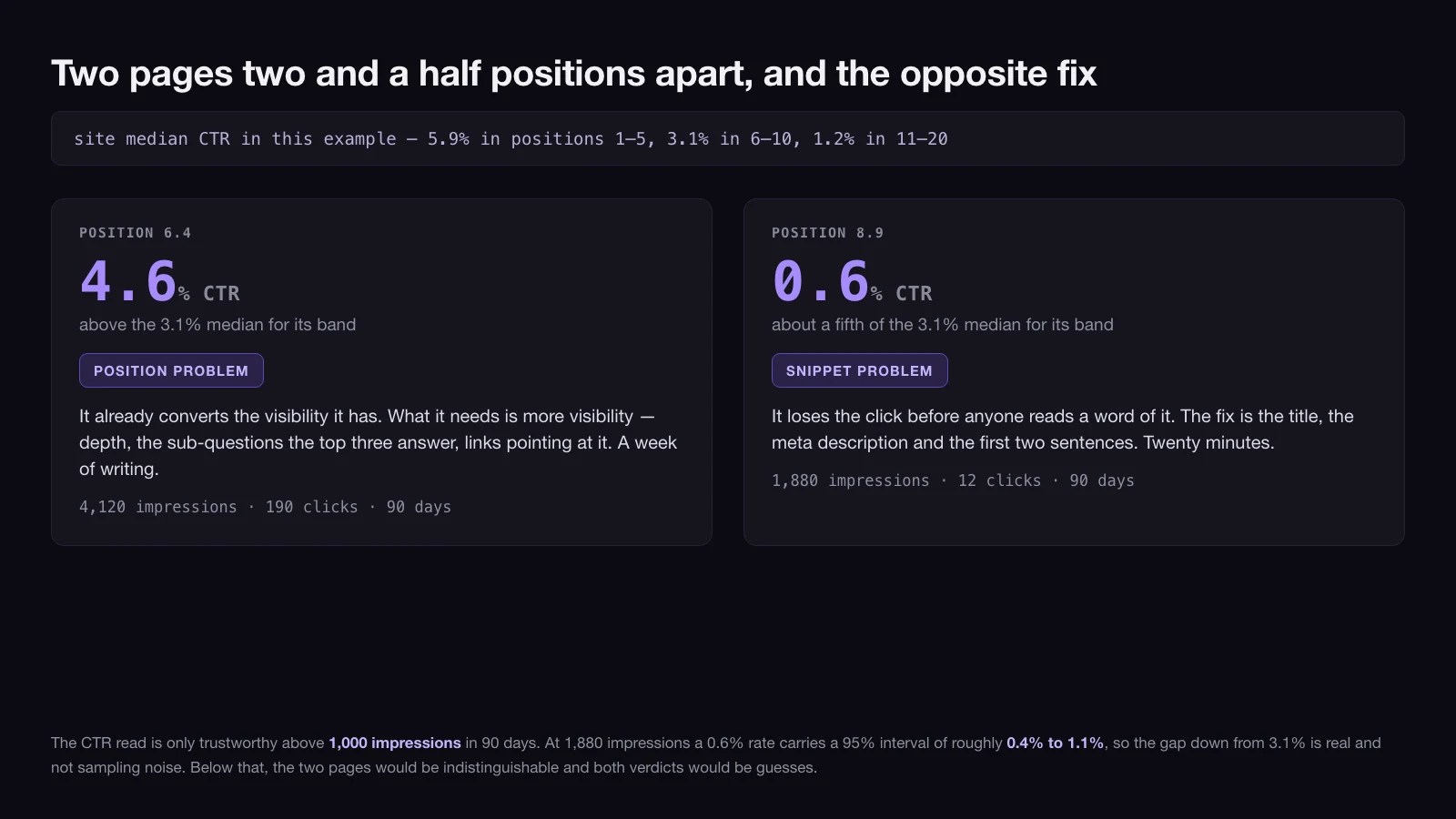
A position problem — the page is below the top three for a query that has real volume, and its CTR is at or above the site median for its band. The page is converting the visibility it has. It needs more visibility: depth, coverage of the sub-questions the top three answer and it does not, internal links pointing at it, and a genuine reason for a reader to prefer it. This is a writing job.
A snippet problem — the page holds a good position and its CTR sits well below the site median for that band, on at least 1,000 impressions. The page is losing the click before anyone reads it. The fix is the title, the meta description and the first two sentences, and it takes twenty minutes rather than a day.
Decay is the third trigger and it can hit a page in any position: clicks down by more than the noise band above, against flat impressions. Flat impressions matter. If impressions fell too, demand moved and the page did not decay — chasing that with an edit is work spent on a query that is no longer being typed.
Where more than one of the three fires on the same row, read them in this order: decay, then snippet, then position. Decay describes a change and the other two describe a level, and a page that is falling needs to be understood before it is expanded.
Past position 20 the verdict is still refresh, but the scope is a rewrite rather than an edit. A page that far out with real impressions and almost no clicks is not close to anything, and polishing it will not move it. Before you scope the rewrite, run the merge test from step 1 over it once more: if another of your URLs holds 20% or more of the same query’s impressions and neither of you breaks the top 10, it was a merge and it slipped past you. If no such page exists, the row reads refresh — rewrite and queues behind everything in the 5-to-20 band, because that band pays back sooner.
One caution before you queue any of these. If the fall shows up on every page at once, it is not a content problem and no amount of refreshing will touch it. Site-wide declines belong in the technical audit or in a search-results change, not in this sheet.
Merge: when two of your own URLs answer the same query
Merge candidates do not show up in a page-level export. To find them, work from the other dimension: in Search Console, filter to a query, then break the results down by page. If two of your URLs both take impressions on it, they are splitting a signal that would be stronger undivided.
Two conditions before it is worth acting on:
- The second URL holds at least 20% of that query’s impressions across the 90 days. Below that share, the overlap is incidental and merging costs more than it returns.
- Neither URL breaks the top 10 on the query. If one of them already ranks well, the split is not hurting you, and you have a linking problem rather than a merge.
Which URL survives is the decision people get backwards. Keep the URL with more distinct queries, not the one with more clicks. Distinct-query count measures how much of a topic a page has already earned the right to be shown for; a click total can be one lucky query, or one seasonal week. Fold the sections that only exist on the losing page into the winner, then 301 the loser to it.
And keep the count of merges per pass low. A merge changes URLs, internal links and redirects at once, and if you do eleven of them in an afternoon you will not be able to attribute what happened next to any of them.
Prune: the three exits for a page that earns nothing
The prune threshold is deliberately strict, because a wrong prune is the only verdict in this audit you cannot quietly reverse. All five conditions must hold:
- Published at least 12 months ago.
- Under 25 impressions and zero clicks in the last 90 days — roughly one appearance every three or four days, for a page that has had a full year to find an audience.
- The three previous 90-day windows look the same, so it is not seasonal.
- No internal links to it from pages you are keeping.
- No job outside search: not a page sales sends to prospects, not an ad landing page, not something you are required to publish.
Confirmed, the page takes one of three exits, and the choice is made by what exists around it rather than by how old it is.
- 301 to a better page on the same topic. The default whenever a receiving page exists. Whatever links and history the URL accumulated go somewhere useful instead of nowhere.
- Keep it and noindex it. For pages with a real job that is not search — a spec sheet support links to daily, a policy page, a landing page for a campaign. Zero impressions is the correct outcome for these, not a failure.
- Delete it. Only when there is no receiving page, no inbound links and no job. The difference between returning 404 and 410 here is not worth an argument; what matters is that the URL stops being a live claim.
Prune, then measure the receiving pages, not the pruned ones. A consolidation is judged by whether the page you kept grew — and if it did not, the diagnosis is usually that the pages you folded in were never the reason it was stuck.
What to do when Search Console has nothing to say
Some sites cannot run any of the thresholds above, and pretending otherwise produces a sheet full of confident verdicts resting on noise. Four situations, four substitutes.
Under 20 pages. Skip the thresholds. Read every page. Statistics are a tool for when reading everything is impractical, and at this size it is not.
Under 90 days of history, or a migration inside the window. The data describes a site that no longer exists. Wait, and use the time on the check you can run without any performance data at all: for each URL, write the one query you would expect it to win. Pages where you cannot write that sentence have a problem the numbers were never going to reveal.
Enough pages, not enough impressions on any of them. Audit by intent coverage instead of performance. Group the pages by the question they answer, find the groups with three pages where one would do, and merge on the overlap — the merge verdict is the only one of the four that does not require traffic to justify.
A page that is genuinely seasonal. A 90-day window catches it in or out of season and gets the verdict wrong either way. Compare it with the same 90 days a year earlier. Search Console holds 16 months of performance data, which is exactly enough to do that once and not twice — so record the numbers in the sheet while they are still there.
Forty-one pages: what one pass actually produced
An illustrative pass over a 41-page site. Site medians for this example: 5.9% CTR in positions 1–5, 3.1% in 6–10, 1.2% in 11–20.
| URL | Impr. 90d | Impr. prev. | Clicks 90d | Clicks prev. | Position | Verdict |
|---|---|---|---|---|---|---|
| /blog/glossary-of-freight-terms/ | 2,340 | 2,280 | 156 | 132 | 3.1 | Keep |
| /blog/shipping-costs-explained/ | 4,120 | 4,050 | 190 | 184 | 6.4 | Refresh — position |
| /blog/warehouse-checklist/ | 1,880 | 1,910 | 12 | 14 | 8.9 | Refresh — snippet |
| /blog/customs-forms-guide/ | 3,900 | 3,860 | 88 | 91 | 12.4 | Refresh — position |
| /blog/incoterms-2020/ | 1,450 | 1,490 | 61 | 119 | 9.2 | Refresh — decay |
| /blog/pallet-sizes/ | 610 | 640 | 9 | 11 | 14.2 | Merge — keep |
| /blog/pallet-dimensions/ | 240 | 250 | 2 | 3 | 17.8 | Merge — fold in |
| /blog/hs-code-lookup/ | 74 | — | 3 | — | 11.6 | Deferred |
Reading four of those rows, because the reasoning is the point:
The glossary is a keep, and the interesting part is why the rise does not count. Clicks went from 132 to 156. That looks like growth, but 2 × √(156 + 132) = 34, and the move is 24 — inside the noise band. There is nothing here to act on and nothing to celebrate; the verdict is keep precisely because no readable change happened.
Shipping costs and the warehouse checklist sit two and a half positions apart and take opposite fixes. The first has a CTR of 4.6% at position 6.4, against a band median of 3.1% — it converts its visibility better than the site average and simply needs more of it. The second runs 0.6% at position 8.9, about a fifth of the same median, on 1,880 impressions, which is enough for that gap to be real. One needs a week of writing; the other needs a new title.
Incoterms is the only decay row, and the impressions column is what proves it. Its CTR of 4.2% sits above the 3.1% band median, so on a level reading it would look like a position problem; the sub-order above is what stops it being filed as one. 119 clicks fell to 61 while impressions barely moved, from 1,490 to 1,450. The noise band is 2 × √(61 + 119) = 27, and the fall is 58 — comfortably readable. The same audience kept arriving at the search results and stopped choosing this page, which is a different diagnosis from the audience going away.
The pallet pair is a merge, and the survivor is not the obvious one. Both take impressions on standard pallet size; the second holds 28% of that query’s impressions, and neither reaches the top 10. /blog/pallet-sizes/ wins not because it has more clicks but because it draws 34 distinct queries in the window against the other page’s 9.
Across the full 41: 7 keeps, 12 refreshes, 4 pages in two merge pairs, 9 prunes — of which 5 take a redirect or a deletion and 4 are kept and noindexed for a job outside search — and 9 deferred for want of data. That last number is normal and it is not a failure of the audit. It is the audit telling you which pages to leave alone until the next one.
The order to work the queue in, and why it is not by verdict
The temptation is to batch by verdict — all the merges, then all the refreshes. Do the opposite: sort the whole queue by 90-day impressions, descending, and work down it regardless of which verdict each row carries. Impressions are the size of the audience already reaching the page, so that ordering puts the largest recoverable audience first, and it front-loads the changes whose effect will be visible soonest.
Twenty-minute snippet fixes are the exception worth pulling forward. Do those in one sitting before the queue starts, because they are the only items where the fix is shorter than the discussion about the fix.
Each refresh then needs a specification, not a note in a cell. What the page must now cover, what it must stop claiming, which queries it is being pointed at — the same fields as a new commission, which is what a content brief is for. Put the resulting work in the schedule you already keep rather than in the audit sheet: a verdict that never reaches the content calendar is a verdict that will still be there at the next audit. And if the output is going to a client rather than into your own backlog, the audit sheet is the evidence, not the deliverable — the shape of the document that gets read is an SEO audit report.
The three questions a content audit is the wrong instrument for
Whether the content is any good. The thresholds measure whether a page earns search visibility. A page can rank well and still be thin, badly argued or off-brand, and none of the four verdicts will say so. That reading is done by a person, on the pages the numbers have already flagged as worth the hour.
Whether you should be publishing this at all. Audits look backwards at what exists. The decision about what the library is for, who it serves and what belongs in it is a different exercise entirely, and running an audit as a substitute for it produces a very well-maintained set of pages about the wrong subjects.
Anything outside your own site’s pages. The method here rests entirely on Search Console data for URLs you control, which is why it stops at the domain boundary. Reviewing what you have posted on social platforms is a separate exercise on separate data — those platforms report their own numbers, on their own definitions, and none of the thresholds above transfer.
The last one is worth stating plainly: an audit run and not acted on is worse than no audit, because it converts a vague sense that the library needs attention into a specific list that then also gets ignored. If the previous list is still open, do not run another pass — work that one down first. And if the queue is full and the capacity is not there, the constraint is hands rather than knowledge, which is the point at which handing the backlog to a team that runs content marketing as its day job stops being an expense and starts being the cheaper option.
12 / Reader questions
Frequently asked questions
01What is a content audit?
A content audit is a page-by-page review of everything you have already published, ending in a single verdict for each URL that has enough data to carry one — keep, refresh, merge or prune — reached from performance data rather than from opinion about which posts feel dated or which ones somebody on the team still likes. Pages without that data are explicitly deferred rather than guessed at, and the inventory is the input to the process, not the output of it.
02How long does a content audit take?
Budget roughly one working day for a site of 40 to 60 pages: about an hour to build the sheet from the sitemap and one Search Console export, three to four hours to apply the thresholds, and the rest on the pages the numbers cannot decide for you. It scales close to linearly up to a few hundred URLs, after which the sheet stops being the right instrument and the job becomes filtering rather than reading.
03Do you need a paid tool to do a content audit?
No — a sitemap, Google Search Console and one spreadsheet cover every decision in this article, because the three numbers that drive the verdicts (impressions, clicks and average position) are all free and all come from the same Search Console export. Paid crawlers save real time on sites past a few hundred URLs. They do not change where the thresholds sit.
04What is the difference between a content inventory and a content audit?
A content inventory is the list — every URL you have, with its title, type, author and date — while a content audit is what happens once that list carries performance data and every row has been given either a verdict or an explicit deferral. Most stalled audits are inventories that never got the second half done.
05Should you delete old blog posts?
Rarely. The default exit for a page that earns nothing is a 301 redirect to the closest page you are keeping, which passes on whatever links and history the old URL accumulated; deletion is for URLs with no receiving page, no inbound links and no job outside search. Before either, check the page is actually indexed — a post with no impressions may be excluded from the index rather than unwanted, and that is a different problem with a different fix.