Published
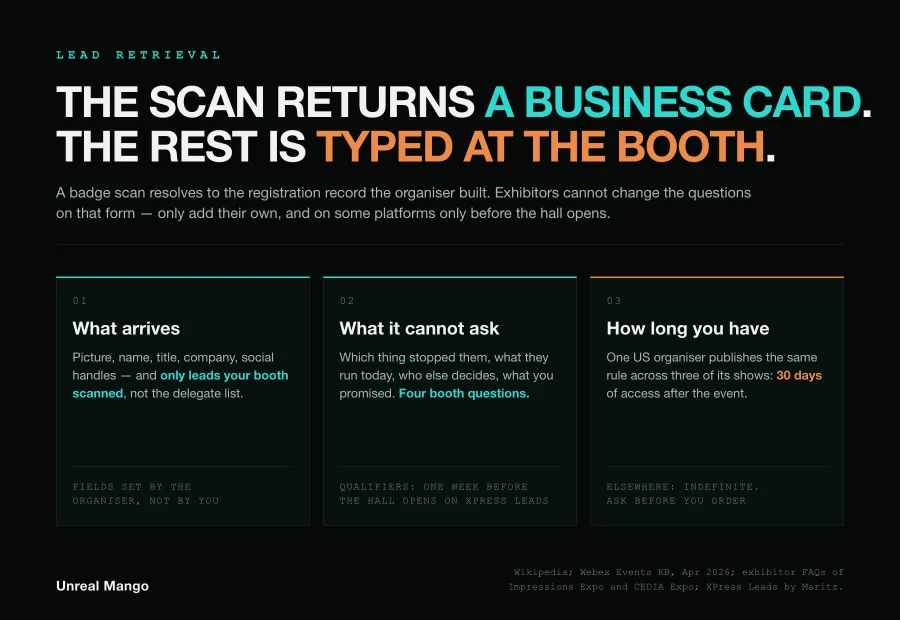
Lead retrieval is the system an event organiser sells exhibitors to turn a badge scan into a contact record. The scan returns whatever the organiser collected at registration — name, title, company — and nothing else. Everything that makes the contact workable is set up in the exhibitor portal before the show — XPress Leads publishes a one-week cut-off, other shows publish no deadline at all — or typed at the booth.
Lead retrieval is the organiser-run service that reads an attendee’s badge and returns that attendee’s registration record to the exhibitor who scanned it.
- It is not lead capture in general. Capture is any route to a contact at a stand — a wall QR code pointing at your own form, a tablet, a digital business card. Retrieval is the one route that reads the organiser’s database.
- It is not a CRM. The output is a spreadsheet or an API payload, and on some platforms the spreadsheet is the only ready-made route into a CRM.
- It is not the scanner. A rented handheld and a phone app are two delivery options for the same lookup.
The badge record is the organiser’s file, not yours
A scan is a database query. The badge carries a barcode, an ID number or a QR code, and on some shows an RFID chip doing the same job; the device resolves it against the registration database the organiser built, and hands back whatever that database holds.
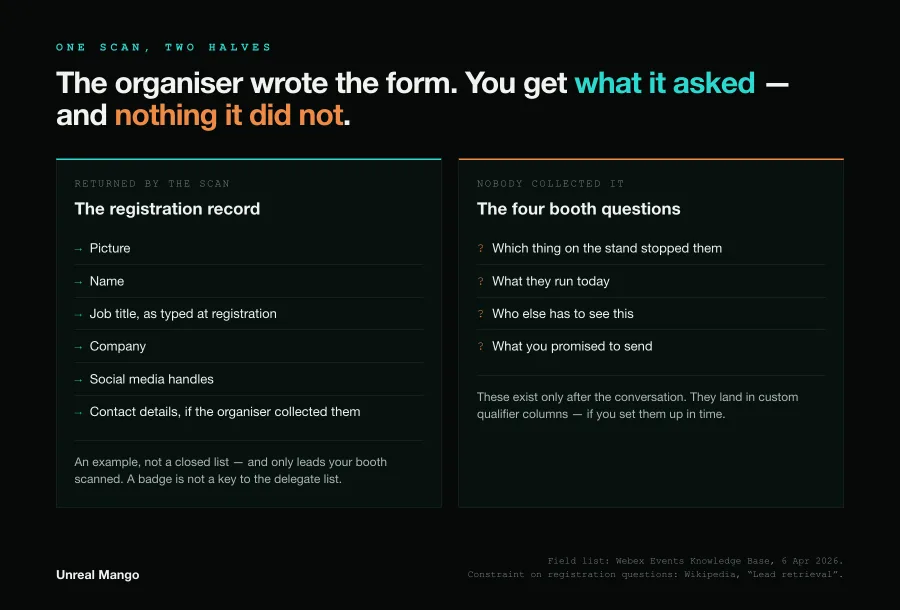
The Wikipedia entry on lead retrieval — the page the AI Overview above the search results takes its definition from — states the constraint in one sentence: exhibitors receive a lot of data about each attendee, “but they cannot choose which data they receive, or to change any questions to make the data more relevant to their needs.”
That limitation is sharper than it reads. The job title in the record was typed by the attendee into a registration form, sometimes months earlier, and that form was written by the team selling floor space rather than by anyone who sells what you sell. Webex Events gives an example of what its scan populates on a lead profile: “details such as picture, name, title, company, and social media handles”. Wikipedia puts contact details in the same record, and often company size. That is a business card with a photograph attached.
There is a second boundary worth knowing before you order: a scan buys you that one person and nobody else. Webex Events puts it plainly in its own documentation — exhibitors “can only access attendee data for leads they’ve scanned.” The badge is not a key to the delegate list.
That definition shapes every AI summary built on it, so its state is worth knowing: the Wikipedia article has carried a tone warning since October 2008 and a “more citations needed” tag since January 2021, and cites a single vendor page. Accurate on the mechanism, silent on everything operational — which is why the mechanism is the only part the search results explain well.
Taking a contact at a booth without renting a scanner
The organiser’s scanner is the default, not the only option, and on a small stand the scan volume rarely justifies the rental. Five routes cover almost every booth:
| Route | What arrives | Fields you control | Where it wins |
|---|---|---|---|
| Organiser scanner or app | Full registration record | None in the registration record — plus your own qualifier columns, where the platform sells them | Large shows, high scan volume, verified attendee identity |
| Wall QR code to your own form | Only what the visitor types | All of them | When you want consent language and your own questions |
| Digital business card | Their contact details, and yours in their phone | Partial | Corridor and evening conversations away from the stand |
| Tablet form on the stand | Whatever the form asks | All of them | Demos where someone is already standing still |
| Manual entry after the conversation | A name and whatever was remembered | All of them | Ten-visitor stands, or a scanner that failed |
The trade is consistent across all five: the organiser’s route buys verified identity at the cost of relevance, your own routes buy relevance at the cost of completeness and typing time. Treating them as exclusive is the mistake. A scan plus your own two questions beats either alone, and the platforms that sell custom qualifiers are built for exactly that.
What a scanner cannot ask, and where those answers get typed
Custom qualifiers are the part of lead retrieval nobody sells and most exhibitors under-use. They are questions you write, pushed to every device on your stand, whose answers land in dedicated columns in the export.
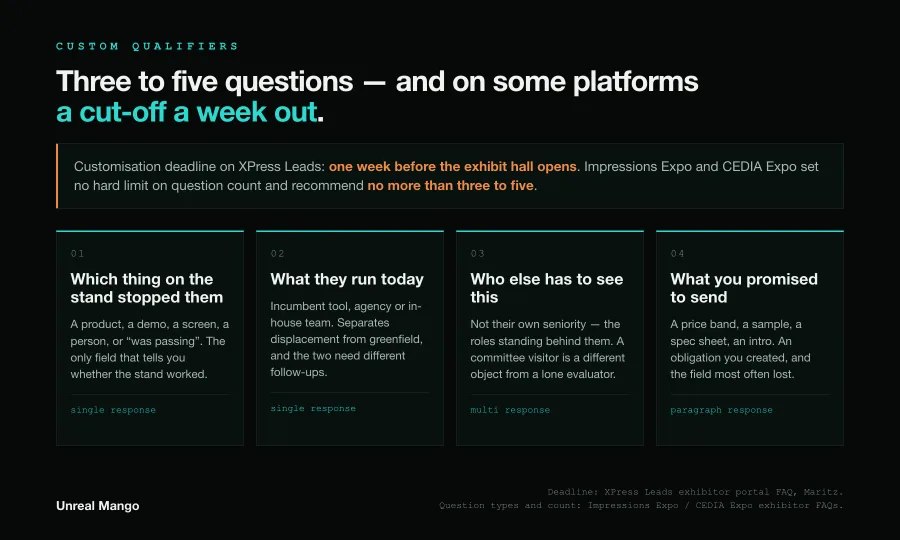
Two operational facts decide whether you get them. First, they have a deadline that is not the show date: the XPress Leads exhibitor portal run by Maritz states that customisation must be submitted one week before the exhibit hall opens. Second, there is a practical ceiling. The exhibitor FAQ used by Impressions Expo and CEDIA Expo permits single-response, multi-response and paragraph questions with no hard limit, then recommends no more than three to five. That is a floor-time constraint, not a technical one: a booth conversation that survives a sixth field is rare.
Three to five slots, then. These four are the ones a registration form structurally cannot hold, because none of them exist until the conversation happens:
- Which thing on the stand stopped them. A product, a demo, a screen, a person, or “was passing”. This is the only field that tells you whether the stand worked, and it is also the sharpest sorting signal you will get in ten seconds.
- What they run today. The incumbent tool, agency or in-house team. It separates displacement from greenfield, and the two need entirely different follow-up emails.
- Who else has to see this. Not the visitor’s own seniority — the names or roles behind them. A single visitor from a buying committee is a different object from a lone evaluator.
- What you promised to send. A price band, a sample, a spec sheet, an intro. This is an obligation you created at the stand, and it is the field most often lost, because it lives only in one person’s memory.
Keep the free-text note for one verbatim line of what they actually said. It is worth more in the follow-up email than any dropdown.
These are capture fields, not a qualification standard. Where the bar sits for calling something a lead at all belongs in the event plan rather than in the scanner settings, and our piece on event marketing strategy is where that argument lives. How captured fields turn into points and an order of contact is covered in lead scoring; which stage a booth contact enters at is the subject of MQL vs SQL.
The 48 hours after the exhibit hall goes dark
The handover from booth to CRM is where lead retrieval quietly fails, and it fails on a clock nobody puts on the run sheet. A workable version fits in two days.
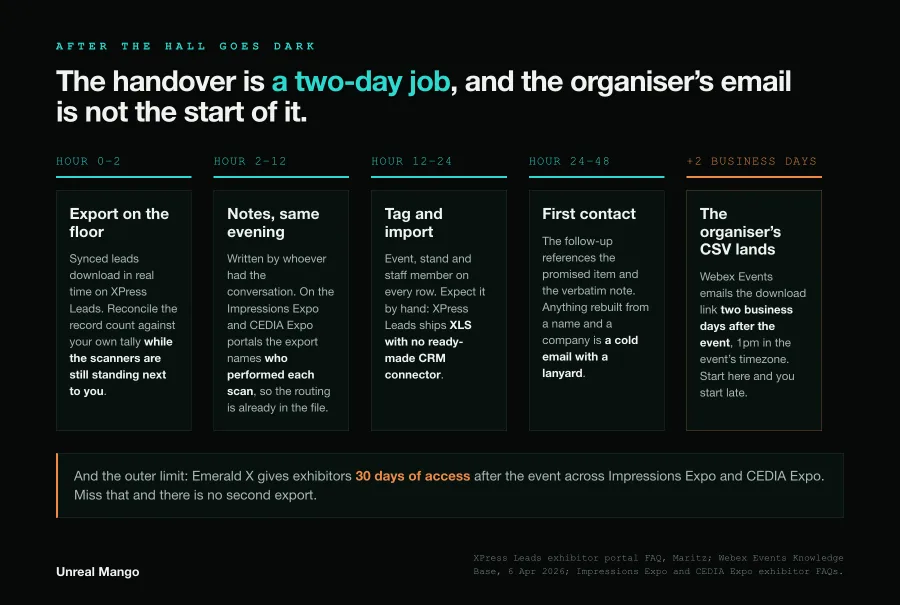
Hours 0 to 2, still on the floor. Export before the stand comes down. XPress Leads states that synced leads are available for download in real time, so there is nothing to wait for. Reconcile the record count against your own tally now, while the people who did the scanning are still standing next to you and can explain a gap.
Hours 2 to 12, the same evening. Notes get written by the person who had the conversation, not by whoever is free. On the exhibitor portals used by Impressions Expo and CEDIA Expo the export identifies who performed each scan, so the routing is already in the file — check your own platform, because not every one publishes what the export contains. Those same portals are where a setup mistake surfaces: notes and ratings are unavailable until a company claims its team in the web version, which means a stand that skipped that step has scans and nothing else.
Hours 12 to 24, the import. Source tagging happens here or never: event name, stand, and the staff member on every row. Expect to do it by hand. XPress Leads is explicit that it offers no direct CRM integration and delivers leads in XLS — an Event API exists, but no ready-made connector — so the mapping between qualifier columns and CRM fields is a spreadsheet job you should have rehearsed before travelling.
Hours 24 to 48, first contact. The follow-up references the promised item and the verbatim note. Anything that has to be reconstructed from a name and a company is a cold email with a lanyard attached.
Note where the organiser’s own timetable lands relative to that. Webex Events emails exhibitors a CSV download link two business days after the event at 1pm in the event’s timezone. If your process starts when that email arrives, it starts after the window in which the notes were still accurate.
Thirty days, two business days, or indefinitely: the access window is a contract term
How long your leads stay reachable is set by the show, not by the industry, and the spread is wide enough to matter.
| Question | What at least one published source says |
|---|---|
| How long is access? | 30 days after the event — the same sentence appears verbatim in the exhibitor FAQs of Impressions Expo (Atlantic City and Long Beach) and CEDIA Expo, three Emerald X shows running near-identical FAQ text |
| Or is it open-ended? | Indefinitely, at Webex Events, “unless you ask us to delete your Event” |
| When does the file arrive? | Two business days after the event, 1pm event timezone, for the Webex Events CSV email |
| What format? | XLS or CSV on the shows above; XLS only for download on XPress Leads, which states it has no direct CRM integrations but does offer an Event API with real-time access to complete lead information |
| When are custom questions due? | One week before the exhibit hall opens, on XPress Leads |
Two of those five have teeth. A 30-day window closes the recovery path for a botched export inside a month, which is roughly how long it takes for a show to be forgotten by everyone who attended it. A one-week qualifier deadline puts the highest-leverage decision in the exercise alongside the stand-graphics argument.
Ask the organiser both questions in writing when you order, and note the answers next to the booth invoice.
When scan count stops being the number worth reporting
Scan count measures the rental. It answers “did we use the device”, which nobody asked. Four numbers answer the question that was asked, and all four come out of the same export:
- Qualifier completion rate. Share of scanned records with the custom qualifier columns filled in. The lower it runs, the more the stand was handing out scans rather than having conversations, and the fix is staffing, not software.
- Attribution completeness. Share of imported records carrying event, stand and scanner name. This is the number that decides whether anyone can answer “what did the show produce” in six months. Every row short of the full set is a lead nobody can attribute to the show later.
- Median hours from scan timestamp to first outbound touch. Check whether your export carries a scan time before you promise this one — platforms differ on what the file contains, and none of the four cited here publishes its column list. Where it is there, both ends of the measurement are already recorded and the metric costs nothing to run. Track the median, not the average — one heroic same-night reply hides forty untouched rows.
- Export completion inside the window. Binary, per show. Either every record was downloaded before access closed or some were not, and on a 30-day contract the second case is unrecoverable.
None of these need a new tool. They need somebody to own the file between the stand and the CRM, which is a role rather than a purchase, and it is the part of the marketing strategy that events tend to leave undefined until the leads have already aged.
07 / Reader questions
Frequently asked questions
01What is a lead retrieval system?
A lead retrieval system is the badge-scanning service an event organiser sells to exhibitors. It connects a handheld scanner or a phone app to the registration database, so scanning an attendee's barcode, QR code or RFID badge returns that person's registration record to the exhibitor who scanned it. The organiser decides which fields the record contains.
02What is the lead retrieval app?
It is the phone or tablet version of the same service, installed on booth staff's own devices instead of rented hardware. It is the same database lookup and the same organiser-defined fields. Ratings, statuses, notes and custom qualifier questions belong to the platform rather than to the form factor — XPress Leads sells custom sales qualifiers with the package whether you take the app or rent a device — so the real difference is whose device it runs on and what it costs.
03What is lead capture, and how is it different from lead retrieval?
Lead capture is any method of taking a contact at a stand: a QR code on the wall pointing at your own form, a tablet, a digital business card, or typing a name after the conversation. Lead retrieval is the subset that runs on the organiser's registration database. Capture gives you your own fields; retrieval gives you the organiser's record, plus any qualifier columns you add on top of it.
04How long do exhibitors have to download their leads?
It depends entirely on the show, and it is a contract term rather than an industry standard. Impressions Expo and CEDIA Expo — all Emerald X shows — publish the same rule in near-identical exhibitor FAQs: leads stay accessible for 30 days after the event, and must be downloaded before that deadline. Webex Events, by contrast, states that exhibitors keep access indefinitely unless the event is deleted.
05What data does a badge scan give you?
Whatever the organiser collected at registration and chose to share — typically name, job title, company, and contact details, sometimes company size or a photo. Webex Events gives picture, name, title, company and social media handles as an example of what populates. Exhibitors cannot add fields to that record, and they see their own booth's scans rather than the delegate list.
06Do you need to rent a scanner for lead retrieval?
No. Most organisers now offer an app licence alongside rented handhelds, and the app runs on booth staff's own phones. Rented hardware still has two advantages: it does not drain a phone the team needs all day, and it is a dedicated device that nobody walks off the stand with. Both read the same badge and return the same record.