Published
A LinkedIn Lead Gen Form is an attachment rather than an ad format: it opens inside the feed with the member’s profile data already sitting in the fields, so the landing page disappears from the path. That is why it produces cheap form fills. Whether those are cheap leads is a separate calculation, and it is one almost nobody runs.
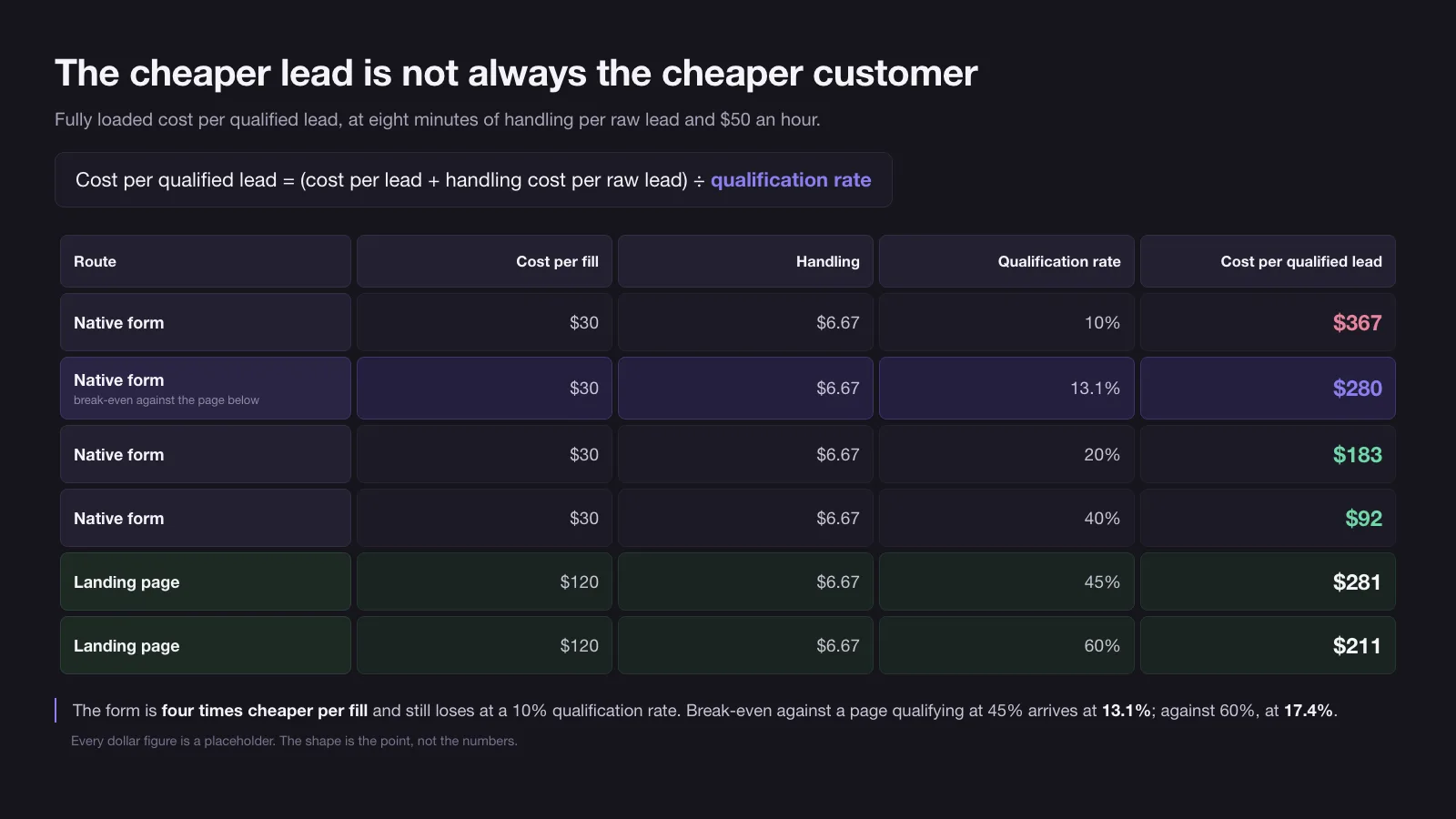
Here is the whole argument in one number. If your landing page costs $120 a lead and 45% of those leads survive a sales conversation, then at $30 a form fill and $6.67 of handling on every raw lead, a native form has to qualify at 13.1% to break even against it — not to be better, just to stop losing money. Below that line the cheaper channel is the more expensive one, and the difference does not show up in Campaign Manager. It shows up in the sales team’s calendar.
How this was checked. For this query in the United States on 18 August 2026, five of the eight organic results were LinkedIn’s own properties, alongside a People Also Ask block, a video pack, a “what people are saying” panel of LinkedIn posts, and three third-party posts — two collections of form examples and one general guide. Every one of them explains the feature. Not one publishes the break-even arithmetic, the difference between fields that cost the member nothing and fields that cost completion rate, or the four documented ways the route from submit to CRM breaks. Everything below about how the form behaves comes from LinkedIn’s Marketing API documentation, versions 202602 to 202607, read on 18 August 2026; the dollar figures are placeholders, and they are labelled as such.
Pre-filled is not the same as verified, and LinkedIn’s own API says so
The selling line is that forms “come pre-filled with accurate LinkedIn profile data”. Two words in that sentence do a lot of work, and the API documentation quietly undoes both.
The first is accurate. Profile data is self-reported and undated. A member’s job title updates when they get round to it, their company size band was chosen once at some point in the past, and nothing on LinkedIn requires either to still be true today. Pre-fill copies what the profile says, not what is the case.
The second is pre-filled, which most people read as locked. It is not. Every question in a lead form carries a responseEditable flag, and the documented default is true: the member can overwrite anything LinkedIn put there before they submit. A form that shows a work email and receives a personal one is not malfunctioning. It is doing exactly what the default allows.
That matters because of a field pairing almost every account gets wrong. LinkedIn offers EMAIL and WORK_EMAIL as two separate predefined fields in its schema, and it does not publish which of the predefined fields pre-fill or from where. In practice EMAIL tends to arrive as the address the member signed up with, which is often a personal one, and personal addresses are where routing rules, domain enrichment and account matching all fail at once. WORK_EMAIL asks for the corporate address specifically, so it is the field a member is most likely to have to type. It converts worse. It also produces a lead your CRM can actually match to a company.
So the honest version of the pitch is narrower than the marketing one: pre-fill removes typing, which removes the main reason people abandon forms. It does not add verification. Anything you plan to trust — the domain you route on, the seniority you score on — has to be treated as a claim, and the design job is deciding which claims are cheap enough to be worth collecting anyway.
The arithmetic that makes a $30 form fill more expensive than a $120 landing page lead
Cost per lead is the metric the platform reports and the wrong one to optimise. The number that decides whether a campaign pays is the fully loaded cost of a lead that a salesperson would actually keep:
Cost per qualified lead = (cost per lead + handling cost per raw lead) ÷ qualification rate
The handling cost is the part everyone leaves out. Every raw lead is opened, read, looked up and either routed or dismissed, and to get one qualified lead you pay that cost 1 ÷ q times, not once. At eight minutes of a rep’s attention per lead and a fully loaded $50 an hour, that is $6.67 a lead — small enough to ignore per record and large enough to dominate the total once the qualification rate drops.
| Route | Cost per fill | Handling | Qualification rate | Cost per qualified lead |
|---|---|---|---|---|
| Native form | $30 | $6.67 | 10% | $367 |
| Native form | $30 | $6.67 | 13.1% | $280 |
| Native form | $30 | $6.67 | 20% | $183 |
| Native form | $30 | $6.67 | 40% | $92 |
| Landing page | $120 | $6.67 | 45% | $281 |
| Landing page | $120 | $6.67 | 60% | $211 |
Every dollar figure in that table is a placeholder, and the 45% and 60% landing page rates are deliberately generous to the page — the form’s case is worth making on charitable assumptions rather than flattering ones. Substitute your own and the shape does not change, because the shape is what matters: the form is four times cheaper per fill and still loses to the landing page at a 10% qualification rate. Break-even against a page qualifying at 45% arrives at 13.1%. Against a page qualifying at 60% it arrives at 17.4%. Those are the only two numbers you need to argue about, and neither of them appears in Campaign Manager.
Two consequences follow, and they point in opposite directions from the usual advice.
The first is that the form only has to clear a low bar, and often does. A 13% threshold is not demanding. If the audience is tight and the offer is specific, a native form that qualifies at 20% is comfortably the better buy, and the reflex to “send everything to a landing page because the leads are better” is often an expensive preference dressed as a principle.
The second is that the bar is invisible until someone measures the qualification rate, and most accounts running native forms have never measured it. They compare $30 to $120, conclude the form won, and are structurally unable to notice when it did not. Agreeing what counts as qualified before the campaign starts is the whole game here, and it is the subject of MQL vs SQL. One warning about borrowing a benchmark instead of measuring: the widely quoted band there — 10% to 26% across 30 industries — measures marketing-qualified leads surviving the handoff to sales, which is a stricter and later denominator than raw form fills, and the same source cautions against using any published band as a pass mark. Your q has to come from your own pipeline, not from someone else’s.
Which fields filter a buyer and which ones only add friction
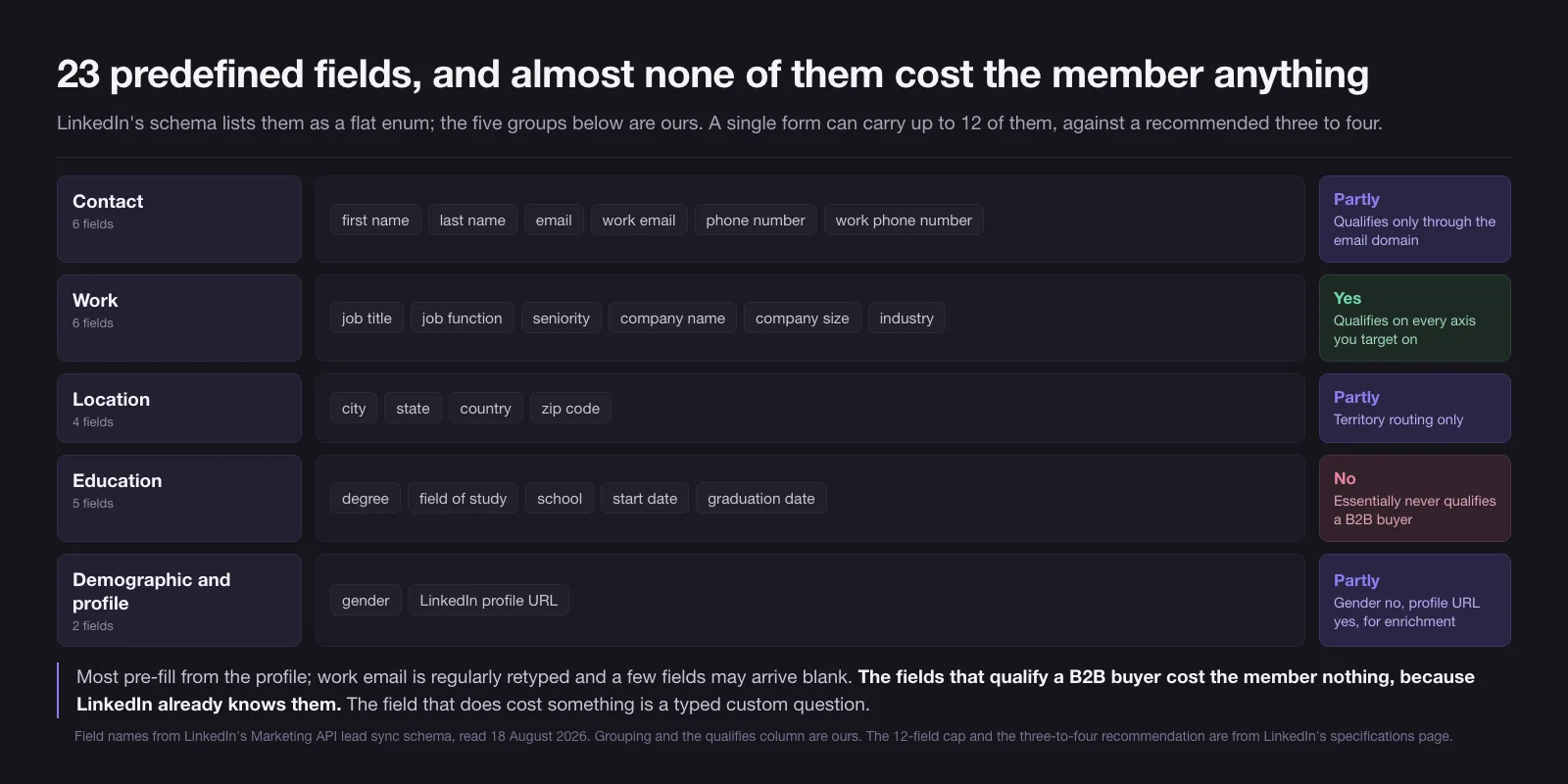
LinkedIn’s schema lists 23 predefined fields as a flat enum. A single form can carry up to 12 of them against a recommended three to four, a limit that lives on LinkedIn’s specification page rather than in the API and is set out with every other LinkedIn measurement in LinkedIn ads dimensions. The grouping below is ours, not LinkedIn’s, and it sorts the 23 by what they cost the member against what they tell you. On that reading, most of them are not real choices at all.
| Group | Fields | Typing cost | Qualifies a B2B buyer |
|---|---|---|---|
| Contact | first name, last name, email, work email, phone number, work phone number | Zero for pre-filled, real for work email | Only through the email domain |
| Work | job title, job function, seniority, company name, company size, industry | Zero — all pre-filled from the profile | Directly, on every axis you target on |
| Location | city, state, country, zip code | Zero, except zip code, which many profiles cannot supply | Territory routing only |
| Education | degree, field of study, school, start date, graduation date | Zero | Essentially never |
| Demographic and profile | gender, LinkedIn profile URL | Zero | Gender no, profile URL yes, for enrichment |
The pattern in that table is the practical answer to “which fields should I add”. The fields that qualify a B2B buyer cost the member nothing, because LinkedIn already knows them. The fields that cost the member something rarely qualify. Seniority, job function and company size are exactly the axes your targeting is built on, they pre-fill silently, and adding all three costs roughly nothing in completion rate while giving the CRM three columns to score on. Adding them is close to free.
The five education fields are the clearest example of a field that exists because the profile has it, not because a B2B buyer is described by it. Unless you sell into universities, they are three seconds of scrolling and a column nobody reads.
Then there is the field that genuinely costs something, and genuinely works: a typed custom question. LinkedIn caps these at three, and the practical number is one. A question the member has to answer in their own words — how many seats, what the timeline is, which system they are replacing — is the only field on the form that cannot be satisfied by stale profile data, and the only one that makes an unserious person stop. It will lower your fill rate. Lowering the fill rate is the point; look back at the break-even table and note that qualification rate sits in the denominator while cost per fill sits in the numerator.
The consent checkbox deserves a line of its own. Each consent you attach carries a checkRequired flag whose documented default is false, meaning an unticked box still lets the form submit. If your legal basis depends on the member actively agreeing, that default is not what you want, and nothing in the interface will tell you it is set wrong.
The exact character allowances for the fields around the questions — offer headline, offer detail, call to action, confirmation message, privacy policy text — are on the dimensions page linked above, and they are not repeated here.
Twenty hidden fields you can fill without asking the member anything
Every form supports up to 20 hidden fields, and they are the most under-used part of the whole unit. A hidden field carries a value the member never sees and never fills in. It can be static text, or a dynamic value written in a double-brace pattern such as {{ACCOUNT_ID}}, which LinkedIn substitutes at submission.
The reason this matters for lead quality is not the data itself, it is what it lets you stop asking. Two questions appear on B2B forms constantly and neither belongs on a visible field:
- “How did you hear about us?” You already know. The campaign, the creative and the account that produced the submission can all ride along as hidden values, and unlike the member’s answer they will be correct.
- Anything your CRM needs for routing that is a property of the campaign rather than the person — region, product line, the owner the lead should land on. Encoding it in the form is deterministic; inferring it later from a job title is not.
Twenty slots is more than any sane form needs, which means there is no reason to trade a visible question for a piece of context you could have hidden. Spend the visible fields on the buyer and the hidden ones on yourself. This is also the cheapest way to make the arithmetic in the previous section computable, because a qualification rate you cannot break down by campaign is a number you cannot act on.
Where the lead goes after submit, and four documented ways that route breaks
A submitted response is stored against an owner: the ad account that ran the ad for sponsored leads, or the Page itself for a form on a company, event or product page. From there it moves in one of three alternative ways — a manual download in Campaign Manager, a pull from the leadFormResponses endpoint of the Marketing API, or a push to a webhook you register through leadNotifications. None of them happens by default. Until one of them is built, the lead exists only as a row in an advertising interface that no salesperson opens.
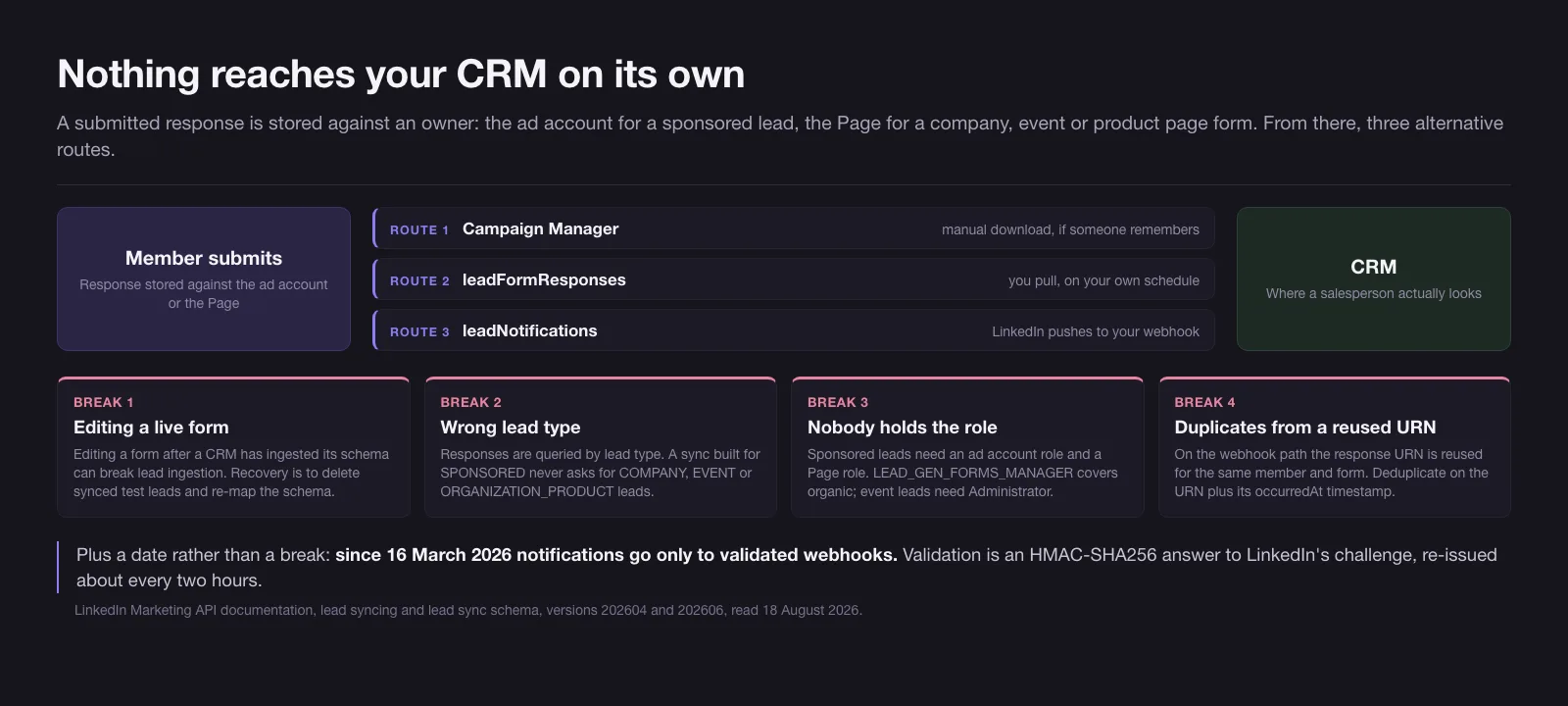
The four failure modes below are all documented by LinkedIn, and all of them fail quietly, which is the property that makes them expensive.
1. Editing a live form breaks the sync. This is the failure mode LinkedIn warns about explicitly: advertisers who have linked forms to a CRM or marketing automation tool are told that editing a form after its schema has been ingested can break the ingestion of lead data. The documented recovery is to delete the test leads already synced and re-map the schema with the updated fields on the third-party side. In practice somebody adds a question on a Tuesday, nobody re-maps anything, and the leads stop arriving without an error appearing anywhere a marketer looks.
2. A sync built for one lead type silently ignores the rest. Lead responses are queried by leadType, and there are four: SPONSORED for leads from ads, COMPANY for a form on your company page, EVENT for a form on an event page, and ORGANIZATION_PRODUCT for one on a product page. An integration wired up for sponsored leads — which is most of them, because that is the one the agency set up — does not fetch the other three. Those leads are not lost, they are simply never asked for.
3. Nobody holds the role that grants access. Reading sponsored leads needs a role on the ad account and one on the Page. Organic leads need a Page role only, and one of the roles that grants it is LEAD_GEN_FORMS_MANAGER — a distinct permission somebody has to deliberately assign; event leads are stricter still, reserved to Administrator and Content Administrator. A Page whose form has been collecting responses for six months while nobody had the role has six months of leads and no reader.
4. Duplicates, from a URN that gets reused. This one is specific to the webhook path. The response URN in a leadNotifications payload is reused for the same member and form combination across repeated actions, such as registering for an event, unregistering and registering again. Deduplicating on that URN alone therefore collapses distinct submissions; the documented approach is a composite key of the URN and the notification’s occurredAt timestamp. Get this wrong in either direction and you either lose real re-engagement or create duplicate records that inflate your lead count and deflate your qualification rate — which, per the table above, is the denominator you are trying to measure.
One more date worth putting in the calendar rather than discovering: since 16 March 2026, lead notifications are pushed only to webhooks that have been validated. Validation is not simply “accept the POST”: the endpoint must be HTTPS and must answer LinkedIn’s challenge with an HMAC-SHA256 of the challenge code signed with your client secret — and keep answering it, because the challenge is re-issued roughly every two hours. A push subscription that quietly fails validation is indistinguishable, from the marketing side, from a campaign that stopped producing leads.
Bidding toward qualified leads only works if the CRM answers back
In the February 2026 API version LinkedIn added MAX_QUALIFIED_LEAD as an optimisation target for lead generation campaigns. It does what the name says: instead of bidding toward the cheapest form fill, the auction bids toward the leads that turned out to be worth something.
The conditions attached to it are the interesting part, and they are specific. The target optimises using qualified lead data sent either from the Conversions API, where the conversion rule type has to be QUALIFIED_LEAD, or from CRM data shared through Business Manager. That is not a setting you switch on; it is a setting that becomes true once your sales system is telling LinkedIn which leads survived. An account with no qualification feedback selects the target and gets nothing from it.
LinkedIn made that feedback loop easier to close in the May 2026 change log, when the Conversions API stopped rejecting events that carry only a lead as the user identifier — a change applied to all active versions rather than gated behind an upgrade. Previously an offline conversion needed enough matching data to tie back to a person; now the lead itself is sufficient, which is exactly the shape of the event a CRM produces when a rep marks a form fill as qualified.
Put the three sections together and the sequence is a strict order, not a menu. Define what qualified means. Route the lead so the definition can be applied. Send the verdict back. Only then does the optimisation target have anything to optimise against. Accounts that select MAX_QUALIFIED_LEAD first and build the loop later have chosen the one order in which none of it works. Where this pays off most is a small named account list, because the definition of “qualified” is already written down — that is the operating logic behind account-based marketing.
Booking the meeting instead of collecting the email
The May 2026 API version also added an analytics metric called appointmentsScheduled, which counts appointments booked through lead generation campaigns. What LinkedIn documents is the metric, not the flow — but a metric counting appointments booked through a lead gen campaign only makes sense if a member who completes a form can be taken straight to booking time with your team, and practitioners posting about the feature in mid-2026 describe exactly that. Treat the booking step as real and the details as worth checking in your own account rather than in a spec.
This is a larger change to the economics than it looks, and it cuts against the format’s own logic. The whole argument for a native form is that removing steps removes leakage. Booking adds a step — but it adds it after the contact details have already been captured, so the downside is bounded. You keep the lead either way; you simply learn, immediately and for free, which of them were willing to give up a calendar slot.
That signal is worth more than most of what a form can ask. A booked meeting is a qualification rate you can read on the day rather than reconstruct from the CRM six weeks later, and it collapses the gap between the two metrics this whole article is about: cost per fill, which the platform reports, and cost per qualified lead, which it does not.
The caution is that not every offer earns a meeting request. A gated report and a demo request sit at opposite ends of intent, and attaching a booking step to the first will mostly produce an empty second screen. Use it where the ask is already a conversation.
The form we would ship, and why it breaks the three-to-four rule
Concrete version, for a mid-market B2B offer with a defined buyer: six visible fields grouped into four asks, one of which is typed, with hidden fields carrying everything else.
Six exceeds LinkedIn’s recommendation of three to four, and that is deliberate. The recommendation is a proxy for friction, and friction is what actually costs you completions — but four of the six fields below pre-fill from the profile and cost the member no typing at all, so the proxy misreads them. Count typing rather than fields and this form asks for two things: a work email, which LinkedIn supplies only where it has one, and a single question in the member’s own words.
| Position | Field | Source | Why it earns the slot |
|---|---|---|---|
| 1 | First name, last name | Pre-filled, editable | Costs nothing, needed for any human follow-up |
| 2 | Work email | Pre-filled where available, often retyped | The domain is what your CRM matches on; personal addresses break routing |
| 3 | Seniority, company size | Pre-filled from profile | Two scoring axes at zero typing cost |
| 4 | One custom question | Typed by the member | The only field an unserious submitter will not bother with |
| Hidden | Campaign, creative, product line, owner | Dynamic values | Attribution and routing that never depended on the buyer’s memory |
Count the visible fields and it reads as six pieces of information, of which at most two — the work email and the custom question — cost the member more than a tap. That is the design principle in a sentence: buy qualification with fields the profile already answers, and spend your one unit of real friction on the question the profile cannot.
Consent checkbox settings are a legal decision rather than a conversion one, so set checkRequired deliberately instead of accepting the default. And whatever you ship, ship it and leave it alone. Every edit to a live form is a chance to break a sync that is currently working, which is why the shape of the form is worth arguing about before launch rather than after.
Two things this form deliberately does not do. It does not attach to a thought leader ad, because that format has no advertiser-controlled destination to attach anything to — the reasons are set out in LinkedIn thought leader ads. And it is not a substitute for choosing the right ad format in the first place; which formats can carry a form at all, and which objective removes them from consideration before you get to compare, is the whole subject of LinkedIn advertising types.
What to change first if you already run LinkedIn Lead Gen Forms
If you run native forms today and have never calculated a cost per qualified lead, that is the first job, and it does not require a project. Take last quarter’s form fills, count how many a salesperson would still call a lead, and put the two numbers into the formula above. Most accounts discover one of two things: the form is winning by a wider margin than they thought and should get more budget, or it has been losing quietly for a year against a landing page nobody rebuilt.
Then check the four break points. They take an afternoon between them: confirm somebody holds the page role, confirm the sync covers the lead types you actually use, confirm the webhook still validates, and confirm nobody edited a live form after the CRM mapped it.
If you would rather hand the whole loop over — the form, the routing, the definition of qualified and the feedback that makes the bidding target mean something — that is part of what we do on LinkedIn ads.
Sources and dates. Field names, question and consent defaults, the hidden field limit, lead types, role requirements, the schema-ingestion warning, the webhook deduplication guidance and the 16 March 2026 validation date were read on 18 August 2026 from LinkedIn’s Marketing API documentation for lead syncing and the lead sync schema, versions 202604 and 202606. MAX_QUALIFIED_LEAD and its two data conditions are from the 202602 change log; appointmentsScheduled and the Conversions API lead-identifier change are from 202605. Three figures do not come from the API and are flagged where they appear: the 12-field cap, the three-to-four recommendation and the three-custom-question cap all sit on LinkedIn’s Lead Gen Form specifications page, checked 10 August 2026. The quoted phrase “come pre-filled with accurate LinkedIn profile data” is from LinkedIn’s own Lead Gen Forms marketing page. LinkedIn ships Marketing API versions monthly and its help pages change without announcement, so treat any specific figure as valid as of that date and re-check the field before a build.
10 / Reader questions
Frequently asked questions
01What are lead gen forms on LinkedIn?
Lead Gen Forms are templates that open inside the LinkedIn feed or inbox when a member clicks your ad's call to action, with contact and profile fields already filled in from their LinkedIn profile. The member submits without leaving LinkedIn, so no landing page sits between the ad and the lead.
02Do LinkedIn Lead Gen Forms produce lower quality leads?
They produce more submissions per dollar, and a larger share of those submissions come from people who were not choosing to convert so much as tapping a button that was already filled in. Quality is not fixed by the format: it is set by which fields you ask for and what happens to the lead afterwards.
03How many fields should a LinkedIn Lead Gen Form have?
LinkedIn allows up to 12 fields and recommends three to four. The useful distinction is not the count but the source: profile-derived fields such as seniority, job function and company size cost the member no typing at all, while a single typed custom question costs real completion rate and is the only field that filters intent.
04Can you add hidden fields to a LinkedIn Lead Gen Form?
Yes, up to 20 per form. Hidden fields carry static or dynamic values that the member never sees and never fills in, using a double-brace pattern such as {{ACCOUNT_ID}}. They are where campaign, account and routing context belongs, instead of a visible question asking the buyer where they heard about you.
05How does a LinkedIn Lead Gen Form work after someone submits it?
The response is stored against an owner — the ad account for a sponsored lead, the Page for a form on a company, event or product page — and can then be downloaded in Campaign Manager, pulled through the leadFormResponses endpoint of the Marketing API, or pushed to a webhook you register through leadNotifications. Nothing reaches a CRM on its own.
06Why did my LinkedIn leads stop syncing to my CRM?
The cause LinkedIn documents explicitly is editing a form after a third-party tool has ingested its schema, which can break the ingestion of lead data. Other causes are a webhook that failed validation, a sync built only for sponsored leads, and nobody holding the page role that grants access to organic forms.
07Is a LinkedIn Lead Gen Form better than a landing page?
Neither wins on cost per lead, because that is the wrong metric. Divide cost per lead by the share that survives a sales conversation, and add the handling cost of the ones that do not. A form that costs a quarter as much per fill still loses if it qualifies at a quarter of the rate.