Published
An ecommerce content strategy decides which text goes on the pages that take money and the pages that feed them — category, product page, buying guide, comparison — rather than only what goes on the blog. Most published advice covers only the blog half. The half that moves the add-to-cart rate is written on templates, at SKU scale.
Almost every guide published under this phrase is a guide to the blog: posts, social, video, user-generated content, email. Those channels are real, and they are also the part of the shop that never has a price on it. The pages that do have a price carry text too, and hardly anyone writes about who owns it, what it has to say, or which number tells you it worked.
How this was checked. Everything Google served in the United States for “content strategy for ecommerce” on 25 August 2026 was recorded: nine organic results, an AI Overview large enough to carry an embedded video, and a People Also Ask block of six questions. Eight of the nine results are vendor or platform blogs, and not one of the nine is organised by the templates a shop is built from. All six People Also Ask questions ask for a numbered list — five pillars, seven steps, five C’s, seven C’s, six types, seven pillars. The term is searched rarely, a mean of 140 a month across a twelve-month series running from 30 to 260, and the recorded top-of-page bid against it was $18.32. Guidance quoted below is from Google Search Central documentation, read in August 2026. The prioritisation example further down is illustrative and labelled where it appears.
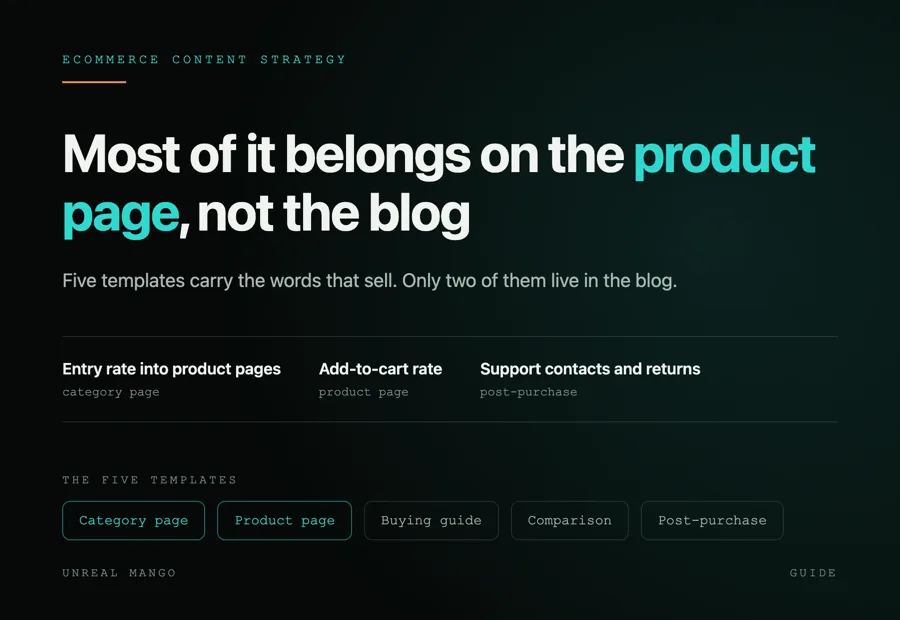
Five templates carry ecommerce content, and only two of them live in the blog
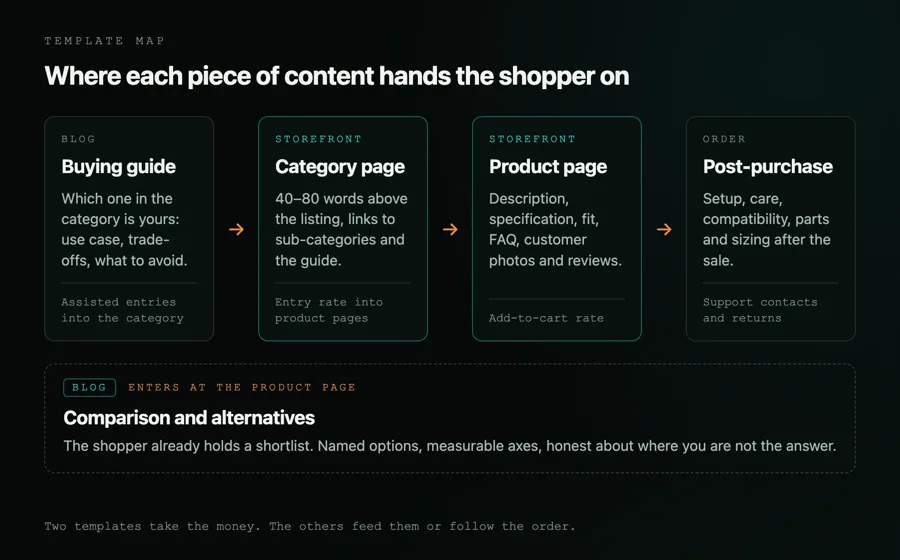
Strip out the channel language and an online shop has five places where words do work:
- The category page, or product listing page: the shopper narrows, the crawler finds products.
- The product page: the shopper decides.
- The buying guide: the shopper works out which product in the category is theirs.
- The comparison or alternatives page: the shopper checks you against a shortlist they already hold.
- Post-purchase content: setup, care, compatibility, spare parts.
Two of the five are commercial templates that ship with the storefront: the category page and the product page. The guide and the comparison usually live in a blog, and they earn that slot by handing traffic to the two that sell. Post-purchase content lands wherever the shop keeps its help pages.
None of this replaces the standing decisions above it — who you publish for, what you promise them, what you refuse to publish. Those get settled once, in a content strategy, and then applied template by template. What follows is the applying.
Template by template: what the page owes the shopper and which number it moves
One row per template. The number in the third column is the primary one: the metric that should move first if the content is right, and the one to argue about if it does not.
| Template | What the content actually is | The number it moves first | How to check it |
|---|---|---|---|
| Category page (PLP) | 40–80 words above the listing naming what the category covers and how to choose inside it, plus links to sub-categories and the guide | Entry rate from the category into product pages | Segment sessions landing on the PLP and follow them to a product page |
| Product page (PDP) | Description, specification table, fit and compatibility logic, FAQ, customer photos and reviews | Add-to-cart rate on that template | Rewrite a matched group of SKUs, hold a comparable group back, compare |
| Buying guide | The choice the category cannot make for you: use case, trade-offs, what to avoid, with links into the category | Assisted entries into the category | Guide to category to cart as a path, not guide pageviews |
| Comparison and alternatives | Named options on measurable axes, honest about where you are not the answer | Sessions that reach checkout from an informational page | The same holdout method, one matched pair of comparison pages at a time |
| Post-purchase content | Setup, care, compatibility, parts and sizing after the sale | Support contacts and returns per hundred orders | Ticket volume by SKU before and after |
One of those five numbers is not a marketing number at all. Support contacts and returns belong to operations, and they are often the fastest to move, because a page that answers the question stops the email.
Category pages: the copy above the listing works, the copy below it mostly does not
A category page has two readers. The shopper wants to narrow a hundred products to five. Googlebot wants to reach the products at all, and Google is plain about the condition: “If category pages don’t include direct links to all products in a category, Googlebot might not find all of your products by crawling alone,” and “It’s strongly recommended to link to all products that you wish indexed.” On a catalogue where that is not achievable, the same page gives the escape hatch: “If it’s not possible to link to all pages, use a sitemap or a Google Merchant Center feed.”
The block of prose under the grid serves neither of them. It sits below the fold and below the pagination, and it exists because somebody was told the page needed 500 words. Replace it with 40 to 80 words above the listing saying what is in the category and how to choose inside it, plus links to the sub-categories and to the guide.
The real content problem on a category page is the filters. Google’s own account of what faceted navigation does to a crawl: “the crawlers will typically access a very large number of faceted navigation URLs before the crawlers’ processes determine the URLs are in fact useless,” and “if crawling is spent on useless URLs, the crawlers have less time to spend on new, useful URLs.” It names two methods for preventing that crawl, and they are the ones to reach for first:
- Disallow filter parameters in robots.txt, with patterns of the form
disallow: /*?*color=. - Encode filters in URL fragments rather than in parameters, because a fragment is not a separate URL to crawl.
Two further methods exist, and Google demotes both itself. rel="canonical" on filtered URLs “may, over time, decrease the crawl volume of non-canonical versions of those URLs”, and rel="nofollow" on anchors pointing at filtered results “may be beneficial” — but only if every anchor pointing to that URL carries the attribute. Google’s own verdict on the pair: they are “generally less effective in the long term than the previously mentioned methods”.
The exception is the filter combination people search for by name. “Waterproof hiking boots” is a category, not a filter: give it a real URL, a real name and its own 40 to 80 words. For the filter URLs you do want crawled, Google asks for an HTTP 404 at the filtered URL itself when a combination returns no results, rather than a redirect to a shared error page. Everything else stays out of the index.
Google publishes nothing that says copy above the grid outranks copy below it, and this is not a ranking claim. It is that the words above the listing get read, the words below it get skipped, and whatever crawl the page is given goes on filter URLs rather than on either.
Product pages carry five separate assets, not one description
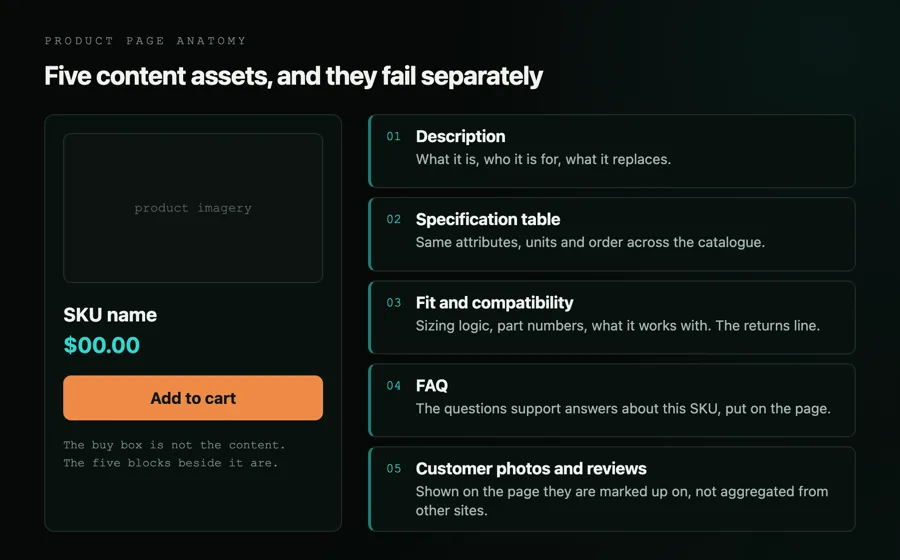
“Write better product descriptions” is where most advice stops. A product page that sells carries five things, and they fail separately:
- Description — what it is, who it is for, what it replaces. Two hundred words at most, written for somebody deciding between this and one other thing.
- Specification table — the same attributes, in the same units, in the same order across the whole catalogue. This is the asset that feeds filters, comparison pages and structured data, and it is the one usually left to whoever loaded the SKU.
- Fit and compatibility — sizing logic, what it works with, part numbers. On apparel and on parts, wrong-size and wrong-fit returns trace straight back to this block, and it is content, not customer service.
- FAQ — the questions support answers about this SKU, on the page. If a question arrives twice a week by email, it belongs here.
- Customer photos and reviews — the part of the page a shopper believes without discounting it first.
Manufacturer-supplied copy fails all five at once, because every retailer selling the SKU is running the same words. Google’s spam policies describe the extreme version of this under thin affiliation: pages where “the product descriptions and reviews are copied directly from the original merchant without any original content or added value”. A retailer is not an affiliate, and shipping the supplied copy is not automatically a policy problem. The failure is the same one, though: if nothing on the page is yours, nothing on it is a reason to buy from you rather than from the next shop with the identical paragraph.
Reviews come with rules worth reading before the block gets built. Google requires that you “Don’t aggregate reviews or ratings from other websites”, and that “the review content you mark up are readily available to users from the marked-up page”; incentivised reviews have to be disclosed. Collecting, moderating and publishing real customer photos is a content programme with an owner and a budget, not a plugin installed in a sprint.
Buying guides eat the category they were meant to feed
The guide answers “which of these is right for me”. The category answers “show me the ones you sell”. Written without a head term each, both end up chasing the same phrase, and two of your URLs compete for one result.
It shows up in three places. In Search Console, one query lands on two URLs across the same weeks. In a site search for your own category phrase, the guide comes back above the category. In the storefront, the guide takes the traffic and the category takes the sales, so the report says the blog is working and the category page is failing.
The fix is a head term per URL. The category keeps the commercial phrase, the guide takes the choosing phrasing — how to choose, what size, which type for what use — and links down into the category using the category name as the anchor text. The category links up to the guide once, from above the listing. Which guides get written at all, and in what order, is a question of measured demand rather than of enthusiasm, and the method for that sits in SEO content strategy.
Comparisons and alternatives sit closer to the cart than any other blog format
A shopper reading a comparison has already decided to buy something. That is the whole reason the format is worth a slot: the intent behind it is a shortlist, not a curiosity.
Four things make one work. Name real options, the ones that turn up on the live results page for the query, rather than a filler list. Compare on measurable axes — price band, lead time, sizes stocked, warranty, what ships in the box — because vague adjectives are exactly what gets dropped when an AI Overview summarises the page. Say where you are not the answer; a comparison in which you win every row is read as an ad and treated as one. And do not invent anyone else’s prices: one honest market range, labelled as a range, beats a fake table of competitor quotes that any reader can disprove in a browser tab.
The page has to name alternatives to be useful. It does not have to link to them.
Two hundred SKUs and twenty thousand SKUs are different content problems
At 200 SKUs, a person can write every description. At 20,000, nobody can, and the strategy has to say what happens to the other 19,800 rather than pretending they will get their turn.
Tier the catalogue. The top few per cent by revenue get handwritten descriptions, FAQs and their own photography. The middle gets copy assembled from real attributes — material, capacity, fit, compatibility — so that every sentence carries a fact that differs between SKUs. The tail gets a complete specification table, good images and nothing else. An empty paragraph of adjectives is worse than no paragraph, because it costs the same to maintain and adds nothing to distinguish the page.
That is also where generated copy gets dangerous. Google’s spam policies define scaled content abuse as pages “generated for the primary purpose of manipulating search rankings and not helping users”, a practice it says is “typically focused on creating large amounts of unoriginal content that provides little to no value to users, no matter how it’s created,” and they list “Using generative AI tools or other similar tools to generate many pages without adding value for users” as an example. The workable test is mechanical: if a sentence would be true of any other SKU in the category, it is padding, not content. Attributes pass that test, and adjectives do not.
The second scale problem is variants. One URL per buying decision, not per colourway — unless people search for the colourway, in which case it is a decision after all. Splitting one product across nine near-identical URLs splits whatever authority the product has across nine URLs instead of concentrating it on one, and gives the shopper nine ways to land on the wrong one.
Which product pages get rewritten first: margin, traffic and the conversion gap
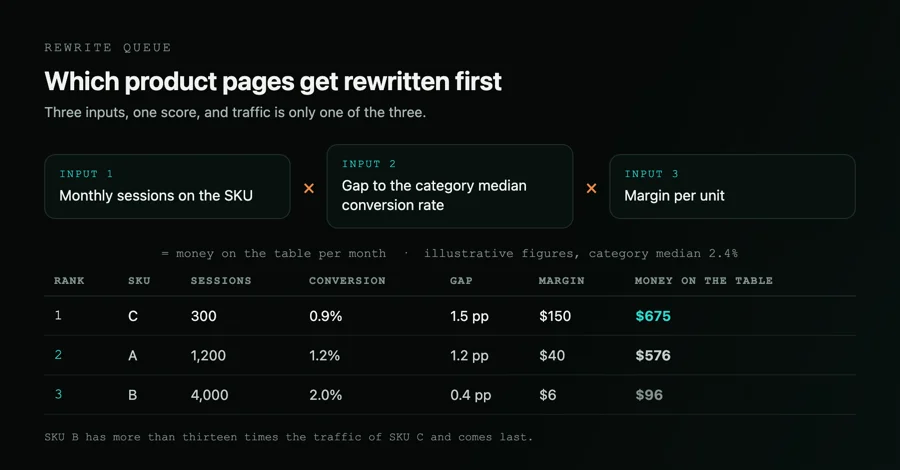
Rewriting in SKU-code order is the default and it is close to random. Three inputs put a number on each candidate: monthly sessions, the gap between that SKU’s conversion rate and the median for its category, and margin per unit. Multiply them and you get the money on the table per month.
The example below is illustrative — the inputs are arbitrary demonstration values chosen to show the arithmetic. They are not measurements from an account, and none of them is a benchmark for any industry:
| SKU | Sessions / month | Conversion rate | Gap to category median (2.4%) | Margin per unit | Money on the table |
|---|---|---|---|---|---|
| A | 1,200 | 1.2% | 1.2 pp | $40 | $576 |
| B | 4,000 | 2.0% | 0.4 pp | $6 | $96 |
| C | 300 | 0.9% | 1.5 pp | $150 | $675 |
SKU C wins on 300 sessions a month. SKU B, with more than thirteen times the traffic, comes last, because 4,000 sessions times a 0.4 point gap times a $6 margin is $96. Traffic alone would have picked B first and burned the quarter on it.
Two cautions. Your own category median is the comparison that matters, not a published industry average, and a SKU below the median may be below it for a reason content cannot fix — price, stock, delivery time. Closing the gap entirely is not the forecast either; it is the ceiling.
The holdout that separates content from every other change on the page
A rewrite ships in the same weeks as a promotion, a price change, a stock-out and somebody’s template tweak. Compare this month against last month and you are measuring all of them at once.
Split the candidate SKUs into two matched groups — same categories, same price bands, similar baseline conversion and traffic. Rewrite one group. Leave the other alone for the whole measurement window, including the parts of it where leaving money on the table is uncomfortable. Compare add-to-cart rate between the groups over the same weeks, so that the season, the promotion and the price change land on both.
Then be honest about the size of the window. The standard approximation for how many sessions each group needs is 16 × p × (1 − p) ÷ d², where p is the baseline rate of the metric you are actually comparing and d is the absolute difference you want to detect, at roughly 80% power and 95% confidence. Take your own add-to-cart rate as p: at a 6% baseline, chosen here only to show the arithmetic, detecting a 10% relative lift — 6.0% against 6.6%, so d is 0.006 — needs about 25,000 sessions per group. Read p off your own account rather than off a benchmark, because the lower the baseline the larger the group: the same relative lift measured on a 2% purchase-conversion baseline would need about 78,000. Tens of thousands, not thousands. A shop that cannot reach that in a reasonable window should measure the rewrite on something coarser and more honest, such as returns and support contacts per hundred orders, and stop pretending the conversion delta is readable.
A ten-point audit for one product page
Run this on a page you already sell from, before rewriting anything:
- Does the first sentence say what the product is and who it is for, without an adjective?
- Is any of the description word-for-word the manufacturer’s?
- Does the specification table use the same attributes and units as the rest of the category?
- Can a shopper work out fit or compatibility without emailing you?
- Is every question that support answers more than twice a week about this SKU on the page?
- Are there customer photos, and were they collected with permission to publish?
- Is the review markup pulling only from reviews shown on the page itself?
- Does the page link back to its category with the category name as the anchor?
- Does anything on the page distinguish it from the same SKU on a competitor’s site?
- If this SKU had double the conversion rate, would you know within a month?
Nine of those are content questions. The tenth is the one that decides whether the other nine ever get answered twice.
Most ecommerce content plans fail on ownership rather than on ideas: the blog has an editor, and the 20,000 product pages have nobody. Fixing that is a catalogue project with a schedule, a tiering rule and a measurement window attached, which is the shape most of our ecommerce and D2C work takes before a single word gets rewritten.
11 / Reader questions
Frequently asked questions
01What is a content strategy for ecommerce?
An ecommerce content strategy decides which text goes on the pages that take money and the pages that feed them — category pages, product pages, buying guides and comparisons — who writes each one, and which number proves it worked. It covers the whole catalogue, not just an editorial calendar.
02Is there a content strategy for ecommerce template?
The template map in this article is the whole template: five rows, one per page type, and four columns — the page, what the content actually is, the number it moves first, and how to check that number. Anything longer usually records the work instead of deciding it.
03What is an example of an ecommerce content strategy?
A worked example: hero SKUs get handwritten descriptions and FAQs, the middle of the catalogue gets templated copy built from real attributes, the tail gets specifications and images only, one buying guide is written per category and links down into it, and add-to-cart rate on rewritten SKUs is the success measure.
04What are the 7 C's of e-commerce?
There is no single agreed list, and sources disagree on both the members and the count, so treat it as a teaching device rather than a finding. One widely taught version runs context, content, community, customisation, communication, connection and commerce; another swaps in convenience and cost. Neither tells you what to publish.
05What are 6 types of e-commerce?
Six is a convention rather than a fixed taxonomy, but the six usually counted are B2B, B2C, B2G, C2B, C2C and D2C. The distinction that changes your content is narrower: whether the shopper buys the same item repeatedly, and whether anyone else sells the identical SKU.
06Can AI write product descriptions for thousands of SKUs?
It can draft them, and the risk is scale without value. Google's spam policies define scaled content abuse as many pages generated for the primary purpose of manipulating search rankings and not helping users, typically by creating large amounts of unoriginal content that provides little to no value, and they list generative AI used to generate many pages without adding value as an example.
07Should a buying guide live in the blog or in the category tree?
Put it wherever it will not compete with the category page for the same query, which usually means the blog for broad how-to-choose guides and the category tree for guides tied to one range. The test is not where it sits but whether two of your URLs now rank for one phrase.
08How do you know whether product page content increased conversion?
Rewrite one matched group of SKUs and hold a comparable group back, then compare add-to-cart rate across both over the same weeks. Without a holdout you are measuring the season, the promotion and the price change as well as the words, and you cannot separate them afterwards.
09Does a blog still help an ecommerce site?
Yes, in two formats and mostly indirectly: buying guides that hand traffic to a category, and comparison pages that catch shoppers already holding a shortlist. Judged on its own pageviews, an ecommerce blog usually looks like a failure; judged on entries into category and product pages, it either earns its slot or it does not.