
Published
Export a TikTok ad at 1080 x 1920, 9:16, in an .mp4, under 500 MB and above 2,500 kbps, and keep it under 60 seconds. That single file clears every TikTok video ad format, auction and reservation alike. The published minimums are lower, and that is where the trouble starts: TikTok documents its specs across a dozen separate help pages, and those pages do not agree with each other.
How this was checked. For this query in the United States on 10 August 2026, Google returned ten organic results, five of them on ads.tiktok.com itself, with no People Also Ask block and no AI Overview. Every TikTok spec below was read from TikTok’s own help articles on that date, and each section names the page it came from. Two things on this page are not from TikTok and are labelled where they appear: the safe-zone pixel readings, which TikTok ships as template files rather than numbers, and the safe box derived from them. Where two TikTok pages give different answers for the same field, this page prints both rather than picking one. Specs decay fast enough that the seventh organic result still carries 2025 in its title while showing an April 2026 update date, so treat any figure here as valid as of 10 August 2026 and re-check before a large production run.
Every TikTok video ad spec, by buying type
Two spec sets exist, and which one applies depends on how you bought the placement, not on what the creative looks like.
| Field | Auction In-Feed | Reservation In-Feed and TopView |
|---|---|---|
| Vertical | 9:16, ≥ 540 x 960 px | 9:16, ≥ 540 x 960 px |
| Horizontal | 16:9, ≥ 960 x 540 px | 16:9, ≥ 960 x 540 px (TopView: vertical only) |
| Square | 1:1, ≥ 640 x 640 px | 1:1, ≥ 640 x 640 px (TopView: vertical only) |
| Containers | .mp4, .mov, .mpeg, .3gp, .avi | .mp4, .mov, .mpeg, .3gp |
| Duration | up to 10 minutes | 5–60 s, recommended 9–15 s |
| File size | ≤ 500 MB | ≤ 500 MB |
| Bitrate | ≥ 516 kbps | ≥ 2,500 kbps |
| Spark Ads Pull | .mp4 or .mov, no duration restriction | .mp4 or .mov, no duration restriction |
Five rows differ, and only one of them is obvious. TopView publishes vertical 9:16 alone, so the horizontal and square options that reservation In-Feed keeps are gone the moment TopView is on the plan. The container list drops .avi. The bitrate floor jumps by a factor of 4.8. And the duration ceiling collapses from ten minutes to sixty seconds.
The profile photo is identical on both: 98 x 98 px, 1:1, .jpg, .jpeg or .png, under 50 KB, with key elements centred inside a 66 x 66 px area. That 66 x 66 figure is the only safe zone TikTok states as a number anywhere in its In-Feed documentation, and it applies to the avatar, not to the ad.
Where TikTok’s documentation contradicts itself
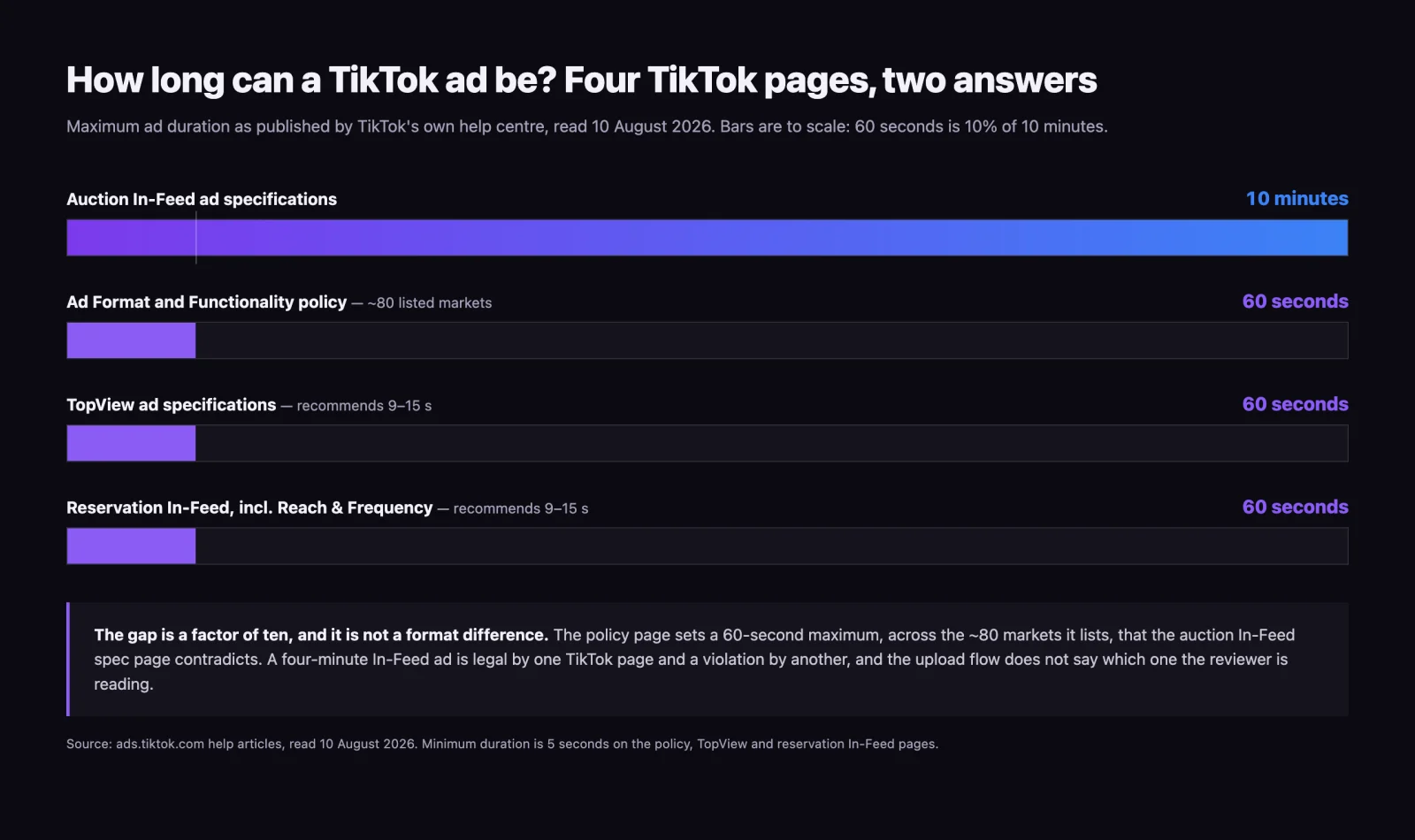
Four TikTok pages answer the question “how long can the ad be” and they return two incompatible answers.
- Auction In-Feed ad specifications: up to 10 minutes.
- Ad Format and Functionality policy: “The duration of the ad must be a minimum of 5 seconds, and a maximum of 60 seconds.”
- TopView ad specifications: 5–60 s, recommend 9–15 s.
- Reservation In-Feed, including Reach & Frequency: 5–60 s, recommend 9–15 s.
The spec page and the policy page are not describing different formats here. The policy sets a 60-second maximum, under its ad quality section, for the roughly eighty markets it lists — a list that includes the United States, the United Kingdom and the EU, and excludes Japan, Korea, India and most of Southeast Asia. Within those markets it contradicts the auction In-Feed spec page by a factor of ten. A 4-minute In-Feed ad is legal by one page and a policy violation by another, and nothing in the upload flow tells you which one the reviewer is reading.
The bitrate split is the more expensive one in practice. A file exported at 800 kbps satisfies auction In-Feed and is rejected outright by TopView and reservation In-Feed, which both require 2,500 kbps or higher. Agencies that build one master at the auction floor discover this at the point where a reservation is already booked and the flight date is fixed.
Caption limits diverge the same way. TopView publishes a hard maximum of 100 characters. Reservation In-Feed publishes 150 characters for a Spark Ads Pull caption, or blank, plus a separate suggestion to stay within 100 characters in non-CJK languages. Auction In-Feed publishes no character number at all, only a display constraint of four lines against the Spark Ads caption, which is a truncation rule rather than a rejection rule. Three pages, three different shapes of answer for the same field: a maximum, a maximum plus a suggestion, and a line count.
The safe zone is three variables, not a rectangle
This is where TikTok behaves better than most platforms and is quoted worse than most. Its In-Feed documentation says outright that “the safe zone size is determined by the dimension (vertical, horizontal, or square), ad caption length, and any additional formats used.” That single sentence explains why every published TikTok safe-zone figure is different from every other one: they are all correct for one combination of those three variables and wrong for the rest.
Instead of a number, TikTok ships downloadable template files. As of 10 August 2026 the In-Feed article offers four:
| Template file | Size |
|---|---|
| In-Feed Standard (LTR) | 84.29 KB |
| In-Feed with Anchor Standard (LTR) | 3.86 MB |
| In-Feed Arabic (RTL) | 84.76 KB |
| In-Feed Arabic with Anchor (RTL) | 3.87 MB |
Two things fall out of that list that almost nobody publishes. First, adding an anchor — TikTok’s term for the interactive add-on that sits above the caption stack — changes the safe zone enough to need its own template, so a spec sheet that ignores add-ons is describing a frame you are not actually shipping into. Second, the Arabic variants are right-to-left, which means the entire interface mirrors: the action rail moves from the right edge to the left, and a creative laid out around a right-hand reserve puts its key elements directly under the buttons in RTL markets. If a campaign runs in the Gulf, the safe zone is not the one on your cheat sheet.
Safe-zone coordinates for a 1080 x 1920 canvas
TikTok publishes the templates, not the numbers. The readings below are therefore not TikTok figures: they are the spread across four third-party guides collected on 10 August 2026, each shown with its publisher and update date. They do not agree, which is exactly what the three-variable rule predicts.
| Source | Updated | Top | Bottom | Right | Left |
|---|---|---|---|---|---|
| Zeely | 23 Dec 2025 | 150–200 px | 250–300 px | ~120 px | not given |
| EzUGC | 21 Jun 2026 | 130 px | 484 px | 140 px | 44 px |
| Creamate | 3 Jul 2026 | ~140 px | ~400 px | ~180 px | ~60 px |
| Recharm | 20 Jul 2026 | ~120–130 px | ~300–320 px | ~120 px | ~60 px |
| Widest of the four | — | 200 px | 484 px | 180 px | 60 px |
Design against the widest value on every edge and you clear all four at once. On a 1080 x 1920 canvas that puts the safe box at x from 60 to 900, y from 200 to 1436 — a rectangle of 840 x 1236 px. That box is a derivation from the table above, not a published TikTok specification, and it reflects the standard In-Feed layout only. None of the four guides states that it measured the anchor template, so an ad carrying an interactive add-on needs that template checked directly.
The box is 50.1% of the frame. Half of a TikTok ad is interface, and the half that survives is not centred: it sits 60 px from the left edge and 180 px from the right, so the optical centre of your safe area is 60 px left of the canvas centre. Centre a logo on the canvas and it renders off-centre inside the visible area.
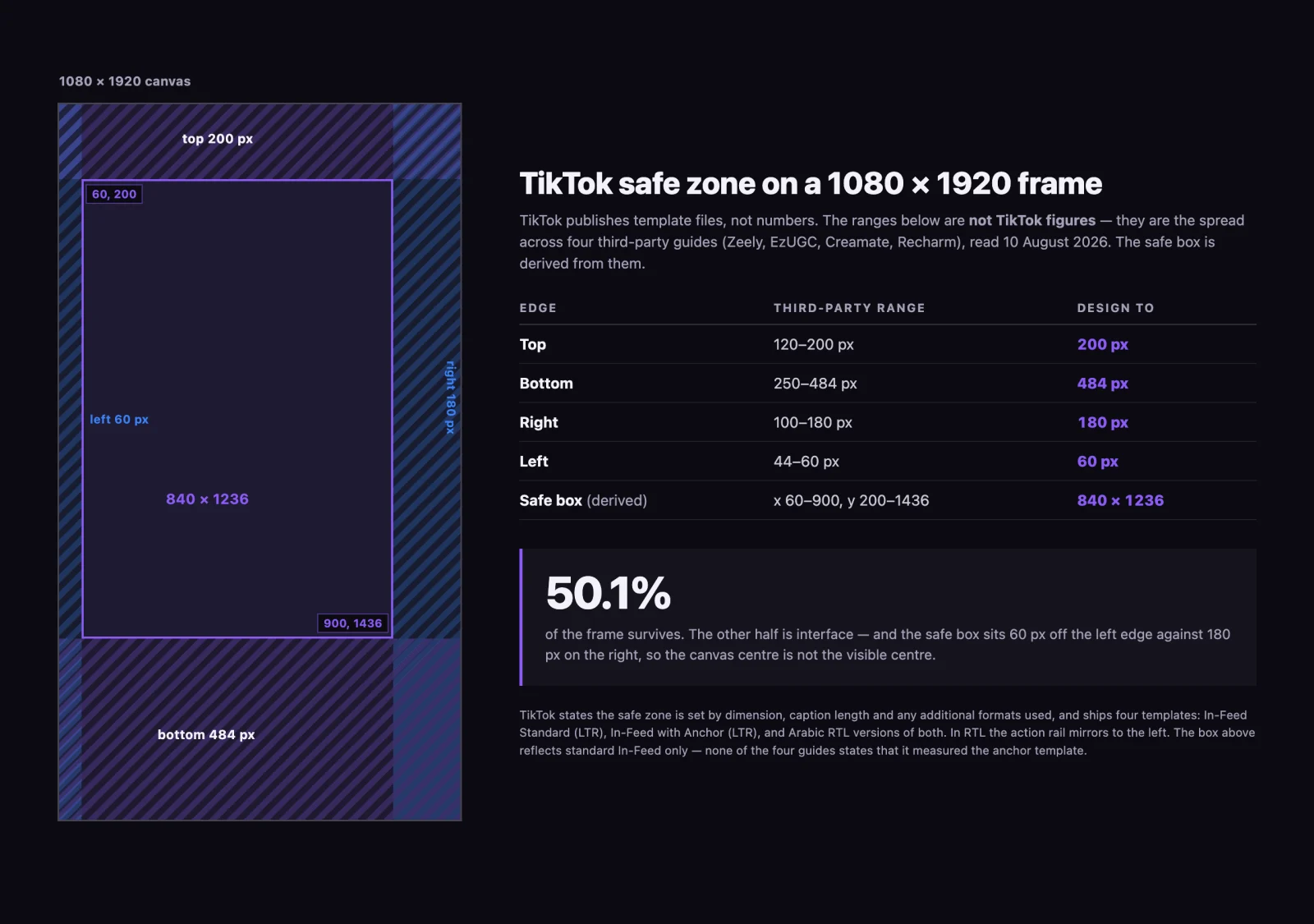
Expressed as percentages, which survive a change of canvas size: 10.4% off the top, 25.2% off the bottom, 16.7% off the right, 5.6% off the left. A quarter of the frame goes to the caption stack alone, which is the largest single reserve on any edge here.
What a vertical built for Instagram loses on TikTok
The reason cross-posted verticals break is not the aspect ratio, which is 9:16 on both. It is the right rail. TikTok’s action column carries the avatar, like, comment, save, share and a rotating record disc, and the widest published reserve for it is 180 px — wider than the right-hand figure most published Reels guidance uses. Anything laid out flush to a narrower right margin ends up in that band: cross-posted end cards, price tags and logo lockups sitting under a button.
Meta’s own safe-zone numbers are a separate argument with their own published spread, and they are set out in our guide to Facebook ad sizes by placement rather than repeated or re-derived here. The organic-versus-paid split inside the Stories frame has its own numbers in Instagram Story dimensions, and LinkedIn’s per-format sizes and character limits are in LinkedIn ads dimensions. The practical rule when one master serves several platforms: lay out to the widest reserve on each edge across every destination, not to the platform you exported for first.
Two TikTok-specific failure modes have no Meta equivalent at all. The caption is rendered “in white with a uniform font that can’t be customized,” so any burned-in caption styling you designed is competing with a system caption you cannot restyle. And TikTok’s ad policy requires that “ad content must be dynamic,” that “static images should not occupy more than 50% of the video,” and that the ad “must contain audio” — a silent, mostly-static cutdown that passes Meta review can be rejected here on content rules rather than on specs.
Which formats are auction and which need a reservation
The buying type decides your minimum spend, your lead time and, as shown above, your bitrate floor.
| Format | Buying type | What it is | Notes |
|---|---|---|---|
| In-Feed | Auction | Standard feed placement | Widest spec tolerance of any format |
| Spark Ads | Auction | Ads run through an existing organic post | Pull path published as “no restrictions” on duration |
| Carousel | Auction | 2–35 images, one caption, one CTA | Music is mandatory, minimum 2 s, loops |
| Search Ads | Auction | Placement against TikTok search keywords | TikTok’s Search Ads creative page: “Video and image formats are the same as in-feed campaigns” |
| Global App Bundle | Auction | Image ads outside the TikTok app | TikTok lists its placements as CapCut and Fizzo only |
| Pangle | Auction | TikTok’s third-party publisher network | Its own asset sizes, including banner-only formats |
| Reservation In-Feed (Reach & Frequency) | Reservation | Fixed CPM, planned reach and frequency | Bookable up to 225 days ahead |
| TopView | Reservation | First in-feed video on app open | Vertical 9:16 only, 2,500 kbps floor |
| TikTok Pulse | Reservation | Adjacency to top trending content | Pulse Core and Pulse Premiere |
Pulse belongs in the reservation column on TikTok’s own wording: its tentative-reservation article opens “Tentative reservation is a method of reserving a Reach & Frequency or Pulse campaign,” and the Pulse Core setup page describes a “reservation purchase method” and says the offering is “available for select customers.” Pulse Premiere sits alongside publisher content from Disney, NBCUniversal and sports leagues, while Pulse Core covers Max Pulse plus category, seasonal and custom lineups.
Reservation is not simply a premium tier of the same product. It buys a fixed CPM instead of dynamic auction bidding, and it can be locked up to 225 days before the flight. Access is gated: the Reach & Frequency page tells advertisers who do not have it to “contact your sales representative.” Tentative reservations hold inventory on a sliding scale — 14 days when the start date is 30 or more days out, 3 days inside the 7-to-30-day window, 1 day inside 3 to 7 days, and no tentative reservation at all within 3 days of the start.
The two minimum budgets are the fastest way to misplan a TikTok test. TikTok’s Budget and Bidding documentation states “the minimum budget is $50 at the campaign level and $20 at the ad group level.” It does not say whether those are daily or lifetime figures, and it does not spell out how the two interact — but read as concurrent floors, which is how Ads Manager enforces budgets at both levels, a structure with four ad groups needs at least 80 dollars flowing through it regardless of what the campaign line says. Plan a five-ad-group test against the 50-dollar campaign figure alone and the structure will not run.
Image, Carousel and Pangle specs, which are three different products
Everything above concerns video in the TikTok feed. The static formats follow different rules and, in one case, do not appear on TikTok at all.
Carousel Ads. Standard Carousel takes a minimum of 2 and a maximum of 35 images, as .jpg, .jpeg or .png, at a suggested ≤100 KB each, in 1200 x 628 horizontal, 640 x 640 square or 720 x 1280 vertical. Music is not optional: it must be present, at least 2 seconds long, and it loops. Standard Carousel sends every image to one URL; VSA Carousel, which is catalog-powered, gives each product image its own link but shows a maximum of 20 and accepts only uploaded music, not the Commercial Music Library.
Global App Bundle image ads. These are the ones most cheat sheets file under “TikTok image ad specs,” and they do not run on TikTok. TikTok’s own page lists their placements as App Open in CapCut and Fizzo, In-Feed and 2-Column Feed in CapCut, Banner in CapCut, Interstitial in CapCut and Fizzo, and Native in Fizzo. Their specs are vertical 9:16 at ≥720 x 1280, horizontal 16:9 at ≥1280 x 720, square 1:1 at ≥640 x 640, in .jpg, .jpeg or .png within 100 MB. Their text limits are the most precise TikTok publishes anywhere: app names 4–40 Latin characters or 2–20 Asian, brand names 2–20 Latin or 1–10 Asian, and ad descriptions 1–100 Latin or 1–50 Asian, with emojis banned from names and from descriptions, {} and # banned from descriptions, and punctuation and spaces counted against the limit.
Pangle. TikTok’s third-party publisher network is a separate product with its own asset sheet: video at 1280 x 720, 720 x 1280 or 720 x 720 up to 10 minutes and 500 MB, images at 1200 x 628, 640 x 640 or 720 x 1280 plus banner-only sizes of 600 x 500, 640 x 200 and 640 x 100, carousels of up to 50 images, and playables as a .zip under 5 MB. Its ad formats are listed as Interstitial, Rewarded, App Open, Native and Banner — none of which exist in the TikTok feed. TikTok’s asset page does not name the apps Pangle serves into, so do not assume the CapCut and Fizzo list above applies here.
Character limits TikTok publishes, and the field it leaves blank
| Field | Limit | Source |
|---|---|---|
| Account name, all formats | 1 line, ≤20 characters (≤10 CJK) | Auction and reservation In-Feed, TopView |
| Account name, recommended | 4–10 characters (2–5 CJK) | TopView |
| Ad caption, TopView | ≤100 characters, ≤4 lines displayed | TopView |
| Ad caption, Spark Ads Pull (reservation) | ≤150 characters, or blank | Reservation In-Feed |
| Ad caption, reservation, suggested | ≤100 characters (≤50 CJK) | Reservation In-Feed |
| Ad caption, auction In-Feed | no character figure published; ≤4 lines displayed against the Spark Ads caption | Auction In-Feed |
| Ad description, Global App Bundle | 1–100 Latin, 1–50 Asian | Global App Bundle |
One rule about captions costs more than any of the counts. TikTok states that ad captions “do not support any clickable links, symbols (@), or hashtags” — so a caption ported from an organic post loses its @-mentions and hashtags silently. The suggested limits sitting below the hard maximums are TikTok’s own hedge: on reservation In-Feed it publishes a 150-character maximum and then suggests staying within 100, which means the number that governs a caption meant to be read is the suggestion, not the ceiling.
A separate trap sits in the search results themselves. The eighth organic result for this query on 10 August 2026 is ads.tiktok.com/toolbox/preview/, and Google’s snippet for it reads “Ad Specs for Videos: Format:MP4; Maximum File Size: 5MB; Video Length: 3-5 seconds.” That page is TikTok’s Business Asset Studio, a preview tool, and those are upload requirements for the preview, not for an ad. The page is a JavaScript application that returns no text to automated retrieval, so the quote above is Google’s snippet rather than the page body — but it is what a buyer searching this term is shown on TikTok’s own domain, one position above two of the best third-party guides. A 5 MB, three-to-five-second cap would gut a production spot.
One master export that satisfies every TikTok video format
The contradictions above collapse into a single export recipe, because every conflicting field has a strict side and a loose side. Build to the strict side and both are satisfied. This covers the video formats; Carousel, Global App Bundle and Pangle are separate builds with their own numbers, given above.
- 1080 x 1920, 9:16. Above the 540 x 960 floor on every format, and the only ratio TopView accepts.
- .mp4. The one container present in every TikTok list, auction and reservation. TikTok does not name a codec on any of these pages; H.264 is the safe default because it is what an .mp4 carries by convention, not because TikTok specifies it.
- 2,500 kbps or higher. Clears the reservation floor, which automatically clears the 516 kbps auction floor.
- Under 500 MB. Identical across every video format, so it is never the constraint that moves. It does not apply to the image formats, which cap at 100 MB or lower.
- Under 60 seconds, ideally 9–15. Satisfies both the policy ceiling and the reservation ceiling, and matches TikTok’s own recommendation.
- Key elements inside x 60–900, y 200–1436. Clears the widest of the four published readings on every edge, for standard In-Feed. Running an interactive add-on means checking the anchor template instead.
- Audio present, motion throughout, static frames under half the runtime. Policy requirements, not spec requirements, and they reject creatives that pass every dimension check.
The cost of this discipline is one export, not several. If the same footage also has to serve YouTube and the horizontal feeds, the shooting decision that makes that possible is covered in video aspect ratios by platform; the numbers here are the TikTok end of it. The cost of skipping the recipe is a reservation booked against a file that fails ingest, which is a scheduling problem rather than a creative one. If planning the format mix and the buying type is the part that keeps stalling, that is the work our TikTok advertising team does before anything gets exported.
Spark Ads deserve their own treatment: the creator authorisation flow, the 60-day code window and what happens to the organic post’s own metrics are a different subject from specs, and are covered separately.
10 / Reader questions
Frequently asked questions
01What are the TikTok ad specs?
Export 1080 x 1920 pixels at 9:16 in an .mp4, under 500 MB, at 2,500 kbps or higher. TikTok's published floors are lower than that, at 540 x 960 pixels and 516 kbps for auction In-Feed, but a file built to the higher numbers clears every video format including the reservation ones. Square 1:1 needs 640 x 640 and horizontal 16:9 needs 960 x 540, though TopView accepts vertical only.
02What is the safe zone for TikTok ads?
TikTok does not publish one as a number. Its In-Feed documentation states the safe zone size is determined by the dimension, the ad caption length and any additional formats used, and ships four downloadable template files instead. Across four third-party guides read on 10 August 2026 the widest reserve on each edge is 200 pixels at the top, 484 at the bottom, 180 on the right and 60 on the left of a 1080 x 1920 frame, which leaves a safe box of 840 x 1236 pixels, or 50.1% of the frame.
03What is the TikTok ad copy character limit?
100 characters for a TopView ad caption and 150 for a Spark Ads Pull caption on reservation In-Feed, both documented by TikTok. Auction In-Feed has no published character number at all: against its Spark Ads caption TikTok gives a display limit of four lines instead. The account name shows on one line at up to 20 characters, or 10 in Chinese, Japanese and Korean.
04How long can a TikTok ad be?
It depends which TikTok page you read, and the gap is a factor of ten. The auction In-Feed spec says up to 10 minutes. TikTok's own Ad Format and Functionality policy says a minimum of 5 seconds and a maximum of 60, for the roughly eighty markets that policy lists. TopView and reservation In-Feed both say 5 to 60 seconds and recommend 9 to 15. Anything over 60 seconds is a bet on the auction spec outranking the policy page.
05Which TikTok ad formats require a reservation?
TopView, Reach and Frequency In-Feed, and the TikTok Pulse suite covering Pulse Core and Pulse Premiere. TikTok's tentative-reservation article describes reserving a Reach and Frequency or Pulse campaign, and the Reach and Frequency page tells advertisers without access to contact a sales representative. Reservation buys a fixed CPM and can be locked up to 225 days before the campaign starts. Auction In-Feed, Spark Ads, Carousel, Search Ads and Pangle need no reservation.
06What is the minimum budget for TikTok ads?
50 US dollars at the campaign level and 20 at the ad group level, per TikTok's Budget and Bidding documentation, which does not state whether those are daily or lifetime figures. Read as concurrent floors, a campaign with three ad groups cannot be funded at the campaign minimum alone: it needs at least 60 dollars across the ad groups.
07Does one video work for both auction and reservation TikTok formats?
Only if you export at the reservation bitrate. Auction In-Feed accepts 516 kbps and up, while TopView and reservation In-Feed require 2,500 kbps or higher, so a file cut to the auction floor is rejected by the reservation formats. Export once at 2,500 kbps or above, keep it under 60 seconds, and the same master runs everywhere.