Published
TikTok Promote is TikTok’s in-app advertising tool for turning a post you have already published into an ad. You pick one of four goals, take a pre-set pack or set four audience fields yourself, choose a budget and a number of days, and pay inside the app. TikTok publishes no minimum spend for it. The number it does publish sits on the other side: an Ads Manager campaign needs a daily budget above $50.
How this was checked. For this query in the United States on 18 August 2026, Google returned an AI Overview above the first organic result — TikTok’s own help centre — then a People Also Ask block, a five-year-old Reddit thread, a video carousel, three more TikTok-owned pages and two marketing posts. All of them describe the button. None quotes the Promote terms, the $2,000 prepaid balance limit, the $50 floor on the Ads Manager side, or the list TikTok itself publishes of what Ads Manager adds. Every number below is named to the TikTok document that states it and the date that document carries.
Promote is a purchase order, not a campaign. Three neighbouring things get filed under the same name:
- Not an organic boost. A promoted post is an advertisement. It is bound by TikTok’s advertising policies for Promote, which bar political content and tobacco and nicotine content outright, and it must use original sound or a sound cleared for commercial use.
- Not a small Ads Manager campaign. TikTok’s Promote Playbook does use the phrase “set an ad group” inside the flow, but there is no configurable ad group layer, so the settings that live at ad group level in Ads Manager have nowhere to sit. That is a structural difference, not a stripped-down menu.
- Not Spark Ads. Spark Ads run a post from a creator’s own handle under a time-limited authorisation code issued by that creator. Promote’s equivalent, Promote for Others, was introduced in February 2023 and also needs the creator’s permission, but it is a separate path with its own controls, and the authorisation mechanics are not the same thing.
The four goals Promote sells, and the four fields you get to set
TikTok’s help centre lists four goal tabs, and each one branches:
| Goal tab | What it optimises towards |
|---|---|
| Boost account | Video views, followers, profile views |
| Get leads | TikTok messages, phone calls, form leads, messages in other apps |
| Get sales | Website visits, product purchases, GMV maximisation — plus website conversions, which are gated (see below) |
| Boost LIVE | LIVE views and followers during a broadcast |
The eligibility rules are short and specific. You must be 18 or over. The post must be public. Government, politician and political party accounts cannot use Promote at all. Promoting a LIVE requires an account with at least 1,000 followers. Lead generation goals require a Business Account. The sound has to be original or drawn from TikTok’s Commercial Music Library, which the policy page describes as holding more than 1,000,000 commercial sounds. Videos, carousel posts and LIVE streams are all eligible; the TikTok Shop Seller Center page adds photo posts.
Targeting is where the tool is narrowest. You either take a pre-set promotion pack, which the help centre describes as coming with pre-set budget, duration and audience, or you customise, and customising means four fields: gender, age, interests and location, with location resolving to state and city. That is the whole list, in TikTok’s own Promote Playbook and its Promote 101 page.
Duration behaves the same way. The Playbook puts the minimum at a one-day promotion and recommends three days or more, and TikTok’s advice elsewhere in the same document is to use Promote at least once a week to keep momentum. Creative wear-out is a real constraint on that cadence rather than a theoretical one, and the published thresholds for it are covered in our piece on ad fatigue.
The website conversions goal is the one to read carefully, because it is not a plain Promote objective. TikTok’s setup article requires two things for it: integrating Promote with TikTok Ads Manager, and installing the TikTok Pixel. The article is explicit that “Without the TikTok Ads Manager integration, you will be unable to select More website conversions.” Plain website visits need neither. So Promote is not blind to conversion tracking — but the deeper half of it sits on the far side of the integration, which is the boundary this whole article is about.
TikTok publishes no Promote minimum; Ads Manager will not open a campaign at $50 a day or less
None of TikTok’s Promote setup articles publishes a budget minimum. Every one of them says “Set your Budget and Duration” and stops. The one figure TikTok itself has put in print for the tool sits in a business blog post dated 21 June 2022: “You can reach up to ~1000 views for as little as 10 dollars.”
That is not a floor. It is a reach illustration, and reading its footnote matters: “up to ~1,000 views” for $10 is a $10 CPM at best — the ceiling of what the money might buy, not the average it does buy. It is also a claim from 2022 being carried into 2026 by every article that repeats it. Promotion packs do carry fixed prices inside the app, but those are prices for bundles, not a published entry threshold.
The ceiling is documented far more precisely, and in a place nobody quotes. The TikTok Promote terms, which carry their own “Last Updated” stamp of August 2025, describe a prepayment route for US users and attach limits to it. In TikTok’s wording, a US user who has not completed Ad Account Integration may add balance in the Promote dashboard, and:
“By utilizing this prepayment feature, your use of Promote will become subject to certain additional rules and limitations: Your Promote account balance cannot exceed US$2,000, and your cumulative access to any balance in a single day (when a single day begins and ends is determined with reference to the UTC+0 time) cannot exceed US$2,000”
Read the trigger, not just the number. The cap attaches to the prepaid balance on a non-integrated US account, not to every Promote user everywhere. It is still the only hard spending number TikTok publishes on the Promote side, and it marks where that funding route stops scaling.
On the other side, TikTok Ads Manager publishes hard minimums. In the budget article, last updated July 2026: a daily budget at campaign level “must exceed $50”, and at ad group level it “must exceed $20”. “Must exceed” is doing work — a campaign set to exactly $50 a day is rejected too. Lifetime budgets carry the same $50 campaign floor, with the ad group lifetime minimum calculated as total days multiplied by the minimum daily budget.
Put the two documents together and the decision has a numeric shape that no one publishes as a shape.
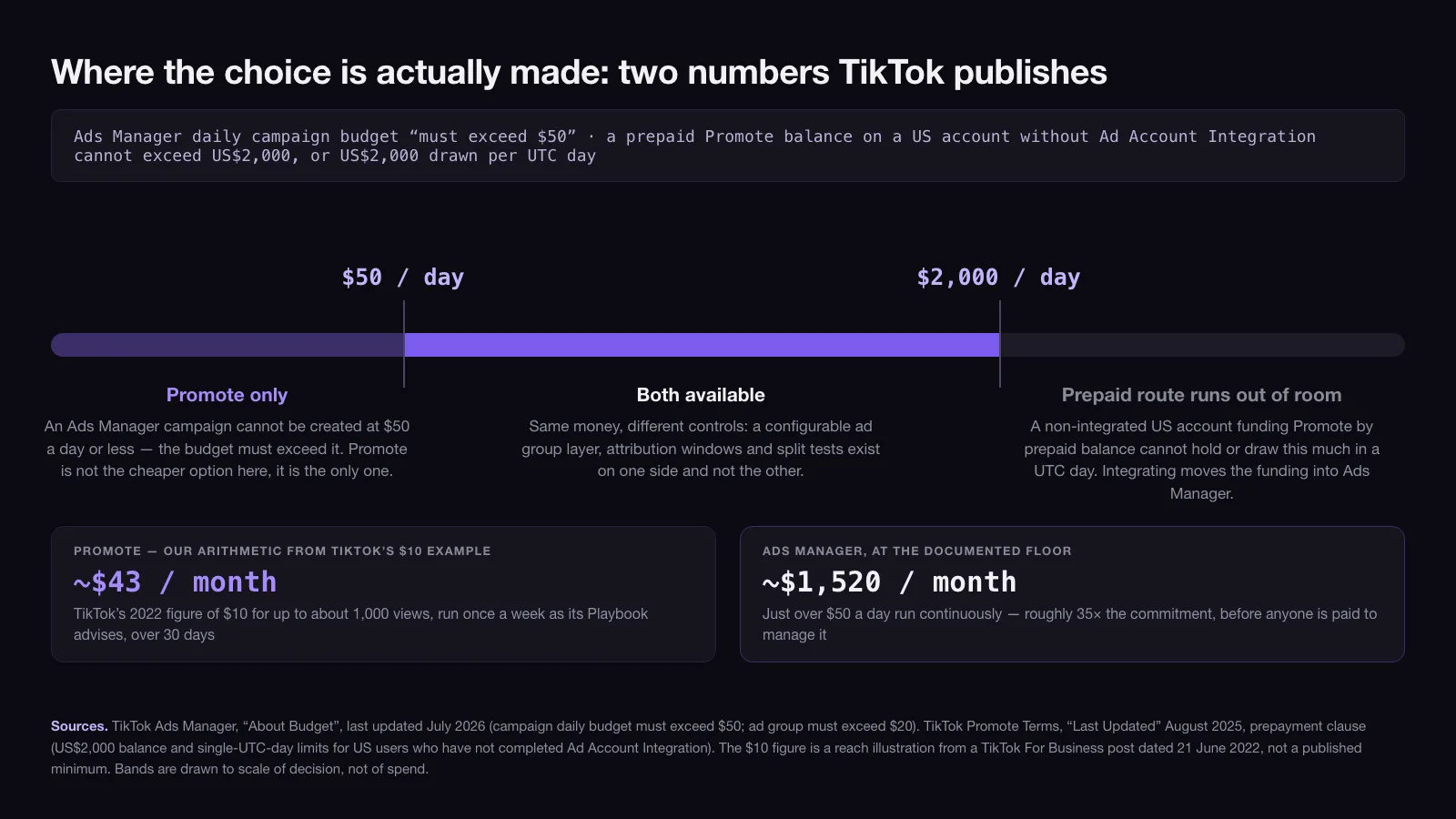
- At $50 a day or less, Ads Manager is not an option. A campaign whose daily budget must exceed $50 cannot be created there. Promote is not the cheap alternative here; it is the only door.
- Between $50 and $2,000 a day, both are available and the choice is genuinely about control rather than access.
- Above $2,000 a day, the prepaid route stops. A non-integrated US account funding Promote through prepaid balance cannot hold or draw that much in a UTC day. The Terms do not promise that integrating lifts the number; what integration does is move the funding into Ads Manager, where the prepayment clause no longer governs it — and put you in the platform that was the other option all along.
The commitment gap is worth stating in months rather than days. Following TikTok’s own Playbook advice of one promotion a week, priced at its own $10 example, comes to about $43 over a 30-day month. The Ads Manager floor of just over $50 a day comes to about $1,520 across the same month if the campaign runs continuously. That is roughly 35 times the commitment, which is why a business with no media budget is not choosing Promote over Ads Manager — it is choosing Promote over nothing. The same arithmetic decides most channel questions; we walk through the version of it that applies to search in how much Google Ads cost.
The list of what you are giving up is written by TikTok, not by an agency
The most useful document in this whole comparison is a help article on the Promote–Ads Manager integration. It is written as a benefits page, and in listing what a Promote user gains by moving into Ads Manager it states, precisely, what the in-app tool does not have. TikTok’s own bullets, in its own order:
| TikTok’s bullet | What it means the in-app tool lacks |
|---|---|
| “Accessing TikTok Ads Manager’s broad suite of advertising and management tools” | The framing bullet: everything below is on the far side |
| “Consolidated campaign management: Manage a greater quantity of campaigns while seeing Promote campaigns together with other campaigns all in one place.” | One order at a time, no portfolio view in-app |
| “Comprehensive reporting: See powerful metrics and recommendations for ad performance.” | Promote reports on the order; the metric library sits elsewhere |
| “Flexible budget management: Manage your budget in ad groups and get access to Campaign Budget Optimization.” | No configurable ad group layer, therefore no CBO |
| “Deeper audience targeting: Select audiences based on interest, location, demographics, behavior, and more.” | Behaviour and custom audiences are on the Ads Manager side of the line |
| “Creative assistance: Enable TikTok Ads Manager’s creative optimization features such as Smart Creative for automated optimization, and see performance recommendations.” | No automated creative optimisation in the button |
| “Spark Ads: Leverage the power of other creators’ organic posts in your ads to drive reach and conversions.” | Creator-post buying at scale runs through Ads Manager |
| “Unlocking deep conversion objectives like website conversion with Pixel tracking.” | The gate on the conversions goal described above |
| “Sharing fund pools across TikTok Ads Manager and Promote, allowing you to top-up funds in TikTok Ads Manager for use on Promote.” | Separate money until you integrate |
This is a stronger source than any agency comparison for one reason: it is the vendor enumerating its own product’s gaps in order to sell the upgrade. It has no incentive to overstate what Promote is missing, which makes the list a floor rather than a wish list.
The controls that stay behind: attribution windows, split tests, behaviour windows
Three specific settings are worth naming, because they are the ones that change what a number on a dashboard means.
Attribution windows. TikTok’s attribution article, last updated February 2025, places the setting at ad group creation in Ads Manager and lists the options: click-through attribution of 1 or 7 days, engaged view-through attribution of 1 or 7 days, and view-through attribution off or 1 day. Promote gives you no ad group to set them on. Whatever window your Promote conversions are counted on, you did not choose it and you cannot align it with the window your other channels report on. Two dashboards reporting different numbers for the same week is usually this, not fraud.
Split tests. Ads Manager’s split testing documentation, last updated January 2026, lists eight testable variables — targeting, placement, creative, budget strategy, creative assets, catalog, bidding and optimisation, and a custom option — and permits one variable per test. The method is configured at campaign level and depends on running two cells against each other, which needs a campaign structure Promote does not build. You can promote two posts and compare their results, but that is a comparison, not a controlled test: the audiences are not held constant.
Behaviour windows. Ads Manager’s behaviour targeting works on defined lookbacks — 15 days for engagement with organic video content, and 90 days for creator-related actions such as following or viewing a creator’s home page — and it works by category rather than by your specific posts. Promote’s four fields do not include behaviour at all. Reaching people who finished videos in your category in the last fifteen days is not a setting you have missed in the app; it is on the other side of the boundary. Retargeting people who watched your videos is a further step again — a custom engagement audience, another Ads Manager object.
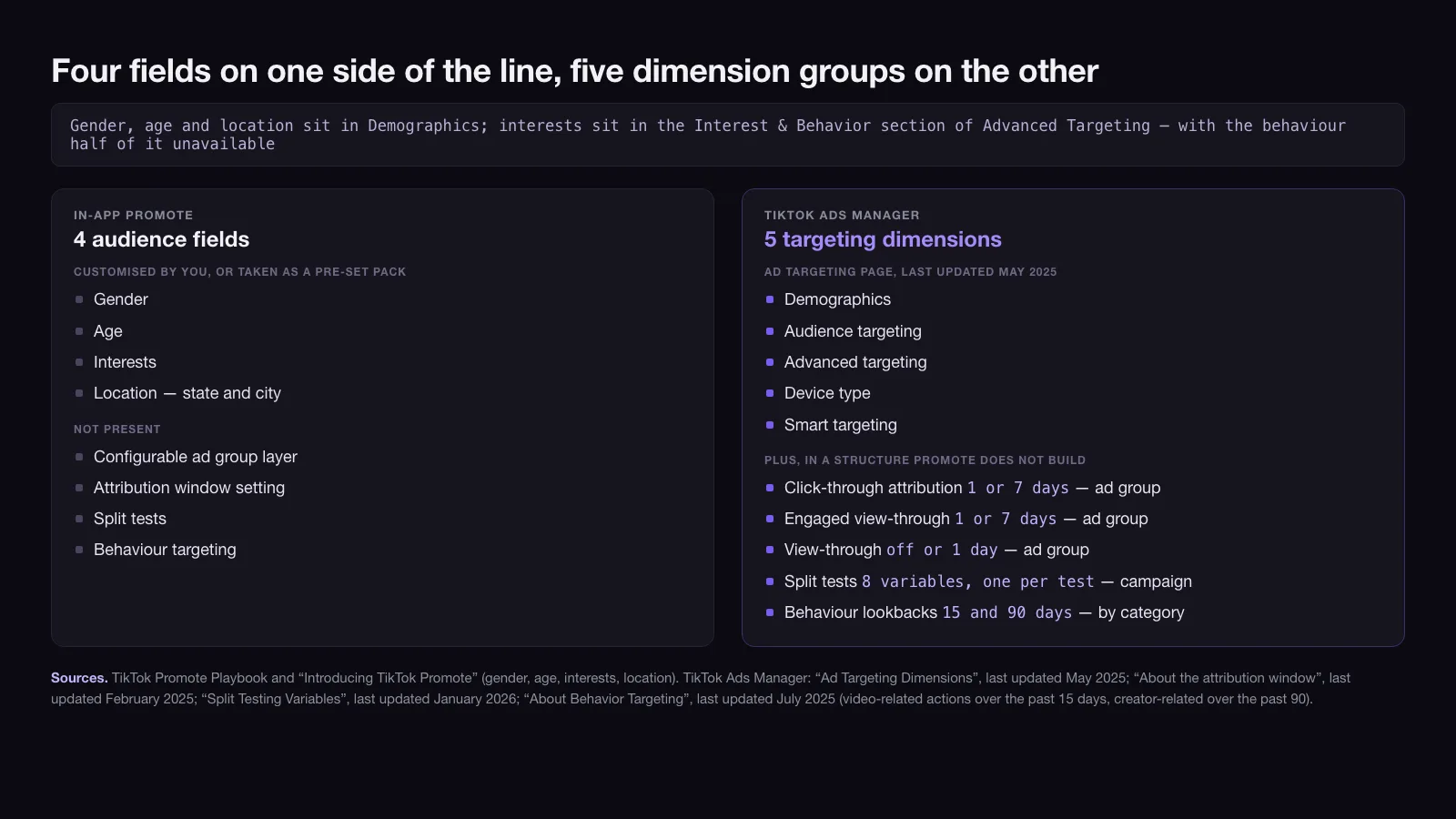
For context, TikTok’s ad targeting page, last updated May 2025, groups Ads Manager targeting into five dimensions: demographics, audience targeting, advanced targeting, device type and smart targeting. Three of Promote’s four fields — gender, age and location — sit inside demographics. Interests sit in the Interest & Behavior section of advanced targeting, with the behaviour half of that same section unavailable to you.
A confirmed Promote order cannot be cancelled or refunded
This is the part that carries real money and appears in none of the top ten results.
The Promote terms are explicit on cancellation: “You may not cancel your order for Promoted Content (the ‘Order’) to be placed on TikTok’s platform once you have confirmed the Order.” On refunds: “Orders are not refundable unless not fulfilled by us, in which case … you may seek a refund of your Promote Balance.” You may request a pause after launch, but TikTok does not guarantee the pause is technically feasible, and if it is not, you remain liable for the charges.
Three more clauses in the same document shape how the tool should be used:
- No performance guarantee. “TikTok does not guarantee the reach or performance that your Promoted Content will receive, such as the number of people who will see your Promoted Content or the number of clicks your Promoted Content will get.” That is standard advertising language, but it sits alongside a no-cancellation clause, which is not.
- Payment method is decided by your handset. All bids are denominated in US dollars. Android users pay directly; on Apple devices the purchase runs through Coins under TikTok’s Virtual Items Policy.
- Thirty days to dispute. Claims about a payment or transaction must be raised within thirty days of it.
The practical consequence is a discipline rather than a warning. An Ads Manager campaign is a live object you edit while it runs. A Promote order is a purchase you make and then watch. Size each order as something you are willing to lose in full, because contractually that is what you have bought.
The line moved in May 2024, and most comparisons have not caught up
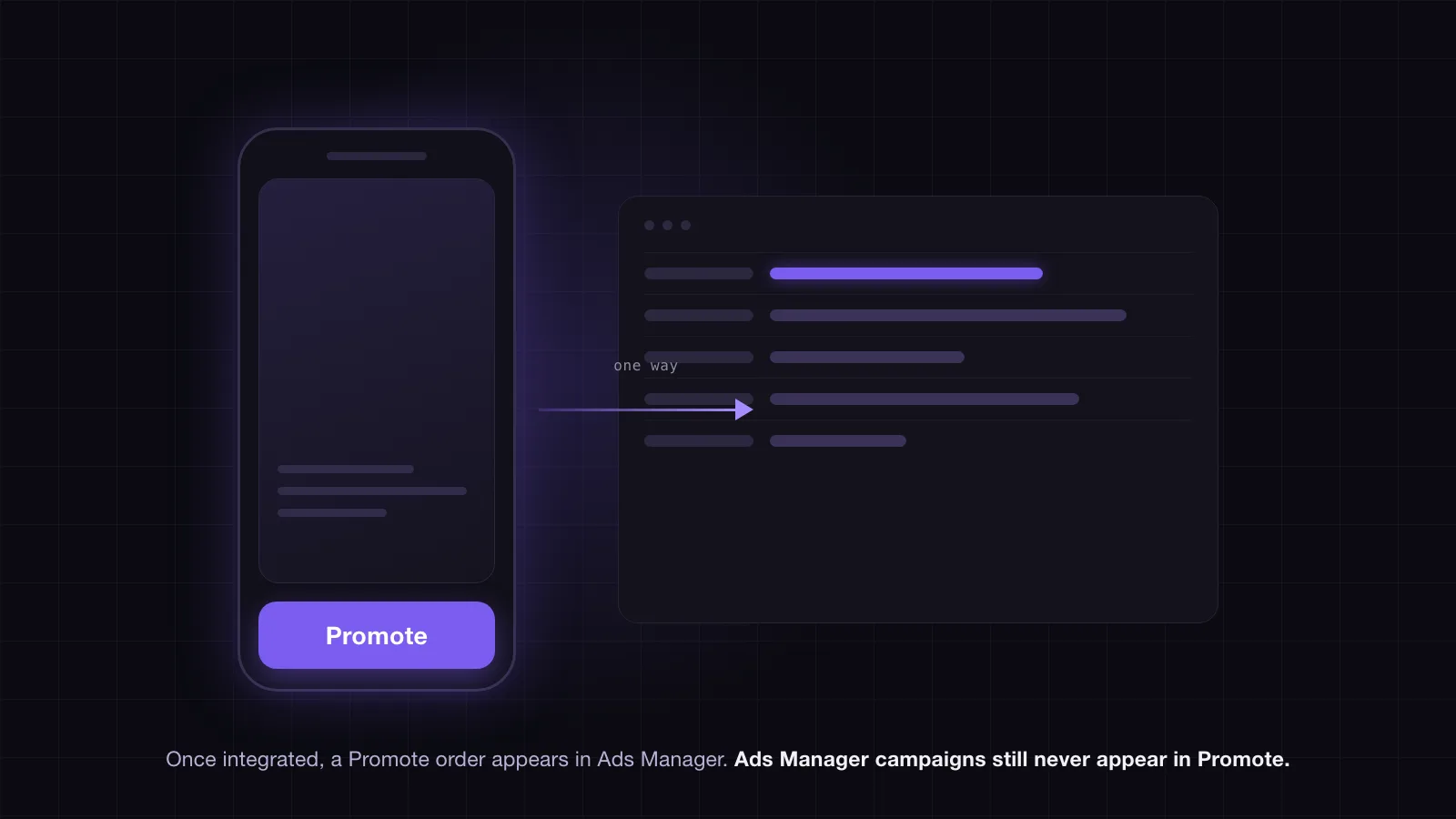
The clean opposition of app-button versus desktop-platform has been out of date since TikTok announced the Promote–Ads Manager integration on 1 May 2024. The help article documenting it states that Promote campaigns appear in the TikTok Ads Manager campaign list, and that “The Promote order details, including campaign budget, period, and performance, can be seen and managed on TikTok Ads Manager.” Creatives from Promote campaigns sync into Ads Manager, and fund pools are shared across both, with top-ups made in Ads Manager usable by Promote.
The traffic runs one way. The same article notes that TikTok Ads Manager campaign details will not be shown in the in-app Promote. Promote is a window that opens into Ads Manager; Ads Manager is not a window into Promote.
Two things follow. First, the argument that Promote leaves no audit trail stopped being accurate for an integrated account more than two years ago. Second, the $2,000 prepaid ceiling and the integration are the same lever pulled from two ends: the Terms attach the cap to the account that has not integrated, and the integration article describes what integrating unlocks. Scaling past the ceiling and gaining the controls are not two decisions.
When the button is the right buy
Three cases survive the comparison.
Validating a creative before it costs anything to be wrong. A one-day, low-budget promotion on a post that already has organic signal tells you whether paid distribution changes its behaviour, at a price well under the Ads Manager floor. It is a read on the creative, not a media test, and it should not be reported as one. If the post is going to end up in a real campaign, get the technical requirements right the first time — the format-by-format specifications are set out in TikTok ad specs.
A local business whose targeting need stops at the city line. Promote resolves location to state and city, and for a restaurant, clinic or single-site retailer that is often the entire targeting brief. Paying for behaviour targeting you would set to “everyone within twenty miles” anyway is not a saving you are giving up.
No one to run Ads Manager and no budget to hire one. At $50 a day or less the platform decides this for you. The honest framing is that Promote is the entry price of the channel, and the moment a business can commit around $1,500 a month it should be evaluating the full account rather than a faster button. Where TikTok sits relative to the other formats competing for the same money is laid out in our breakdown of digital ad types.
Where it stops being the right buy is easier to name than most channel decisions, because TikTok has published both ends of the range. If a promotion is repeating weekly, if conversions are being reported against a window you did not set, or if the prepaid balance is pushing at the $2,000 daily limit, the tool has been outgrown — and the integration that ends the prepaid route is the same one that hands back the controls. That is the point at which the work stops being a purchase and starts being an account, which is the shape of the TikTok advertising engagements we run.
08 / Reader questions
Frequently asked questions
01What is TikTok Promote?
Promote is TikTok's in-app advertising tool for turning an existing video, photo post or LIVE into a paid ad. TikTok's help centre defines it as a tool to amplify your videos and LIVEs with a few taps. You pick one of four goals, set an audience, a budget and a duration, and pay inside the app.
02How does TikTok Promote work?
You open a public post, choose a goal, then either take a pre-set promotion pack or set gender, age, interests and location yourself. You set a budget and a number of days, pay, and TikTok delivers the post as an in-feed ad. It runs under TikTok's advertising policies, not its organic rules.
03How much does TikTok Promote cost?
TikTok publishes no minimum. Its setup articles say only "Set your Budget and Duration", and the one printed figure it offers is $10 for up to about 1,000 views, in a June 2022 post — a $10 CPM at best, and an illustration rather than a floor. Pre-set promotion packs carry their own fixed prices in the app.
04Is TikTok Promote worth it?
It is worth it below the point where Ads Manager will take you. A TikTok Ads Manager campaign needs a daily budget above $50, so at $50 a day or less Promote is the only route in. Above it, you are paying the same money for fewer controls: no configurable ad group layer, no attribution window setting, no split test.
05What happens if I promote a post on TikTok?
The post is delivered as an advertisement to people who do not follow you, and it is subject to TikTok's advertising policies. TikTok's own 2022 guidance is that using Promote does not reduce the views your other, non-promoted videos receive, and that a promoted video continues to have some positive effects after the promotion period ends.
06Can you cancel a TikTok Promote order?
No. The Promote terms state that you may not cancel an order once you have confirmed it, and that orders are not refundable unless TikTok fails to fulfil them. You can ask to pause a running promotion, but TikTok does not guarantee a pause is technically possible and you still owe the charges if it is not.
07Does TikTok Promote ruin your account?
TikTok's published answer is no: a 2022 post states that using Promote does not affect the number of views you get on your other, non-promoted videos. What it does not promise is a result. The Promote Terms separately say TikTok does not guarantee the reach or performance a promoted post will receive.